cancel
Showing results for 
Search instead for 
Did you mean: 

We've captured the moments from FabCon & SQLCon that everyone is talking about, and we are bringing them to the community, live and on-demand. Starts on April 14th. Register now

Reply
Anonymous
Not applicable

Running total with value of previous month if next value does not exist

Hello guys, 

This is what problem looks like:
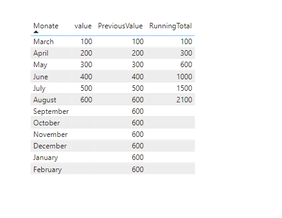
anoonymous_0-1667390360381.png

As you can see running Total does not calculate the value of the column "PreviousValue".


For that I am using a measure, that helps to fill my missing value with the previous one. (Septemeber value == august value):


PreviousValue = 
VAR _actualOrder = SELECTEDVALUE('Datetable'[Order])
VAR _mspOrder =
    CALCULATE ( MAX('Table'[Order]), ALLSELECTED ('Table'))
VAR _maxdate =
    CALCULATE ( MAX ( 'Table'[Data] ), ALLSELECTED ( 'Table' ) )
VAR _month =
    MONTH ( _maxdate )
VAR _lastvalue =
    CALCULATE (
        SUM ( 'Table'[value] ),
        FILTER (
            ALLSELECTED ( 'Table' ),
            YEAR ( 'Table'[Data] ) = YEAR ( _maxdate )
                && MONTH ( 'Table'[Data] ) = _month
        )
    )
RETURN
    IF ( _actualOrder <= _mspOrder, SUM ( 'Table'[value] ), _lastvalue )


I already have a code for running total and it would be perfect if the solution is based on that code:
1.


MinDate = Date(SELECTEDVALUE(Datetable[GJ]),3,1)


2.


RunningTotal=
VAR minDate = [MinDate]

return 
   CALCULATE (
        SUM('Table'[value]),
     FILTER (
            ALL ('Table'),
            'Table'[Data] >= minDate
                &&'Table'[Data] <= MAX ( 'Table'[Data])), FILTER (
            ALL ('Table'),
            'Table'[Order] <= MAX ( 'Table'[Order])))


I am sadly not able to add an file so I am giving you guys all the information here (Maybe someone can tell me how, so I can post it here)


Tables I am using:

OrderMonth (Running Total has to work between the first day of march and the last day of february (next year)

Because of that I created an order Table:

anoonymous_2-1667390713763.png


Table: 

(As you can see, there is not data for september, october etc.)
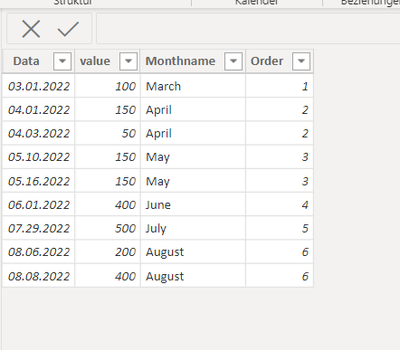
anoonymous_3-1667390847864.png


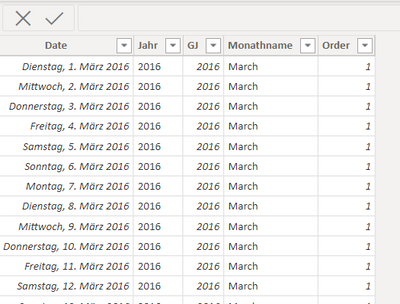
Datetable:

anoonymous_4-1667390959703.png

I can give you to sourcecode: 


let
	 Source = #date(2013, 1, 1), 
	 #"add dates until today" = List.Dates(Source, Number.From(DateTime.LocalNow())+0- Number.From(Source), #duration(1,0,0,0)), 
	 #"Converted to Table" = Table.FromList(#"add dates until today", Splitter.SplitByNothing(), null, null, ExtraValues.Error), 
	 #"Renamed Column Date" = Table.RenameColumns(#"Converted to Table",{{"Column1", "Datum"}}), 
	 #"Changed Type of Column Date" = Table.TransformColumnTypes(#"Renamed Column Date",{{"Datum", type date}}),
    #"Hinzugefügte benutzerdefinierte Spalte3" = Table.AddColumn(#"Changed Type of Column Date", "Jahr", each Date.Year([Datum])),
    #"Hinzugefügte benutzerdefinierte Spalte" = Table.AddColumn(#"Hinzugefügte benutzerdefinierte Spalte3", "GJ", each if [Datum] <> null then (if Date.Month([Datum])  then Date.Year([Datum])-1 else Date.Year([Datum])) else null),
    #"Hinzugefügte benutzerdefinierte Spalte1" = Table.AddColumn(#"Hinzugefügte benutzerdefinierte Spalte", "Monatsname", each Date.MonthName([Datum])),
    #"Geänderter Typ" = Table.TransformColumnTypes(#"Hinzugefügte benutzerdefinierte Spalte1",{{"GJ", Int64.Type}}),
    #"Zusammengeführte Abfragen" = Table.NestedJoin(#"Geänderter Typ", {"Monatsname"}, OrderMonth, {"Monate"}, "OrderMonth", JoinKind.LeftOuter),
    #"Erweiterte OrderMonth" = Table.ExpandTableColumn(#"Zusammengeführte Abfragen", "OrderMonth", {"Order"}, {"OrderMonth.Order"}),
    #"Umbenannte Spalten" = Table.RenameColumns(#"Erweiterte OrderMonth",{{"OrderMonth.Order", "Order"}, {"Monatsname", "Monathname"}, {"Datum", "Date"}})
in
    #"Umbenannte Spalten"


Relationshipmodel: 

anoonymous_1-1667390688506.png


1 ACCEPTED SOLUTION
v-zhangti
Community Support
Community Support

Hi, @Anonymous 


You can try the following methods.

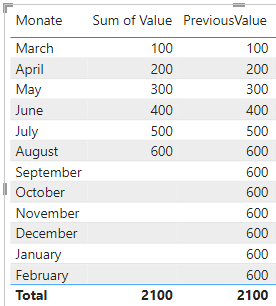
PreviousValue = 
VAR _a = SUM('Table'[Value])
Var _b = CALCULATE(SUM('Table'[Value]),FILTER(ALL('Table'),[Order]=MAXX(ALL('Table'),[Order])))
return IF(ISBLANK(_a),_b,_a)

vzhangti_0-1667458015389.png

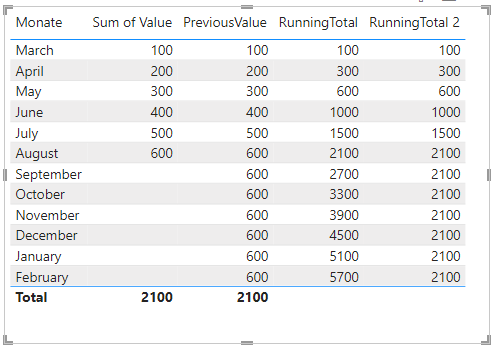
RunningTotal = SUMX(FILTER(ALL(OrderMonth),[Order]<=SELECTEDVALUE(OrderMonth[Order])),[PreviousValue])
RunningTotal 2 = 
Var _N1=SUM('Table'[Value])
Var _N2=SUMX(FILTER(ALL(OrderMonth),[Order]<=SELECTEDVALUE(OrderMonth[Order])),[PreviousValue])
Var _N3=CALCULATE(SUM('Table'[Value]),ALL('Table'))
Return
IF(ISBLANK(_N1),_N3,_N2)

vzhangti_2-1667458435448.png

Is this the result you expect?


Best Regards,

Community Support Team _Charlotte

If this post helps, then please consider Accept it as the solution to help the other members find it more quickly.

View solution in original post

3 REPLIES 3
v-zhangti
Community Support
Community Support

Hi, @Anonymous 


You can try the following methods.

PreviousValue = 
VAR _a = SUM('Table'[Value])
Var _b = CALCULATE(SUM('Table'[Value]),FILTER(ALL('Table'),[Order]=MAXX(ALL('Table'),[Order])))
return IF(ISBLANK(_a),_b,_a)

vzhangti_0-1667458015389.png

RunningTotal = SUMX(FILTER(ALL(OrderMonth),[Order]<=SELECTEDVALUE(OrderMonth[Order])),[PreviousValue])
RunningTotal 2 = 
Var _N1=SUM('Table'[Value])
Var _N2=SUMX(FILTER(ALL(OrderMonth),[Order]<=SELECTEDVALUE(OrderMonth[Order])),[PreviousValue])
Var _N3=CALCULATE(SUM('Table'[Value]),ALL('Table'))
Return
IF(ISBLANK(_N1),_N3,_N2)

vzhangti_2-1667458435448.png

Is this the result you expect?


Best Regards,

Community Support Team _Charlotte

If this post helps, then please consider Accept it as the solution to help the other members find it more quickly.

Anonymous
Not applicable

I know this is marked as solved but a problem came up.

As you can see some values don't have a "date" so previousMonth = the value where month is null and running total is starting right there and not march..


I hope I was able to make it clear...


Anonymous
Not applicable

Thank you so so so much!

Helpful resources

Announcements
New to Fabric survey Carousel

New to Fabric Survey

If you have recently started exploring Fabric, we'd love to hear how it's going. Your feedback can help with product improvements.

Power BI DataViz World Championships carousel

Power BI DataViz World Championships - June 2026

A new Power BI DataViz World Championship is coming this June! Don't miss out on submitting your entry.

Join our Fabric User Panel

Join our Fabric User Panel

Share feedback directly with Fabric product managers, participate in targeted research studies and influence the Fabric roadmap.

March Power BI Update Carousel

Power BI Community Update - March 2026

Check out the March 2026 Power BI update to learn about new features.