cancel
Showing results for 
Search instead for 
Did you mean: 

Next up in the FabCon + SQLCon recap series: The roadmap for Microsoft SQL and Maximizing Developer experiences in Fabric. All sessions are available on-demand after the live show. Register now

Reply
Anonymous
Not applicable

Running total - exclude if no orders for months

Hi all,


I have a challenge I would need some help with.


My setup:

* Sales table containing "Company ID", "Order Date", "Revenue".

* Company table containing dimensions (Relation to Company ID)

* Date table (Relation to Order Date)


I would like to do a running total showing number of companies (customers we have), based on their first order.

However, if a customer suddenly has not bought for 18 months, they should not be included in the next months.


Example:

Company A buys first time 1st Jan 2015. They are counted every month ahead. Let's say their last order is 31 May 2015, then they should be counted from Jan 2015 until Nov 2016 (18 months since 31 May 2015). After that, they should not be counted anymore. It is important that they are STILL counted all months before the 18 months, but only not counted after that period. How would I do that?


I have tried with this: 

DateDiffMonths = DATEDIFF(TODAY(), [Last Date], MONTH)
 
However, that is looking in real time from TODAY always, which is not what I want. I want it to look "based on each month" if there was order 18 months back.
 
I hope it makes sense!
 
Thanks!


2 REPLIES 2
amitchandak
Super User
Super User

@Anonymous ,Can you share sample data and sample output in table format? Or a sample pbix after removing sensitive data.

Share with Power BI Enthusiasts: Full Power BI Video (20 Hours) YouTube
Microsoft Fabric Series 60+ Videos YouTube
Microsoft Fabric Hindi End to End YouTube
Anonymous
Not applicable

Hello,


Here I put an example of Companies and Order Date, and I added a column showing "CountUntil", meaning for how long this company (based on each order) should count in the rolling total companies. 


IDOrder DateLast Until
A01-01-201524-06-2016
A25-06-201516-12-2016
A12-12-201504-06-2017
A01-03-201623-08-2017
A05-08-201627-01-2018
A01-12-201625-05-2018
B01-01-201524-06-2016
B25-06-201516-12-2016
B12-12-201504-06-2017
B01-03-201623-08-2017
B05-08-201627-01-2018
B01-12-201625-05-2018
B01-01-201725-06-2018
B14-02-201708-08-2018
C01-06-201723-11-2018
C14-10-201707-04-2019
C17-07-201808-01-2020
C12-12-201904-06-2021


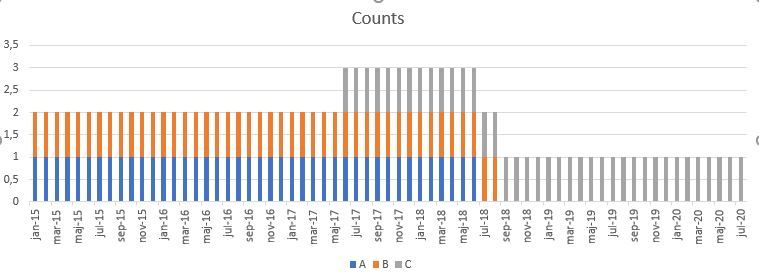
And here is my desired output:


Capture.JPG


Example: Company A has its first order Jan 2015, and its last order Dec 2016. It means it should count until May 2018 (Last Order + 18 months). 


How do I make this in PBI?

Helpful resources

Announcements
New to Fabric survey Carousel

New to Fabric Survey

If you have recently started exploring Fabric, we'd love to hear how it's going. Your feedback can help with product improvements.

Power BI DataViz World Championships carousel

Power BI DataViz World Championships - June 2026

A new Power BI DataViz World Championship is coming this June! Don't miss out on submitting your entry.

Join our Fabric User Panel

Join our Fabric User Panel

Share feedback directly with Fabric product managers, participate in targeted research studies and influence the Fabric roadmap.

March Power BI Update Carousel

Power BI Community Update - March 2026

Check out the March 2026 Power BI update to learn about new features.