Join us at FabCon Atlanta from March 16 - 20, 2026, for the ultimate Fabric, Power BI, AI and SQL community-led event. Save $200 with code FABCOMM.
Register now!Learn from the best! Meet the four finalists headed to the FINALS of the Power BI Dataviz World Championships! Register now
Hello Power Bi Community,
Apologies upfront for my amateur view and approach to this.
I'm trying to create a running total of our stock based on data extracted through an API from Salesforce. My data runs from 2005 until now.
I've created a quick-measure which does partially what I need:
1. Total PW = CALCULATE(
COUNTA('PhoneWord'[Name]),
FILTER(
ALLSELECTED('Dates for Phonewords'[Date]),
ISONORAFTER('Dates for Phonewords'[Date], MAX('Dates for Phonewords'[Date]), DESC)
))
-------------------------------------------------------------------------------------------------------------------------------------------
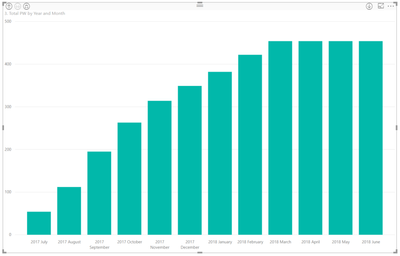
The only Issue I have with this is that I need a running total from the very first date of my data point even after I filter down the visual level of my column chart. Currently when I only want to display the running total from this fiscal year (01.07.17- YTD), it starts from 0 and doesnt include the running total value until the 30.06.17.
--------------------------------------------------------------------------------------------------------------------------------------------
How do I approach this?
Hi,
Try this
=CALCULATE(COUNTA('PhoneWord'[Name]),DATESBETWEEN('Dates for Phonewords'[Date],MINX(ALL('Dates for Phonewords'[Date]),'Dates for Phonewords'[Date]),MAX('Dates for Phonewords'[Date])))
Hope this helps.
Hi Ashish,
thanks for your help.
However it appears that the value is inaccurate. The maximum value of the running total is 3k short.
Also it seems to be less flexible to the filters.
Any other recommendations?
Hi,
I need to see your file. What do you mean by "seems to be less flexible to the filters"?
Share feedback directly with Fabric product managers, participate in targeted research studies and influence the Fabric roadmap.
Check out the February 2026 Power BI update to learn about new features.
| User | Count |
|---|---|
| 53 | |
| 47 | |
| 30 | |
| 15 | |
| 14 |
| User | Count |
|---|---|
| 88 | |
| 73 | |
| 39 | |
| 26 | |
| 24 |