Don't miss your chance to take the Fabric Data Engineer (DP-600) exam for FREE! Find out how by attending the DP-600 session on April 23rd (pacific time), live or on-demand.
Learn moreNext up in the FabCon + SQLCon recap series: The roadmap for Microsoft SQL and Maximizing Developer experiences in Fabric. All sessions are available on-demand after the live show. Register now
Hello Power Bi Community,
Apologies upfront for my amateur view and approach to this.
I'm trying to create a running total of our stock based on data extracted through an API from Salesforce. My data runs from 2005 until now.
I've created a quick-measure which does partially what I need:
1. Total PW = CALCULATE(
COUNTA('PhoneWord'[Name]),
FILTER(
ALLSELECTED('Dates for Phonewords'[Date]),
ISONORAFTER('Dates for Phonewords'[Date], MAX('Dates for Phonewords'[Date]), DESC)
))
-------------------------------------------------------------------------------------------------------------------------------------------
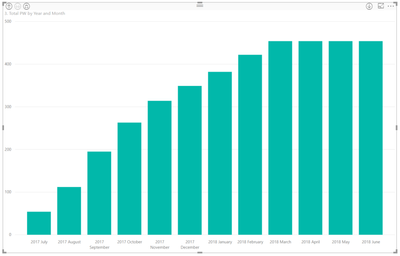
The only Issue I have with this is that I need a running total from the very first date of my data point even after I filter down the visual level of my column chart. Currently when I only want to display the running total from this fiscal year (01.07.17- YTD), it starts from 0 and doesnt include the running total value until the 30.06.17.
--------------------------------------------------------------------------------------------------------------------------------------------
How do I approach this?
Hi,
Try this
=CALCULATE(COUNTA('PhoneWord'[Name]),DATESBETWEEN('Dates for Phonewords'[Date],MINX(ALL('Dates for Phonewords'[Date]),'Dates for Phonewords'[Date]),MAX('Dates for Phonewords'[Date])))
Hope this helps.
Hi Ashish,
thanks for your help.
However it appears that the value is inaccurate. The maximum value of the running total is 3k short.
Also it seems to be less flexible to the filters.
Any other recommendations?
Hi,
I need to see your file. What do you mean by "seems to be less flexible to the filters"?
If you have recently started exploring Fabric, we'd love to hear how it's going. Your feedback can help with product improvements.
A new Power BI DataViz World Championship is coming this June! Don't miss out on submitting your entry.
| User | Count |
|---|---|
| 44 | |
| 43 | |
| 38 | |
| 19 | |
| 15 |
| User | Count |
|---|---|
| 68 | |
| 64 | |
| 31 | |
| 29 | |
| 24 |