Join us at FabCon Atlanta from March 16 - 20, 2026, for the ultimate Fabric, Power BI, AI and SQL community-led event. Save $200 with code FABCOMM.
Register now!The Power BI Data Visualization World Championships is back! It's time to submit your entry. Live now!
Hello
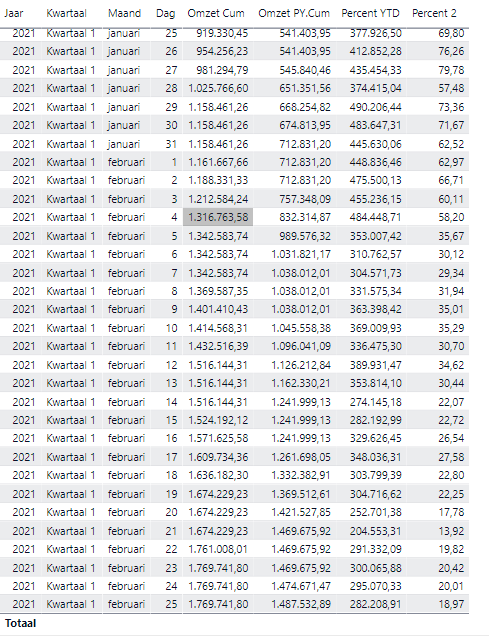
I'm creating a report with running totals from this year. I use a relative date-slicer.
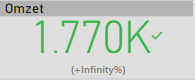
I created two measures until date. If I put them in a KPI, it will display infinity at the target.
Note: omzet = revenue
Omzet PY.**bleep** = if(LASTDATE(Datum[Datum]) > TODAY(), BLANK(), CALCULATE([Omzet PY],FILTER(ALLSELECTED(Datum),Datum[Datum] <= MAX(Datum[Datum]))))
Omzet **bleep** = IF(LASTDATE(Datum[Datum]) > TODAY(), BLANK(), CALCULATE(SUM(Waardepost[Omzet]),FILTER(ALLSELECTED(Datum),Datum[Datum] <= MAX(Datum[Datum]))))
I already tried it on a different way. Just with creating new measures to calculate my own %. Just one problem, I just want the number of the last date (today). I tried a couple of techniques but none of them worked.
So my two questions:
1) Can i create a KPI with RT ?
2) Is it possible to just selected the lastest data from the table.
Kind regard
Soler
Solved! Go to Solution.
Hi @Anonymous ,
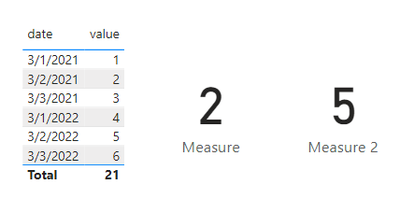
If so you could use TODAY() function to get today's date and use EDATE() or DATEADD() function to get next year today's date.
Measure = CALCULATE(SUM('Table'[value]),FILTER('Table','Table'[date]=TODAY()))
Measure 2 = CALCULATE(SUM('Table'[value]),FILTER('Table','Table'[date]=EDATE(TODAY(),+12)))
Best Regards,
Jay
Hi @Anonymous ,
I haven't heard that we can't create a KPI with RT. And when you saying " just select the latest data from the table" are you meaning default select latest date in the slicer?
Best Regards,
Jay
If today is 01/02, I want the see the difference between RT 01/03/2021 and 01/03/2022. When I load tomorrow new data. I want the see the difference between RT 02/03/2021 and 02/03/2022.
Hi @Anonymous ,
If so you could use TODAY() function to get today's date and use EDATE() or DATEADD() function to get next year today's date.
Measure = CALCULATE(SUM('Table'[value]),FILTER('Table','Table'[date]=TODAY()))
Measure 2 = CALCULATE(SUM('Table'[value]),FILTER('Table','Table'[date]=EDATE(TODAY(),+12)))
Best Regards,
Jay
Thanks for the solution!
The Power BI Data Visualization World Championships is back! It's time to submit your entry.
Check out the January 2026 Power BI update to learn about new features.
| User | Count |
|---|---|
| 69 | |
| 44 | |
| 34 | |
| 28 | |
| 23 |
| User | Count |
|---|---|
| 142 | |
| 121 | |
| 59 | |
| 40 | |
| 32 |