cancel
Showing results for 
Search instead for 
Did you mean: 

The Power BI Data Visualization World Championships is back! Get ahead of the game and start preparing now! Learn more

Reply
Anonymous
Not applicable

Running Total

Good day,

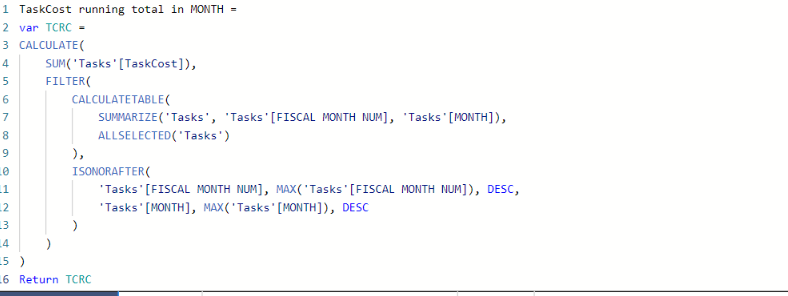
I used a quick measure to get the running total for monthly income. I could not use the DATEYTD because we are working on a financial year starting in March and also using trimesters instead of quarters so, I needed to create new date tables the Month table is not seen as a date table but as a text column. I also can't use calendarauto(2) because that creates a circle dependency with a calculated table used elsewhere. I managed to use the quick measure to create a running total.

My question now is how do get a total of my running total, all my running totals counted together? 

I'm using it in a matirx and that total is just the last months total. 


Also i am getting my data from MS Projects PWA through odatafeed 

Thanks in advance 

See below quick measure 

Screenshot 2022-11-22 150038.png


2 REPLIES 2
Anonymous
Not applicable

The fiscal year is also not seen as a date but as a whole number. When I try to convert the year numbers to date instead of whole numbers, it shows other dates.

And my running total works I just need the total of the running total. 

Uspace87
Resolver III
Resolver III

@Anonymous 


You can used YTD setting the "Fiscal Year end":


For example:


FYTD = CALCULATE(
[Income],
DATESYTD(Date_Table[Date],"28/02")
)

Helpful resources

Announcements
Power BI DataViz World Championships

Power BI Dataviz World Championships

The Power BI Data Visualization World Championships is back! Get ahead of the game and start preparing now!

December 2025 Power BI Update Carousel

Power BI Monthly Update - December 2025

Check out the December 2025 Power BI Holiday Recap!

FabCon Atlanta 2026 carousel

FabCon Atlanta 2026

Join us at FabCon Atlanta, March 16-20, for the ultimate Fabric, Power BI, AI and SQL community-led event. Save $200 with code FABCOMM.