Join us at FabCon Atlanta from March 16 - 20, 2026, for the ultimate Fabric, Power BI, AI and SQL community-led event. Save $200 with code FABCOMM.
Register now!Learn from the best! Meet the four finalists headed to the FINALS of the Power BI Dataviz World Championships! Register now
Good day,
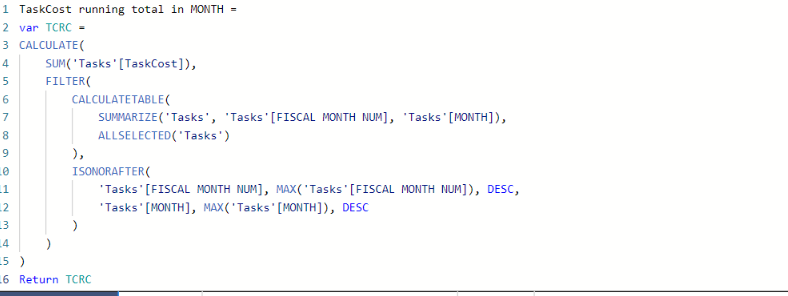
I used a quick measure to get the running total for monthly income. I could not use the DATEYTD because we are working on a financial year starting in March and also using trimesters instead of quarters so, I needed to create new date tables the Month table is not seen as a date table but as a text column. I also can't use calendarauto(2) because that creates a circle dependency with a calculated table used elsewhere. I managed to use the quick measure to create a running total.
My question now is how do get a total of my running total, all my running totals counted together?
I'm using it in a matirx and that total is just the last months total.
Also i am getting my data from MS Projects PWA through odatafeed
Thanks in advance
See below quick measure
The fiscal year is also not seen as a date but as a whole number. When I try to convert the year numbers to date instead of whole numbers, it shows other dates.
And my running total works I just need the total of the running total.
@Anonymous
You can used YTD setting the "Fiscal Year end":
For example:
Share feedback directly with Fabric product managers, participate in targeted research studies and influence the Fabric roadmap.
Check out the February 2026 Power BI update to learn about new features.
| User | Count |
|---|---|
| 65 | |
| 59 | |
| 45 | |
| 19 | |
| 15 |
| User | Count |
|---|---|
| 109 | |
| 108 | |
| 39 | |
| 30 | |
| 26 |