Join us at FabCon Atlanta from March 16 - 20, 2026, for the ultimate Fabric, Power BI, AI and SQL community-led event. Save $200 with code FABCOMM.
Register now!The Power BI Data Visualization World Championships is back! Get ahead of the game and start preparing now! Learn more
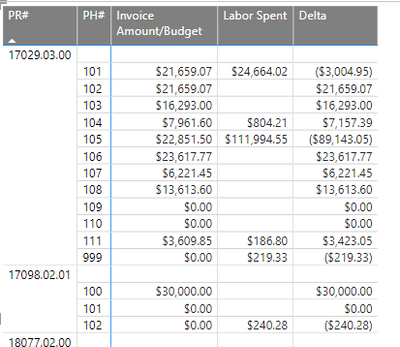
Hello All. This seems like it should be very simple, but I can't figure it out. I have a Matrix like so
First three columns are in one table, Labor Spent in another and Delta is a measure:
Solved! Go to Solution.
Hi @AMPAllie ,
Please refer this formula:
RunningTotal =
SUMX (
ALLEXCEPT (
'PR PH TS Names and Budget',
'PR PH TS Names and Budget'[PR#],
'PR PH TS Names and Budget'[PH#]
),
[Delta]
)
Or
RunningTotal =
SUMX (
FILTER (
ALLSELECTED ( 'PR PH TS Names and Budget' ),
'PR PH TS Names and Budget'[PR#]
= SELECTEDVALUE ( 'PR PH TS Names and Budget'[PR#] )
&& 'PR PH TS Names and Budget'[PH#]
= SELECTEDVALUE ( 'PR PH TS Names and Budget'[PH#] )
),
[Delta]
)
If it still doesn't work, please share some sample data.
Best Regards,
Jay
Hi @AMPAllie ,
Please refer this formula:
RunningTotal =
SUMX (
ALLEXCEPT (
'PR PH TS Names and Budget',
'PR PH TS Names and Budget'[PR#],
'PR PH TS Names and Budget'[PH#]
),
[Delta]
)
Or
RunningTotal =
SUMX (
FILTER (
ALLSELECTED ( 'PR PH TS Names and Budget' ),
'PR PH TS Names and Budget'[PR#]
= SELECTEDVALUE ( 'PR PH TS Names and Budget'[PR#] )
&& 'PR PH TS Names and Budget'[PH#]
= SELECTEDVALUE ( 'PR PH TS Names and Budget'[PH#] )
),
[Delta]
)
If it still doesn't work, please share some sample data.
Best Regards,
Jay
Hi @AMPAllie
please try
Running Total =
VAR CurrentPH =
SELECTEDVALUE ( TableName[PH#] )
VAR T1 =
CALCULATETABLE (
VALUES ( TableName[PR#] ),
ALLEXCEPT ( TableName, TableName[PH#] ),
ALLSELECTED ( TableName )
)
VAR T2 =
FILTER ( T1, TableName[PH#] <= CurrentPH )
RETURN
SUMX ( T2, [Delta] )
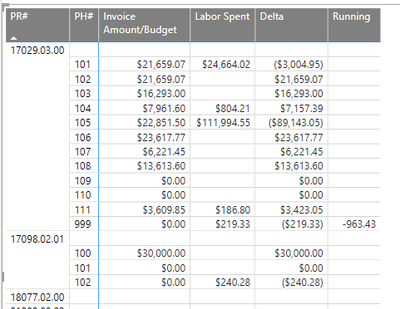
That returned this:
I found my typo...corrected it. But now I get an error. I should have mentioned...the PH# values are not unique. They repeat over and over.
The Power BI Data Visualization World Championships is back! Get ahead of the game and start preparing now!
| User | Count |
|---|---|
| 41 | |
| 38 | |
| 36 | |
| 30 | |
| 28 |
| User | Count |
|---|---|
| 128 | |
| 88 | |
| 79 | |
| 67 | |
| 62 |