This is best Fabric, Power BI, SQL and AI community event. How do we know? The last event sold out! Save €200 with code FABCMTY200.
Register nowA new Data Days event is coming soon! This time we’re going bigger than ever. Fabric, Power BI, SQL, AI and more. Don't miss out.
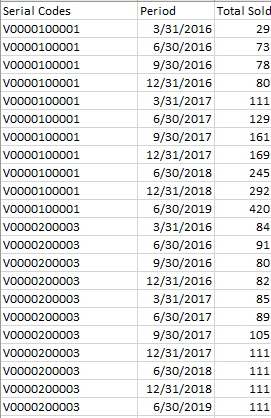
Hi, my data is below.
I generate data that is a running total of items sold ("Total Sold") per item and wanted to generate values that measures the difference between periods ("Sold per period"). For each item also, the earliest entry will be the initial value. May I ask how can I create a measure or caculated column for this? Will appreciate any help!
Solved! Go to Solution.
Hi @nates05 ,
You can try my method:
At first, create a new column "rank".
rank = RANKX ( 'Table', 'Table'[Period],, ASC, DENSE )
Then create your goal column.
Sold per period =
VAR a =
CALCULATE (
FIRSTNONBLANK ( 'Table'[Total Sold], 1 ),
FILTER (
'Table',
'Table'[Serial Codes] = EARLIER ( 'Table'[Serial Codes] )
&& 'Table'[rank]
= EARLIER ( 'Table'[rank] ) - 1
)
)
RETURN
'Table'[Total Sold] - a
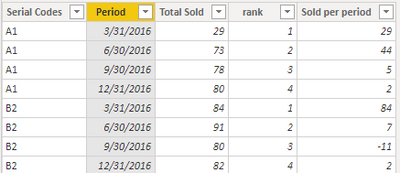
Here is the result.
Best Regards,
Eads
If this post helps, then please consider Accept it as the solution to help the other members find it more quickly.
Hi @nates05 ,
You can try my method:
At first, create a new column "rank".
rank = RANKX ( 'Table', 'Table'[Period],, ASC, DENSE )
Then create your goal column.
Sold per period =
VAR a =
CALCULATE (
FIRSTNONBLANK ( 'Table'[Total Sold], 1 ),
FILTER (
'Table',
'Table'[Serial Codes] = EARLIER ( 'Table'[Serial Codes] )
&& 'Table'[rank]
= EARLIER ( 'Table'[rank] ) - 1
)
)
RETURN
'Table'[Total Sold] - a
Here is the result.
Best Regards,
Eads
If this post helps, then please consider Accept it as the solution to help the other members find it more quickly.
Hi, would this have an M code equivalent?
I realized I need to insert these columns in power query itself.
Thanks!
Does the image posted represent source data or the expected output? Please see this post regarding How to Get Your Question Answered Quickly: https://community.powerbi.com/t5/Community-Blog/How-to-Get-Your-Question-Answered-Quickly/ba-p/38490
You might find some of these links helpful, it is hard to say:
https://community.powerbi.com/t5/Quick-Measures-Gallery/Time-Intelligence-quot-The-Hard-Way-quot-TIT...
https://community.powerbi.com/t5/Quick-Measures-Gallery/Open-Tickets/m-p/409364
https://community.powerbi.com/t5/Quick-Measures-Gallery/Periodic-Billing/m-p/409365
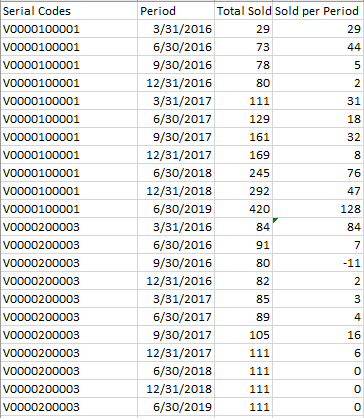
To clarify, the source data is columns up to "Total Sold" only, which is a running total of total items sold. I've attached a revised screenshote below. I wanted to calculate the actual sales per period which can be generated by the difference between each period
For example, for item V0000100001, between 3/31/2016 and 6/30/2016, actual sales were 44.
Check out the May 2026 Power BI update to learn about new features.
Sign up to receive a private message when registration opens and key events begin.
If you have recently started exploring Fabric, we'd love to hear how it's going. Your feedback can help with product improvements.
| User | Count |
|---|---|
| 31 | |
| 26 | |
| 23 | |
| 22 | |
| 13 |
| User | Count |
|---|---|
| 61 | |
| 47 | |
| 27 | |
| 23 | |
| 18 |