This time we’re going bigger than ever. Fabric, Power BI, SQL, AI and more. We're covering it all. You won't want to miss it.
Learn moreLevel up your Power BI skills this month - build one visual each week and tell better stories with data! Get started
Hello all,
Hoping someone can help me out with this.
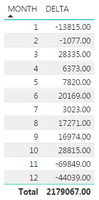
I've created a measure called 'Delta. Calculated as
DELTA = SUM(TABLE[WARRANTYUNITS]) - CALCULATE([AVG.WARR.]),ALL(TABLE))
AVG.WARR. is another measure calculated as
AVG.WARR = SUM(TABLE[WARRANTYUNITS]) / DISTINCTCOUNT(TABLE[MONTH))
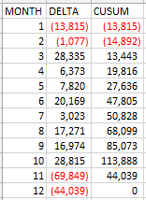
I don't need a total sum of Delta, I need to add the result for Month 2 to Month 1, Month 3 to this and so on
The other picture is the table in excel using the correct calculation
I'm hoping to avoid linking the Delta by Month output into a new table so as to avoid refreshing the data continuously
Is there perhaps something I can do with time intelligence to make this calculate correctly?
Thank you for any help that may be provided!
Solved! Go to Solution.
Hi @rjeffers,
You can try to use below mesure to calcualte running total:
CUSUM =
VAR AVG =
SUMX ( ALL ( TABLE ), [WARRANTYUNITS] ) / 12
RETURN
SUMX (
FILTER ( ALLSELECTED ( TABLE ), [MONTH] <= MAX ( [MONTH] ) ),
[WARRANTYUNITS]
)
- AVG * COUNTROWS ( VALUES ( TABLE[MONTH] ) )
Regards,
Xiaoxin Sheng
Hi @rjeffers,
You can try to use below mesure to calcualte running total:
CUSUM =
VAR AVG =
SUMX ( ALL ( TABLE ), [WARRANTYUNITS] ) / 12
RETURN
SUMX (
FILTER ( ALLSELECTED ( TABLE ), [MONTH] <= MAX ( [MONTH] ) ),
[WARRANTYUNITS]
)
- AVG * COUNTROWS ( VALUES ( TABLE[MONTH] ) )
Regards,
Xiaoxin Sheng
Check out the April 2026 Power BI update to learn about new features.
Sign up to receive a private message when registration opens and key events begin.
If you have recently started exploring Fabric, we'd love to hear how it's going. Your feedback can help with product improvements.
| User | Count |
|---|---|
| 30 | |
| 24 | |
| 23 | |
| 17 | |
| 15 |
| User | Count |
|---|---|
| 61 | |
| 36 | |
| 29 | |
| 22 | |
| 22 |