cancel
Showing results for 
Search instead for 
Did you mean: 

July 28 - August 9 | Final Round of the Power BI Dataviz World Championships. This is your chance. Learn more

Reply
rjeffers
New Member

Running Sum

Hello all,


Hoping someone can help me out with this.

I've created a measure called 'Delta. Calculated as

DELTA = SUM(TABLE[WARRANTYUNITS]) - CALCULATE([AVG.WARR.]),ALL(TABLE))


AVG.WARR. is another measure calculated as

AVG.WARR = SUM(TABLE[WARRANTYUNITS]) / DISTINCTCOUNT(TABLE[MONTH))


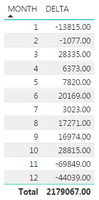
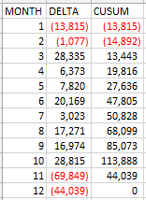
I don't need a total sum of Delta, I need to add the result for Month 2 to Month 1, Month 3 to this and so on

The other picture is the table in excel using the correct calculation


I'm hoping to avoid linking the Delta by Month output into a new table so as to avoid refreshing the data continuously

Is there perhaps something I can do with time intelligence to make this calculate correctly?


image.pngimage.png


Thank you for any help that may be provided!

1 ACCEPTED SOLUTION
Anonymous
Not applicable

Hi @rjeffers,


You can try to use below mesure to calcualte running total:

CUSUM =
VAR AVG =
    SUMX ( ALL ( TABLE ), [WARRANTYUNITS] ) / 12
RETURN
    SUMX (
        FILTER ( ALLSELECTED ( TABLE ), [MONTH] <= MAX ( [MONTH] ) ),
        [WARRANTYUNITS]
    )
        - AVG * COUNTROWS ( VALUES ( TABLE[MONTH] ) )


Regards,

Xiaoxin Sheng

View solution in original post

1 REPLY 1
Anonymous
Not applicable

Hi @rjeffers,


You can try to use below mesure to calcualte running total:

CUSUM =
VAR AVG =
    SUMX ( ALL ( TABLE ), [WARRANTYUNITS] ) / 12
RETURN
    SUMX (
        FILTER ( ALLSELECTED ( TABLE ), [MONTH] <= MAX ( [MONTH] ) ),
        [WARRANTYUNITS]
    )
        - AVG * COUNTROWS ( VALUES ( TABLE[MONTH] ) )


Regards,

Xiaoxin Sheng

Helpful resources

Announcements
FabCon and SQLCon Barcelona 2026

FabCon & SQLCon – Barcelona 2026

Join us in Barcelona for FabCon and SQLCon, the Fabric, Power BI, SQL, and AI community event. Save €200 with code FABCMTY200.

Fabric Community Sticker Design Challenge Barcelona Carousel

Fabric Community Sticker Challenge - Barcelona 2026

If you love stickers, then you will definitely want to check out our community sticker challenge, Barcelona edition!

July Power BI Update Carousel

Power BI Monthly Update - July 2026

Check out the July 2026 Power BI update to learn about new features.

Power BI DataViz World Championships carousel

Power BI DataViz World Championships - June 2026

A new Power BI DataViz World Championship is coming this June! Don't miss out on submitting your entry.

Top Solution Authors