Join us at FabCon Atlanta from March 16 - 20, 2026, for the ultimate Fabric, Power BI, AI and SQL community-led event. Save $200 with code FABCOMM.
Register now!The Power BI Data Visualization World Championships is back! Get ahead of the game and start preparing now! Learn more
Hello all,
Hoping someone can help me out with this.
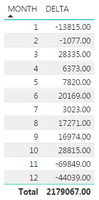
I've created a measure called 'Delta. Calculated as
DELTA = SUM(TABLE[WARRANTYUNITS]) - CALCULATE([AVG.WARR.]),ALL(TABLE))
AVG.WARR. is another measure calculated as
AVG.WARR = SUM(TABLE[WARRANTYUNITS]) / DISTINCTCOUNT(TABLE[MONTH))
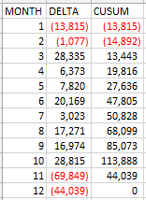
I don't need a total sum of Delta, I need to add the result for Month 2 to Month 1, Month 3 to this and so on
The other picture is the table in excel using the correct calculation
I'm hoping to avoid linking the Delta by Month output into a new table so as to avoid refreshing the data continuously
Is there perhaps something I can do with time intelligence to make this calculate correctly?
Thank you for any help that may be provided!
Solved! Go to Solution.
Hi @rjeffers,
You can try to use below mesure to calcualte running total:
CUSUM =
VAR AVG =
SUMX ( ALL ( TABLE ), [WARRANTYUNITS] ) / 12
RETURN
SUMX (
FILTER ( ALLSELECTED ( TABLE ), [MONTH] <= MAX ( [MONTH] ) ),
[WARRANTYUNITS]
)
- AVG * COUNTROWS ( VALUES ( TABLE[MONTH] ) )
Regards,
Xiaoxin Sheng
Hi @rjeffers,
You can try to use below mesure to calcualte running total:
CUSUM =
VAR AVG =
SUMX ( ALL ( TABLE ), [WARRANTYUNITS] ) / 12
RETURN
SUMX (
FILTER ( ALLSELECTED ( TABLE ), [MONTH] <= MAX ( [MONTH] ) ),
[WARRANTYUNITS]
)
- AVG * COUNTROWS ( VALUES ( TABLE[MONTH] ) )
Regards,
Xiaoxin Sheng
The Power BI Data Visualization World Championships is back! Get ahead of the game and start preparing now!
| User | Count |
|---|---|
| 56 | |
| 45 | |
| 35 | |
| 34 | |
| 21 |
| User | Count |
|---|---|
| 143 | |
| 123 | |
| 100 | |
| 80 | |
| 57 |