FabCon is coming to Atlanta
Join us at FabCon Atlanta from March 16 - 20, 2026, for the ultimate Fabric, Power BI, AI and SQL community-led event. Save $200 with code FABCOMM.
Register now!- Power BI forums
- Get Help with Power BI
- Desktop
- Service
- Report Server
- Power Query
- Mobile Apps
- Developer
- DAX Commands and Tips
- Custom Visuals Development Discussion
- Health and Life Sciences
- Power BI Spanish forums
- Translated Spanish Desktop
- Training and Consulting
- Instructor Led Training
- Dashboard in a Day for Women, by Women
- Galleries
- Data Stories Gallery
- Themes Gallery
- Contests Gallery
- QuickViz Gallery
- Quick Measures Gallery
- Visual Calculations Gallery
- Notebook Gallery
- Translytical Task Flow Gallery
- TMDL Gallery
- R Script Showcase
- Webinars and Video Gallery
- Ideas
- Custom Visuals Ideas (read-only)
- Issues
- Issues
- Events
- Upcoming Events
The Power BI Data Visualization World Championships is back! Get ahead of the game and start preparing now! Learn more
- Power BI forums
- Forums
- Get Help with Power BI
- Desktop
- Running 52 weeks - create filter for repport
- Subscribe to RSS Feed
- Mark Topic as New
- Mark Topic as Read
- Float this Topic for Current User
- Bookmark
- Subscribe
- Printer Friendly Page


- Mark as New
- Bookmark
- Subscribe
- Mute
- Subscribe to RSS Feed
- Permalink
- Report Inappropriate Content
Running 52 weeks - create filter for repport
Hi, i am working on a report which is updated weekly, and which needs to run the last 52 weeks, can anybody help? 🙂
Kind regards Daniel
Solved! Go to Solution.

- Mark as New
- Bookmark
- Subscribe
- Mute
- Subscribe to RSS Feed
- Permalink
- Report Inappropriate Content
Hi @bilingual ,
So you want to filter the data for the last 52 weeks, right?
If you have a date column in your data source, then you can use a relative date slicer to filter:
Use a relative date slicer or filter in Power BI - Power BI | Microsoft Docs
There is a difference between Weeks and Weeks (Calendar), it can be found in the above document, which has an explanation.
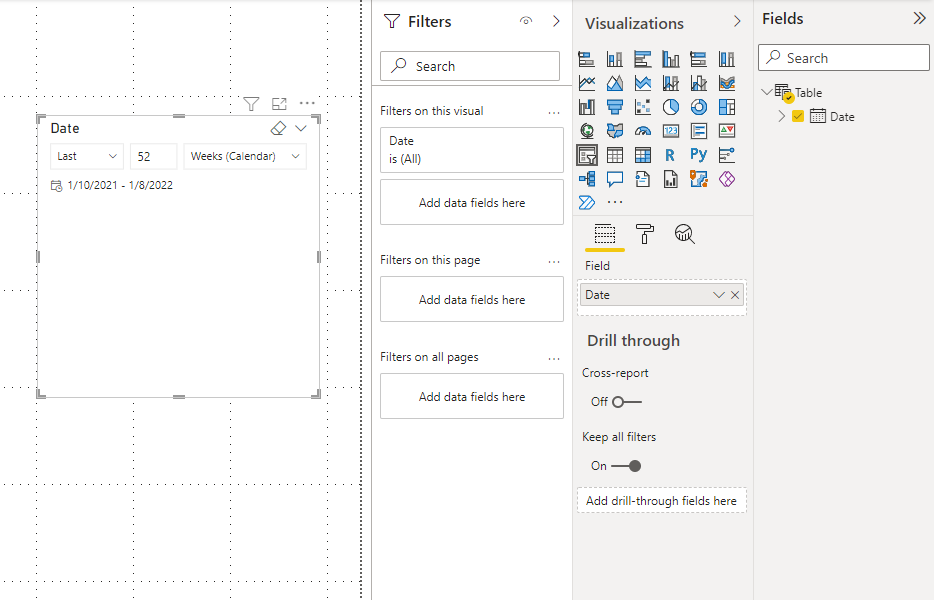

Best Regards,
Stephen Tao
If this post helps, then please consider Accept it as the solution to help the other members find it more quickly.


- Mark as New
- Bookmark
- Subscribe
- Mute
- Subscribe to RSS Feed
- Permalink
- Report Inappropriate Content
Hi @bilingual ,
You can hide the slicer from the visibility pane.
Thank you,
Vishesh Jain
If yes, then please mark my post as a solution!
Thank you,
Vishesh Jain
Proud to be a Super User!
- Mark as New
- Bookmark
- Subscribe
- Mute
- Subscribe to RSS Feed
- Permalink
- Report Inappropriate Content
Hi @bilingual ,
So you want to filter the data for the last 52 weeks, right?
If you have a date column in your data source, then you can use a relative date slicer to filter:
Use a relative date slicer or filter in Power BI - Power BI | Microsoft Docs
There is a difference between Weeks and Weeks (Calendar), it can be found in the above document, which has an explanation.
Best Regards,
Stephen Tao
If this post helps, then please consider Accept it as the solution to help the other members find it more quickly.
- Mark as New
- Bookmark
- Subscribe
- Mute
- Subscribe to RSS Feed
- Permalink
- Report Inappropriate Content
Thanks a lot Stephen, it seem very intuitive. At present I only export PowerBI as PDF,so i need the slicer to act as filter for all pages without being visible, aka as a normal filter.
What would be the optimal solution for doing so?
- Mark as New
- Bookmark
- Subscribe
- Mute
- Subscribe to RSS Feed
- Permalink
- Report Inappropriate Content
Hi @bilingual ,
Could you please provide more information as to do you want to update data of the last 52 weeks only or do you want calculations of the last 52 weeks and does your data contain only the last 52 weeks?
You can try the following link as to how to set up your calendar table for calculations over weeks:
Week-related calculations – DAX Patterns
Lastly, as @mhossain suggested that you can look into incremental refreshes but that won't work with the free license.
Hope this helps.
Thank you,
Vishesh Jain
If yes, then please mark my post as a solution!
Thank you,
Vishesh Jain
Proud to be a Super User!
- Mark as New
- Bookmark
- Subscribe
- Mute
- Subscribe to RSS Feed
- Permalink
- Report Inappropriate Content
Hi , i periodically update the data every week by Excel files which has data from 2018, so when a new week is ready, i need a filter in the report which for example can be used to only show data greater than or equal to Week 1 2021 this week.
- Mark as New
- Bookmark
- Subscribe
- Mute
- Subscribe to RSS Feed
- Permalink
- Report Inappropriate Content
Hi @bilingual ,
I would suggest, that you create a YearWeek column in your calendar table, which will be numeric and then use that as a slicer on your report page.
You can create the slicer column based on the link I shared.
So the column will be 202101 for 2021 week 1, 202102 for 2022 week 2 etc. and the put this column as a slicer on the report page.
You can paste the same slicer on every page of your report, use sync slicers and hide it from the visibility pane from every page apart from the 1st page of your report. This way you have to make the selection only once.
Hope this helps.
Thank you,
Vishesh Jain
If yes, then please mark my post as a solution!
Thank you,
Vishesh Jain
Proud to be a Super User!


- Mark as New
- Bookmark
- Subscribe
- Mute
- Subscribe to RSS Feed
- Permalink
- Report Inappropriate Content
If I read it correctly you require to keep only last 52 weeks of data in your model, what is your source, is it the relational database? Please check incremental refresh:
https://docs.microsoft.com/en-us/power-bi/connect-data/incremental-refresh-overview
If you are unable to use incremental refresh, you can apply filter.
Please elaborate more if above doesn't solve.
Helpful resources

Power BI Dataviz World Championships
The Power BI Data Visualization World Championships is back! Get ahead of the game and start preparing now!

Power BI Monthly Update - December 2025
Check out the December 2025 Power BI Holiday Recap!

FabCon Atlanta 2026
Join us at FabCon Atlanta, March 16-20, for the ultimate Fabric, Power BI, AI and SQL community-led event. Save $200 with code FABCOMM.

| User | Count |
|---|---|
| 39 | |
| 37 | |
| 33 | |
| 32 | |
| 29 |


| User | Count |
|---|---|
| 132 | |
| 88 | |
| 82 | |
| 68 | |
| 64 |


