cancel
Showing results for 
Search instead for 
Did you mean: 

The Power BI Data Visualization World Championships is back! Get ahead of the game and start preparing now! Learn more

Reply
Anonymous
Not applicable

Running 12 month Total with Condition

Hi,


I want to create a measure to calculate "Total shipment count for running 12 months". But the condition is if there are multiple shipment(i.e. >1) in same Month&Year(eg. for December 2017 there are 2 shipment) particular "Shipto-Material" then it should be counted as 1.


I have created measure as below to calculate rolling 12 months count,  
R12 count of shipment = CALCULATE(SUM('Table_BulkMOQ'[Total Shipment Count]),
(DATESINPERIOD(Table_BulkMOQ[Calendar Year_Month],LASTDATE(Table_BulkMOQ[Calendar Year_Month]),-12,MONTH)))


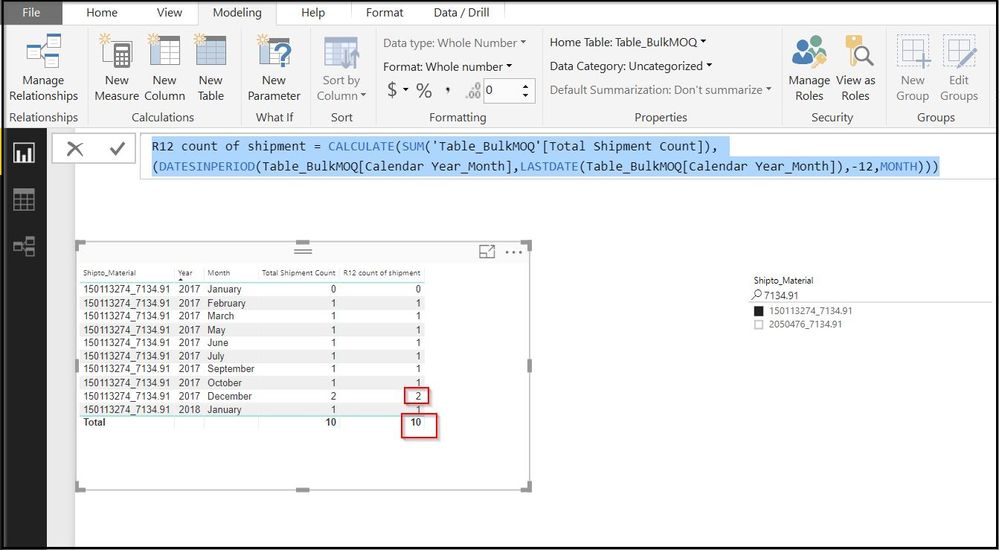
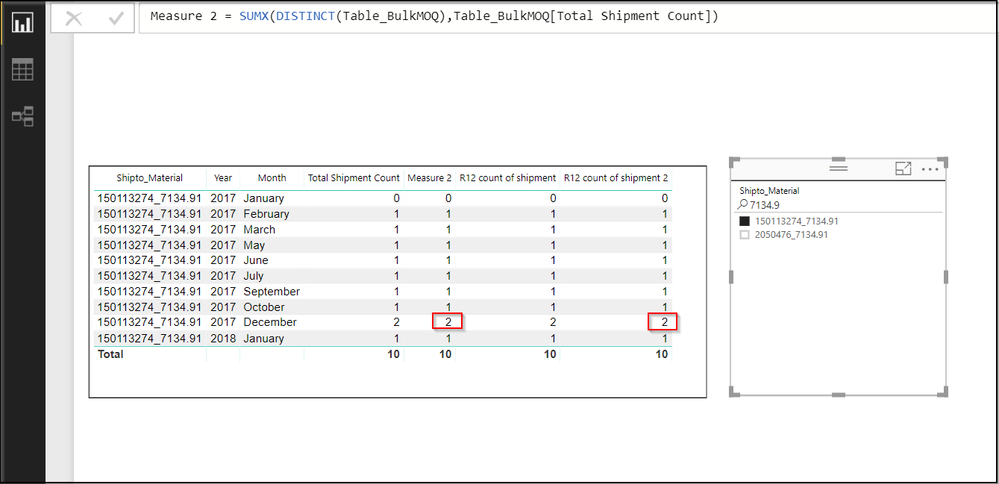
but some how unable to apply the condition. For Example, See the following Screenshot


Shipment count.jpg


Here, for  "R12 Count of Shipment" Column the Total should be 9 but it is displaying 10. 


Can Some one please help me to get it.


Thanks


1 ACCEPTED SOLUTION

Hi @Anonymous

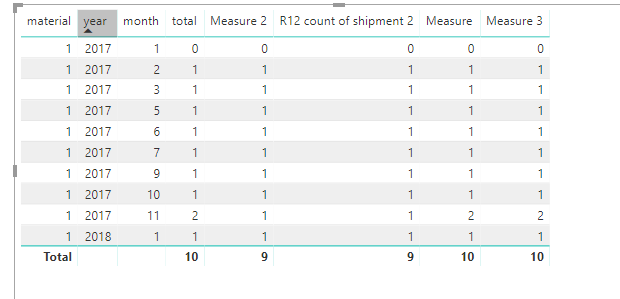
As tested, when i add a measure in the SUMX function, it shows the same value as yours.

Measure 3 = SUMX(DISTINCT(Table2),[Measure])

5.png


Here is my pbix


View solution in original post

5 REPLIES 5
v-juanli-msft
Community Support
Community Support

Hi @Anonymous

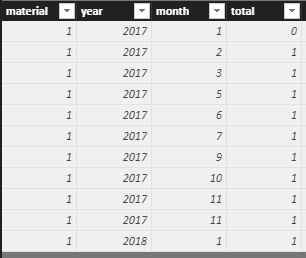
Assume table is like

5.png

Try this measure

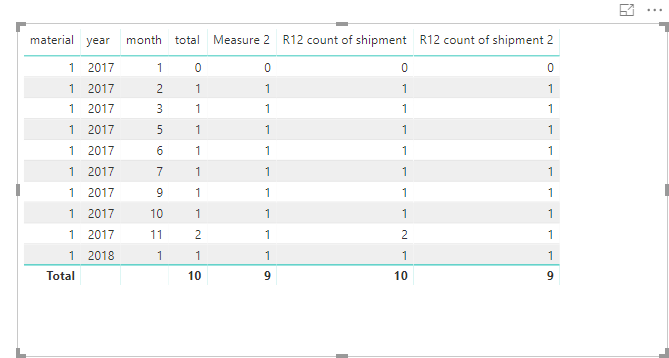
Measure 2 = SUMX(DISTINCT(Table2),[total])

R12 count of shipment 2 = SUMX(
DATESINPERIOD(Table2[date],LASTDATE(Table2[date]),-12,MONTH),[Measure 2])

4.png


Best Regards

Maggie

Anonymous
Not applicable

Hi Maggie,


Thanks for your reply.

Actually I tried creating the measures as you told but its still giving same output in Measure 2. I am not getting if I am going wrong somewhere 😞


Please find the screenshot below,

R12 count of shipment2.png

Hi @Anonymous

As tested, when i add a measure in the SUMX function, it shows the same value as yours.

Measure 3 = SUMX(DISTINCT(Table2),[Measure])

5.png


Here is my pbix


v-juanli-msft
Community Support
Community Support

Hi @Anonymous

Does the "'Table_BulkMOQ'[Total Shipment Count]" is a column which shows 1 for each row?

Then this column is added to the table and set "sum" instead of "don't summarize".


You could create a column use "IF" to judge if here are multiple shipment(i.e. >1) in same Month&Year.

Total Shipment Count2=IF('Table_BulkMOQ'[Total Shipment Count]>1,1,'Table_BulkMOQ'[Total Shipment Count])

Then replace 'Table_BulkMOQ'[Total Shipment Count] with 'Table_BulkMOQ'[Total Shipment Count2] in R12 count of shipment.


Best Regards

Maggie


Anonymous
Not applicable

Hi @v-juanli-msft

Yes, "Total Shipment Count" is calculated column which displays 0 & 1 that is used for further calculations.

I used it in a Table with "Sum" function but here the thing is i want to perform "Running 12 Months Shipment count" & if there are multiple shipment in Same month and Year While counting 12 months Shipment for particular Shipto-Material then it should be counted as 1.  

Can it be done using measure or do i have to create calculated table/columns?

I used following DAX to calculate total Shipment: 

Total Shipment Count
= VAR currentIndex=Table_BulkMOQ[NewIndex]
var previousShipment= CALCULATE(FIRSTNONBLANK(Table_BulkMOQ[Plant_Ship-to_Shipment_Material],TRUE()),
FILTER(Table_BulkMOQ,Table_BulkMOQ[NewIndex]=currentIndex-1))
var sameShipment=Table_BulkMOQ[Plant_Ship-to_Shipment_Material]=previousShipment
Return
IF(Table_BulkMOQ[Plant_Ship-to_Shpmt_Mat Gross KGS]<>0,IF(sameShipment,0,1),0)

Helpful resources

Announcements
Power BI DataViz World Championships

Power BI Dataviz World Championships

The Power BI Data Visualization World Championships is back! Get ahead of the game and start preparing now!

December 2025 Power BI Update Carousel

Power BI Monthly Update - December 2025

Check out the December 2025 Power BI Holiday Recap!

FabCon Atlanta 2026 carousel

FabCon Atlanta 2026

Join us at FabCon Atlanta, March 16-20, for the ultimate Fabric, Power BI, AI and SQL community-led event. Save $200 with code FABCOMM.