Join us at FabCon Atlanta from March 16 - 20, 2026, for the ultimate Fabric, Power BI, AI and SQL community-led event. Save $200 with code FABCOMM.
Register now!The Power BI Data Visualization World Championships is back! Get ahead of the game and start preparing now! Learn more
I am trying to create a new column ("pct_change") within an existing dataframe that was imported from SQLServer.
The following code worked in R Studio:
library(dplyr)
df1 <- df1 %>%
group_by(employeeid) %>%
arrange(fiscalyear, .by_group = TRUE) %>%
mutate(pct_change = ((Salary/lag(Salary) - 1) * 100))
I then modified the above code from "df1" to "dataset" but was unable to get it to work. Could someone please help me?
Solved! Go to Solution.
Hi @Anonymous ,
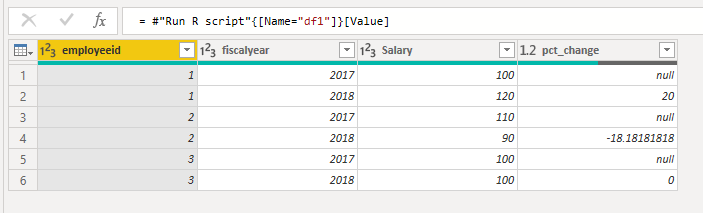
I use the code below and new column is created.
library(stats) library(base) library(dplyr) df1 <- dataset %>% group_by(employeeid) %>% arrange(fiscalyear, .by_group = TRUE) %>% mutate(pct_change = ((Salary/lag(Salary) - 1) * 100))
Best Regards,
Icey
If this post helps, then please consider Accept it as the solution to help the other members find it more quickly.
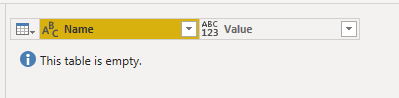
I'm just getting a blank table.
Hi @Anonymous ,
I use the code below and new column is created.
library(stats) library(base) library(dplyr) df1 <- dataset %>% group_by(employeeid) %>% arrange(fiscalyear, .by_group = TRUE) %>% mutate(pct_change = ((Salary/lag(Salary) - 1) * 100))
Best Regards,
Icey
If this post helps, then please consider Accept it as the solution to help the other members find it more quickly.
How and where did you save that code block within Power BI?
Thanks, Icey! I didn't realize you had to import R base and stats.
Hi @Anonymous ,
Can you give me your error information? So that I can help you better.
Best Regards,
Icey
The Power BI Data Visualization World Championships is back! Get ahead of the game and start preparing now!
Check out the November 2025 Power BI update to learn about new features.
| User | Count |
|---|---|
| 65 | |
| 46 | |
| 43 | |
| 26 | |
| 19 |
| User | Count |
|---|---|
| 198 | |
| 126 | |
| 102 | |
| 68 | |
| 51 |