cancel
Showing results for 
Search instead for 
Did you mean: 

Data Days is here! Join us now for 60+ days of learning, challenges, and connection. Learn more

Reply
Anonymous
Not applicable

Run R Script to create new column

I am trying to create a new column ("pct_change") within an existing dataframe that was imported from SQLServer.


The following code worked in R Studio:

library(dplyr)

df1 <- df1 %>%
group_by(employeeid) %>%
arrange(fiscalyear, .by_group = TRUE) %>%
mutate(pct_change = ((Salary/lag(Salary) - 1) * 100))


I then modified the above code from "df1" to "dataset" but was unable to get it to work. Could someone please help me?

1 ACCEPTED SOLUTION
Icey
Community Support
Community Support

Hi @Anonymous ,


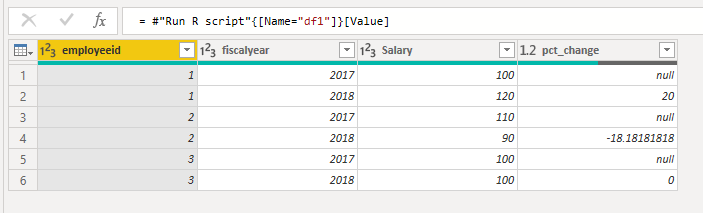
I use the code below and new column is created.

library(stats)
library(base)
library(dplyr)
df1 <- dataset %>%
group_by(employeeid) %>%
arrange(fiscalyear, .by_group = TRUE) %>%
mutate(pct_change = ((Salary/lag(Salary) - 1) * 100))

r.PNG


Best Regards,

Icey


If this post helps, then please consider Accept it as the solution to help the other members find it more quickly.


View solution in original post

5 REPLIES 5
Anonymous
Not applicable

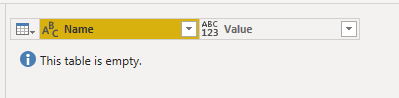
I'm just getting a blank table.


Capture.PNG

Icey
Community Support
Community Support

Hi @Anonymous ,


I use the code below and new column is created.

library(stats)
library(base)
library(dplyr)
df1 <- dataset %>%
group_by(employeeid) %>%
arrange(fiscalyear, .by_group = TRUE) %>%
mutate(pct_change = ((Salary/lag(Salary) - 1) * 100))

r.PNG


Best Regards,

Icey


If this post helps, then please consider Accept it as the solution to help the other members find it more quickly.


 How and where did you save that code block within Power BI?

Anonymous
Not applicable

Thanks, Icey! I didn't realize you had to import R base and stats.

Icey
Community Support
Community Support

Hi @Anonymous ,

Can you give me your error information? So that I can help you better.


Best Regards,

Icey

Helpful resources

Announcements
Fabric Data Days is here Carousel

Fabric Data Days 2026

Don't miss out on Data Days, June 15 through August 7. Learn Fabric, Power BI, SQL, AI and more.

May Power BI Update Carousel

Power BI Monthly Update - May 2026

Check out the May 2026 Power BI update to learn about new features.

Power BI DataViz World Championships carousel

Power BI DataViz World Championships - June 2026

A new Power BI DataViz World Championship is coming this June! Don't miss out on submitting your entry.