Don't miss your chance to take the Fabric Data Engineer (DP-600) exam for FREE! Find out how by attending the DP-600 session on April 23rd (pacific time), live or on-demand.
Learn moreNext up in the FabCon + SQLCon recap series: The roadmap for Microsoft SQL and Maximizing Developer experiences in Fabric. All sessions are available on-demand after the live show. Register now
Good afternoon everyone,
I'm trying to create a measure that brings in all the rows in a column based on a filter.
If this was a column, and I'd like to keep only the LeadId where the created date was last month, I'd write something like:
if(month(leadid)=month(today())-1,LeadId, ""). But how to do that in a measure that would display all the Lead IDs that fall under that expression?
I tried combining FILTER and VALUES, but VALUES returns nothing.
Thanks!
Solved! Go to Solution.
Hi @Anonymous ,
You could use DATEADD function to realize it:
First create a dim calendar table;
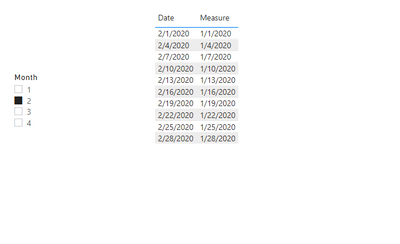
Then create a measure as below:
Measure = IF(NOT(ISFILTERED('calendar table'[Month])),MAX('Table'[date]),CALCULATE(MAX('Table'[date]),DATEADD('calendar table'[Date],-1,MONTH)))
And you will see:
For the related .pbix file,pls see attached.
Best Regards,
Kelly
Did I answer your question? Mark my post as a solution!
@Anonymous , if you have date you can use time intelligence
example
MTD Sales = CALCULATE(SUM(Sales[Sales Amount]),DATESMTD('Date'[Date]))
last MTD Sales = CALCULATE(SUM(Sales[Sales Amount]),DATESMTD(dateadd('Date'[Date],-1,MONTH)))
last month Sales = CALCULATE(SUM(Sales[Sales Amount]),previousmonth('Date'[Date]))
Power BI — Month on Month with or Without Time Intelligence
https://medium.com/@amitchandak.1978/power-bi-mtd-questions-time-intelligence-3-5-64b0b4a4090e
https://www.youtube.com/watch?v=6LUBbvcxtKA
Thanks for the reply, but I'm not looking for a calculation, I want the measure to return the list of items in a column that reflect the filtering.
Hi @Anonymous ,
You could use DATEADD function to realize it:
First create a dim calendar table;
Then create a measure as below:
Measure = IF(NOT(ISFILTERED('calendar table'[Month])),MAX('Table'[date]),CALCULATE(MAX('Table'[date]),DATEADD('calendar table'[Date],-1,MONTH)))
And you will see:
For the related .pbix file,pls see attached.
Best Regards,
Kelly
Did I answer your question? Mark my post as a solution!
If you have recently started exploring Fabric, we'd love to hear how it's going. Your feedback can help with product improvements.
A new Power BI DataViz World Championship is coming this June! Don't miss out on submitting your entry.
| User | Count |
|---|---|
| 47 | |
| 44 | |
| 39 | |
| 20 | |
| 15 |
| User | Count |
|---|---|
| 70 | |
| 68 | |
| 32 | |
| 27 | |
| 25 |