Don't miss your chance to take the Fabric Data Engineer (DP-600) exam for FREE! Find out how by attending the DP-600 session on April 23rd (pacific time), live or on-demand.
Learn moreNext up in the FabCon + SQLCon recap series: The roadmap for Microsoft SQL and Maximizing Developer experiences in Fabric. All sessions are available on-demand after the live show. Register now
Good afternoon everyone,
I'm trying to create a measure that brings in all the rows in a column based on a filter.
If this was a column, and I'd like to keep only the LeadId where the created date was last month, I'd write something like:
if(month(leadid)=month(today())-1,LeadId, ""). But how to do that in a measure that would display all the Lead IDs that fall under that expression?
I tried combining FILTER and VALUES, but VALUES returns nothing.
Thanks!
Solved! Go to Solution.
Hi @Anonymous ,
You could use DATEADD function to realize it:
First create a dim calendar table;
Then create a measure as below:
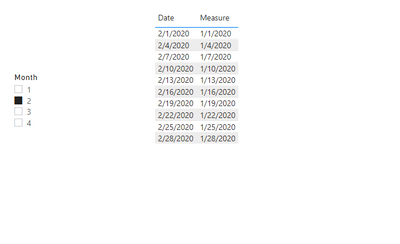
Measure = IF(NOT(ISFILTERED('calendar table'[Month])),MAX('Table'[date]),CALCULATE(MAX('Table'[date]),DATEADD('calendar table'[Date],-1,MONTH)))
And you will see:
For the related .pbix file,pls see attached.
Best Regards,
Kelly
Did I answer your question? Mark my post as a solution!
@Anonymous , if you have date you can use time intelligence
example
MTD Sales = CALCULATE(SUM(Sales[Sales Amount]),DATESMTD('Date'[Date]))
last MTD Sales = CALCULATE(SUM(Sales[Sales Amount]),DATESMTD(dateadd('Date'[Date],-1,MONTH)))
last month Sales = CALCULATE(SUM(Sales[Sales Amount]),previousmonth('Date'[Date]))
Power BI — Month on Month with or Without Time Intelligence
https://medium.com/@amitchandak.1978/power-bi-mtd-questions-time-intelligence-3-5-64b0b4a4090e
https://www.youtube.com/watch?v=6LUBbvcxtKA
Thanks for the reply, but I'm not looking for a calculation, I want the measure to return the list of items in a column that reflect the filtering.
Hi @Anonymous ,
You could use DATEADD function to realize it:
First create a dim calendar table;
Then create a measure as below:
Measure = IF(NOT(ISFILTERED('calendar table'[Month])),MAX('Table'[date]),CALCULATE(MAX('Table'[date]),DATEADD('calendar table'[Date],-1,MONTH)))
And you will see:
For the related .pbix file,pls see attached.
Best Regards,
Kelly
Did I answer your question? Mark my post as a solution!
If you have recently started exploring Fabric, we'd love to hear how it's going. Your feedback can help with product improvements.
A new Power BI DataViz World Championship is coming this June! Don't miss out on submitting your entry.
Share feedback directly with Fabric product managers, participate in targeted research studies and influence the Fabric roadmap.
| User | Count |
|---|---|
| 44 | |
| 43 | |
| 38 | |
| 18 | |
| 16 |
| User | Count |
|---|---|
| 67 | |
| 63 | |
| 30 | |
| 30 | |
| 23 |