
Don't miss your chance to take the Fabric Data Engineer (DP-700) exam on us!
Learn moreWe've captured the moments from FabCon & SQLCon that everyone is talking about, and we are bringing them to the community, live and on-demand. Starts on April 14th. Register now
Hi,
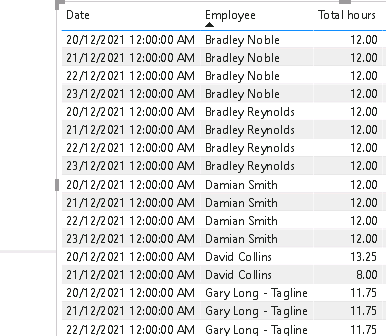
Having an issue in solving this simple problem. so I have a table lets say employeehours having following data:
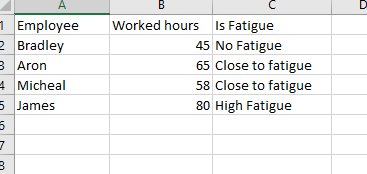
The requirement is to have hours worked by employees and a calculation which tell whether an employee is in fatigue or close to or in No fatigue , some thing like this, the below chart sums up by week and week is present in a slicer :
so if an employee during a week work for less than 50 h, its no fatigue, <=70 close to fatigue and greater than 70 is high fatigue, date column is not present in it , but when I am creating "Is Fatigue" calculation i think it is taking date into consideration , i only need to have that calcultion apply on what the current data is shown in table. Simple switch statement to calculate "is fatigue" column is below:
but it is not calculating correctly, the weekly filter is applied here:
Solved! Go to Solution.
Hi @Anonymous,
Please convert your date fields to the real date value first, then you can try to use the following calculated column formula to get tags based on summary work hour per week for each employee:
Tag =
VAR workhour =
CALCULATE (
SUM ( Employee[Hours worked] ),
FILTER ( Employee, [Employee] = EARLIER ( Employee[Employee] ) )
&& YEAR ( [Date] ) = YEAR ( EARLIER ( Employee[Date] ) )
&& WEEKNUM ( [Date], 2 ) = WEEKNUM ( EARLIER ( Employee[Date] ), 2 )
)
RETURN
IF (
workhour <= 50,
"No Fatigue",
IF ( workhour > 50 && workhour <= 60, "Close to fatigue", "High fatigue" )
)
Regards,
Xiaoxin Sheng
Hi,
You already have a Date column. Ensure that you also have a Calendar Table with a week number column in there. Share the link from where i can download your PBI file.
Hi Asish,
Thank you for getting back, PFA, have a look at calculation "IsFatigue" and you can see it is not calculating correctly in table. looks like some row context issues.
I could not attach a file here, so a google drive link for PBIX:
https://drive.google.com/file/d/1xij7GQaFglIN1rMulxERYFYbmFUYXiI4/view?usp=sharing
Hi @Anonymous,
Please convert your date fields to the real date value first, then you can try to use the following calculated column formula to get tags based on summary work hour per week for each employee:
Tag =
VAR workhour =
CALCULATE (
SUM ( Employee[Hours worked] ),
FILTER ( Employee, [Employee] = EARLIER ( Employee[Employee] ) )
&& YEAR ( [Date] ) = YEAR ( EARLIER ( Employee[Date] ) )
&& WEEKNUM ( [Date], 2 ) = WEEKNUM ( EARLIER ( Employee[Date] ), 2 )
)
RETURN
IF (
workhour <= 50,
"No Fatigue",
IF ( workhour > 50 && workhour <= 60, "Close to fatigue", "High fatigue" )
)
Regards,
Xiaoxin Sheng
Hi,
All figures in that column are <50, so your formula is correct in returning "No fatigue" in all cells. Where's the problem. Besides, correct for the following:
If you have recently started exploring Fabric, we'd love to hear how it's going. Your feedback can help with product improvements.
A new Power BI DataViz World Championship is coming this June! Don't miss out on submitting your entry.
Share feedback directly with Fabric product managers, participate in targeted research studies and influence the Fabric roadmap.
| User | Count |
|---|---|
| 55 | |
| 35 | |
| 31 | |
| 19 | |
| 17 |
| User | Count |
|---|---|
| 75 | |
| 72 | |
| 38 | |
| 35 | |
| 25 |