Join us at FabCon Atlanta from March 16 - 20, 2026, for the ultimate Fabric, Power BI, AI and SQL community-led event. Save $200 with code FABCOMM.
Register now!The Power BI Data Visualization World Championships is back! Get ahead of the game and start preparing now! Learn more
I have a report when I aply row security level.
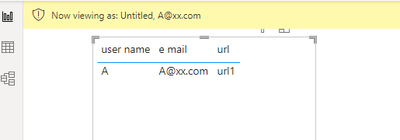
In this report when i change the user, show me the image url correspondig at the person.
But when i don´t choose any person, none rule aply, show me the image at one person. Why this is happen?
I don´t want to see the image, only if i select the person in the view rule selection.
Solved! Go to Solution.
Hi @ruinaldo ,
Thanks @amitchandak for the quick reply.
According to your description, here are my steps you can follow as a solution.
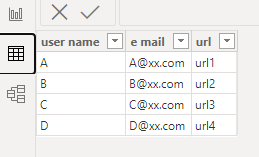
(1) This is my test data.
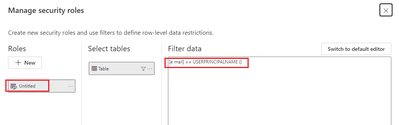
(2) From the Modeling tab, select Manage Roles.
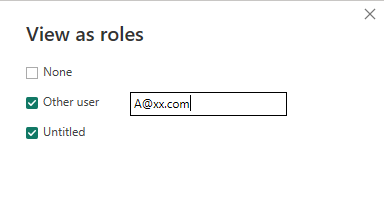
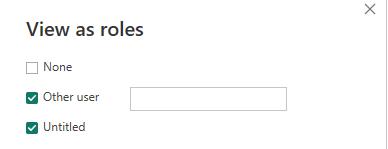
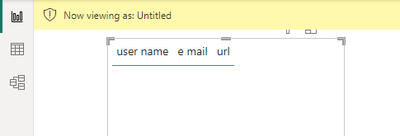
(3) From the Modeling tab, select View as.
Best Regards,
Neeko Tang
If this post helps, then please consider Accept it as the solution to help the other members find it more quickly.
Hi @ruinaldo ,
Thanks @amitchandak for the quick reply.
According to your description, here are my steps you can follow as a solution.
(1) This is my test data.
(2) From the Modeling tab, select Manage Roles.
(3) From the Modeling tab, select View as.
Best Regards,
Neeko Tang
If this post helps, then please consider Accept it as the solution to help the other members find it more quickly.
@ruinaldo , Create a measure for the URL, Mark that Image URL, and then use that
URL = Maxx(filter(Table, Table[User Email] = userprincipalname() ), Table[URL])
The Power BI Data Visualization World Championships is back! Get ahead of the game and start preparing now!
| User | Count |
|---|---|
| 41 | |
| 38 | |
| 36 | |
| 31 | |
| 28 |
| User | Count |
|---|---|
| 128 | |
| 88 | |
| 79 | |
| 68 | |
| 63 |