Don't miss your chance to take the Fabric Data Engineer (DP-600) exam for FREE! Find out how by attending the DP-600 session on April 23rd (pacific time), live or on-demand.
Learn moreNext up in the FabCon + SQLCon recap series: The roadmap for Microsoft SQL and Maximizing Developer experiences in Fabric. All sessions are available on-demand after the live show. Register now
Hi -
I am using the new feature - 'Row Level Security' ...
(1) How do I assign a "role" to a user after I creaste it in PBI Desktop?
(2) Can I hide an entire report for a specific role?
Thanks,
Steven
Hi @sshweky,
I agree with @Greg_Deckler.
Have you checked the following article? You can add member to the role by typing in the email address, or name of the user, security group or distribution list you want to add. This operation can only be taken in Power BI Service rather than in Power BI Desktop.
https://powerbi.microsoft.com/en-us/documentation/powerbi-admin-rls/
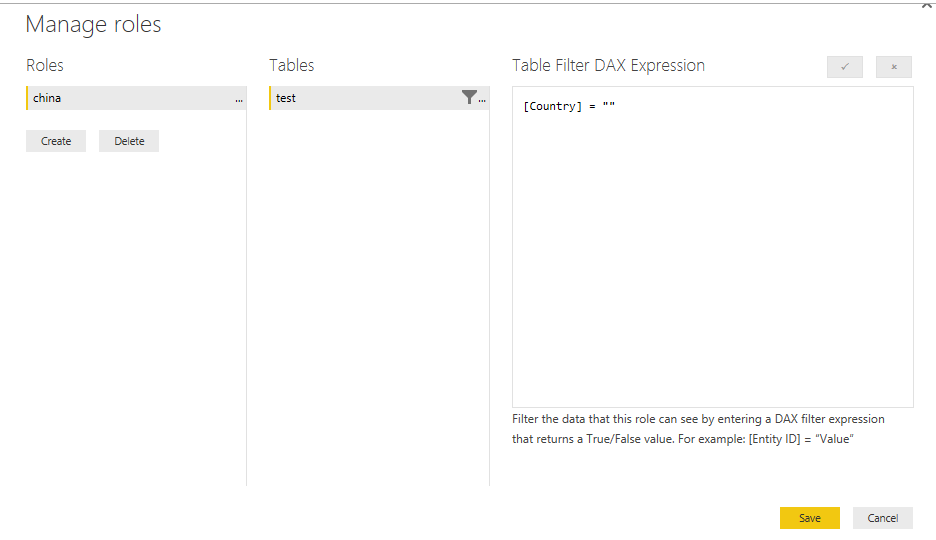
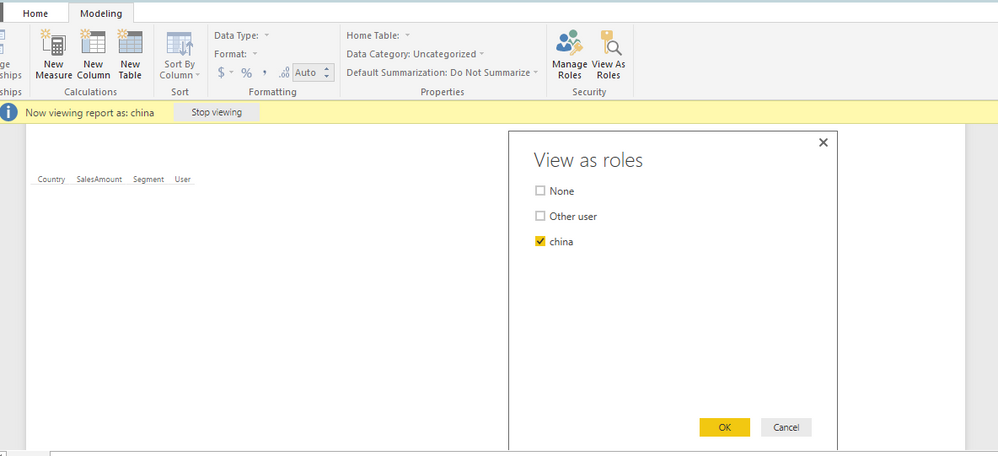
In addition, you can specify a value which doesn’t exist in your dataset when creating DAX expression for the role. After that , test the results of the role within Power BI Desktop and you will find that you hide the entire report for this role. There is an example for your reference.
However, if the above solution is not helpful, please describe more details about your requirement.
Thanks,
Lydia Zhang
@Anonymous is there any chance to set the "view as" as default for all users? Thus, enabling RLS for the PBI-file per default?
Hi @sshweky,
Could you please share sample data and post expected result here? Do you want to show single visual in a report page to a specific role?
Thanks,
Lydia Zhang
1. You need to publish it to the Service and then you can assign roles
2. I suppose, if you put rules in place like [Client] = "Nobody" and there is no "Nobody" client, they wouldn't be able to see anything pertaining to any clients for example.
If you have recently started exploring Fabric, we'd love to hear how it's going. Your feedback can help with product improvements.
A new Power BI DataViz World Championship is coming this June! Don't miss out on submitting your entry.
Experience the highlights from FabCon & SQLCon, available live and on-demand starting April 14th.
| User | Count |
|---|---|
| 48 | |
| 40 | |
| 37 | |
| 20 | |
| 16 |
| User | Count |
|---|---|
| 70 | |
| 67 | |
| 32 | |
| 27 | |
| 25 |