This time we’re going bigger than ever. Fabric, Power BI, SQL, AI and more. We're covering it all. You won't want to miss it.
Learn moreDid you hear? There's a new SQL AI Developer certification (DP-800). Start preparing now and be one of the first to get certified. Register now
Hi
This is a test scenario and I’m having the following issue
I have two tables
Users (with two columns)
Username Region Name
-------------- -------------------
A@x.com Seattle
B@x.com San Diego
Regions (with two columns)
Region Name State
------------------ ------------------
Seattle WA
San Diego CA
Row level security has been configured with filtering [Username] = USERPRINCIPALNAME() From users table.
I have the following Measures
_USERPRINCIPALNAME = VALUES(Users[Username])
_USERPRINCIPALNAME Region = if(HASONEVALUE(Users[Region Name]),VALUES(Users[Region Name]),"single Region must be selected")
And following calculated column on Region
Filter Region = if(Regions[MarketName]=[_USERPRINCIPALNAME Region],1, 0)
if I view report as role B@x.com
_USERPRINCIPALNAME will be populated as B@x.com
_USERPRINCIPALNAME Region will be populated as Seattle
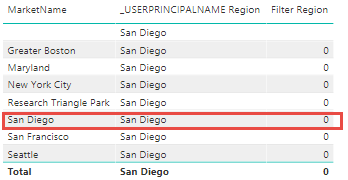
However Filter Region will always return 0. I was expecting for San Diego to return 1 and for all other regions to return 0
Thanks
Hi @skhalatian,
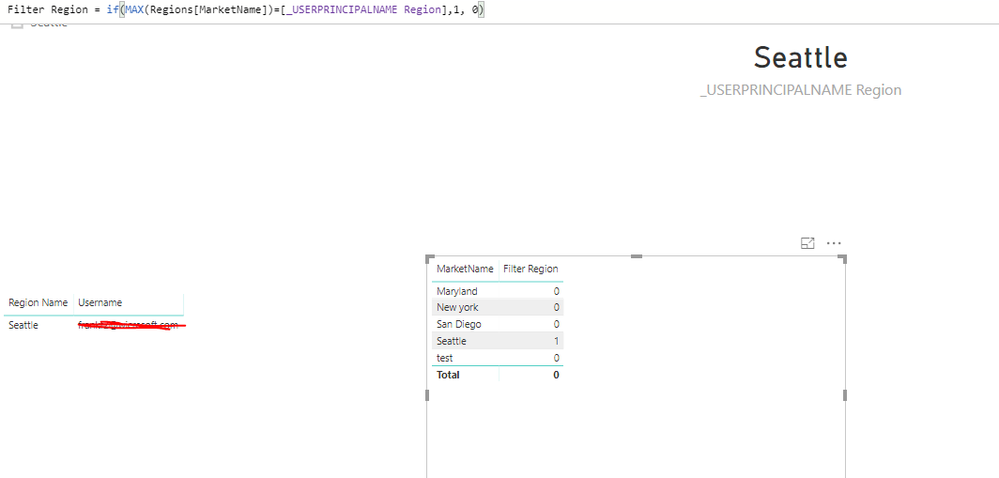
Based on my test, here we need to create the Filter Region as a measure and update the formula as below.
Filter Region = if(MAX(Regions[MarketName])=[_USERPRINCIPALNAME Region],1, 0)
Then we can get the result as we excepted.
Regards,
Frank
That is a perfect suggestion however I need to use the Filter Region on the page/report level
if I use a measue I can not use that as page/report filter ( it has to be calculated column or column)
Check out the April 2026 Power BI update to learn about new features.
Sign up to receive a private message when registration opens and key events begin.
If you have recently started exploring Fabric, we'd love to hear how it's going. Your feedback can help with product improvements.
| User | Count |
|---|---|
| 34 | |
| 31 | |
| 30 | |
| 21 | |
| 16 |
| User | Count |
|---|---|
| 65 | |
| 53 | |
| 31 | |
| 23 | |
| 23 |