Hi
This is a test scenario and I’m having the following issue
I have two tables
Users (with two columns)
Username Region Name
-------------- -------------------
[email protected] Seattle
[email protected] San Diego
Regions (with two columns)
Region Name State
------------------ ------------------
Seattle WA
San Diego CA
Row level security has been configured with filtering [Username] = USERPRINCIPALNAME() From users table.
I have the following Measures
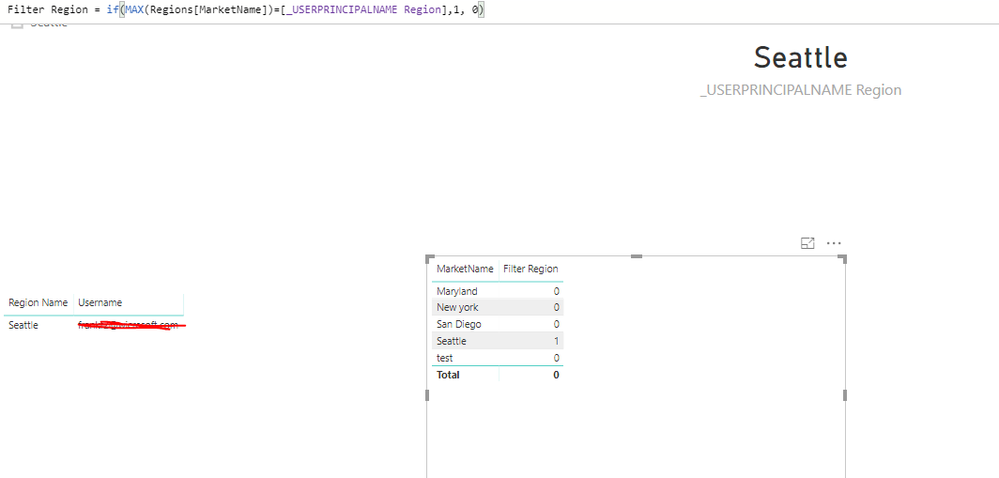
_USERPRINCIPALNAME = VALUES(Users[Username])
_USERPRINCIPALNAME Region = if(HASONEVALUE(Users[Region Name]),VALUES(Users[Region Name]),"single Region must be selected")
And following calculated column on Region
Filter Region = if(Regions[MarketName]=[_USERPRINCIPALNAME Region],1, 0)
if I view report as role [email protected]
_USERPRINCIPALNAME will be populated as [email protected]
_USERPRINCIPALNAME Region will be populated as Seattle
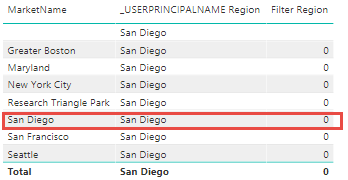
However Filter Region will always return 0. I was expecting for San Diego to return 1 and for all other regions to return 0
Thanks