Join us at FabCon Atlanta from March 16 - 20, 2026, for the ultimate Fabric, Power BI, AI and SQL community-led event. Save $200 with code FABCOMM.
Register now!Vote for your favorite vizzies from the Power BI Dataviz World Championship submissions. Vote now!
Hello All,
I am trying to write the DAX for filtering the data at "Manage Roles".
I have written [ BU] = "Brand Marketing & Customer Experience BMCX", which will filter all the employee under "Brand Marketing & Customer Experience BMCX".
I also want to add another entity in the same Role ie "Data Analytics & Artificial Intelligence DAAI".
Please Suggest
Solved! Go to Solution.
Hi @Anonymous ,
We can use the following steps to meet your requirement.
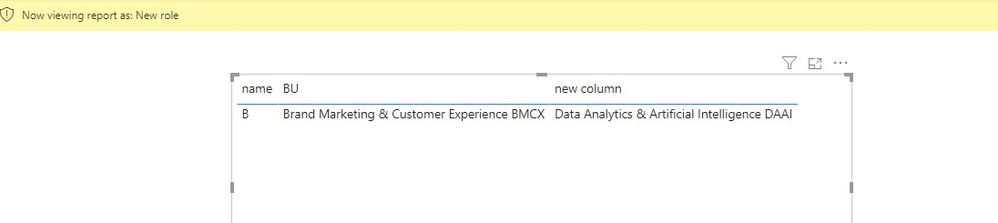
1. If "Data Analytics & Artificial Intelligence DAAI" doesn’t belong to [BU], we can use this measure.
[BU] = "Brand Marketing & Customer Experience BMCX" && [new column] = "Data Analytics & Artificial Intelligence DAAI"
2. If "Data Analytics & Artificial Intelligence DAAI" belongs to [BU], we can use this measure.
[BU 2] in
{"Brand Marketing & Customer Experience BMCX",
"Data Analytics & Artificial Intelligence DAAI"
}
If it doesn’t meet your requirement, could you please show the exact expected result based on the table that we have shared?
BTW, pbix as attached.
Best regards,
Community Support Team _ zhenbw
If this post helps, then please consider Accept it as the solution to help the other members find it more quickly.
Hi @Anonymous ,
We can use the following steps to meet your requirement.
1. If "Data Analytics & Artificial Intelligence DAAI" doesn’t belong to [BU], we can use this measure.
[BU] = "Brand Marketing & Customer Experience BMCX" && [new column] = "Data Analytics & Artificial Intelligence DAAI"
2. If "Data Analytics & Artificial Intelligence DAAI" belongs to [BU], we can use this measure.
[BU 2] in
{"Brand Marketing & Customer Experience BMCX",
"Data Analytics & Artificial Intelligence DAAI"
}
If it doesn’t meet your requirement, could you please show the exact expected result based on the table that we have shared?
BTW, pbix as attached.
Best regards,
Community Support Team _ zhenbw
If this post helps, then please consider Accept it as the solution to help the other members find it more quickly.
@Anonymous , Check if these can help
https://blog.tallan.com/2018/04/10/row-level-security-in-power-bi-part-1-roles-and-users/
https://www.blue-granite.com/blog/using-dynamic-row-level-security-with-organizational-hierarchies
https://docs.microsoft.com/en-us/power-bi/service-admin-rls
https://community.powerbi.com/t5/Desktop/DAX-Code-for-Dynamic-RLS/m-p/807960
If you love stickers, then you will definitely want to check out our Community Sticker Challenge!
Check out the January 2026 Power BI update to learn about new features.
| User | Count |
|---|---|
| 65 | |
| 64 | |
| 45 | |
| 21 | |
| 18 |
| User | Count |
|---|---|
| 115 | |
| 114 | |
| 38 | |
| 36 | |
| 26 |