Join us at FabCon Atlanta from March 16 - 20, 2026, for the ultimate Fabric, Power BI, AI and SQL community-led event. Save $200 with code FABCOMM.
Register now!Learn from the best! Meet the four finalists headed to the FINALS of the Power BI Dataviz World Championships! Register now
Hello All,
I am trying to write the DAX for filtering the data at "Manage Roles".
I have written [ BU] = "Brand Marketing & Customer Experience BMCX", which will filter all the employee under "Brand Marketing & Customer Experience BMCX".
I also want to add another entity in the same Role ie "Data Analytics & Artificial Intelligence DAAI".
Please Suggest
Solved! Go to Solution.
Hi @Anonymous ,
We can use the following steps to meet your requirement.
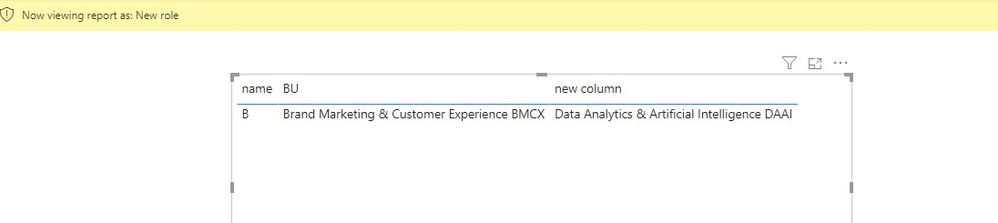
1. If "Data Analytics & Artificial Intelligence DAAI" doesn’t belong to [BU], we can use this measure.
[BU] = "Brand Marketing & Customer Experience BMCX" && [new column] = "Data Analytics & Artificial Intelligence DAAI"
2. If "Data Analytics & Artificial Intelligence DAAI" belongs to [BU], we can use this measure.
[BU 2] in
{"Brand Marketing & Customer Experience BMCX",
"Data Analytics & Artificial Intelligence DAAI"
}
If it doesn’t meet your requirement, could you please show the exact expected result based on the table that we have shared?
BTW, pbix as attached.
Best regards,
Community Support Team _ zhenbw
If this post helps, then please consider Accept it as the solution to help the other members find it more quickly.
Hi @Anonymous ,
We can use the following steps to meet your requirement.
1. If "Data Analytics & Artificial Intelligence DAAI" doesn’t belong to [BU], we can use this measure.
[BU] = "Brand Marketing & Customer Experience BMCX" && [new column] = "Data Analytics & Artificial Intelligence DAAI"
2. If "Data Analytics & Artificial Intelligence DAAI" belongs to [BU], we can use this measure.
[BU 2] in
{"Brand Marketing & Customer Experience BMCX",
"Data Analytics & Artificial Intelligence DAAI"
}
If it doesn’t meet your requirement, could you please show the exact expected result based on the table that we have shared?
BTW, pbix as attached.
Best regards,
Community Support Team _ zhenbw
If this post helps, then please consider Accept it as the solution to help the other members find it more quickly.
@Anonymous , Check if these can help
https://blog.tallan.com/2018/04/10/row-level-security-in-power-bi-part-1-roles-and-users/
https://www.blue-granite.com/blog/using-dynamic-row-level-security-with-organizational-hierarchies
https://docs.microsoft.com/en-us/power-bi/service-admin-rls
https://community.powerbi.com/t5/Desktop/DAX-Code-for-Dynamic-RLS/m-p/807960
Share feedback directly with Fabric product managers, participate in targeted research studies and influence the Fabric roadmap.
Check out the February 2026 Power BI update to learn about new features.
| User | Count |
|---|---|
| 68 | |
| 60 | |
| 45 | |
| 19 | |
| 15 |
| User | Count |
|---|---|
| 108 | |
| 107 | |
| 39 | |
| 30 | |
| 26 |