Get certified for free when you join Fabric Data Days 2026 and dive into Fabric, Power BI, SQL, AI, and other essential data skills.
Join nowJuly 7 - July 17 | Round 2 of the Power BI Dataviz World Championships. Don't miss your chance! Learn more
Dear All,
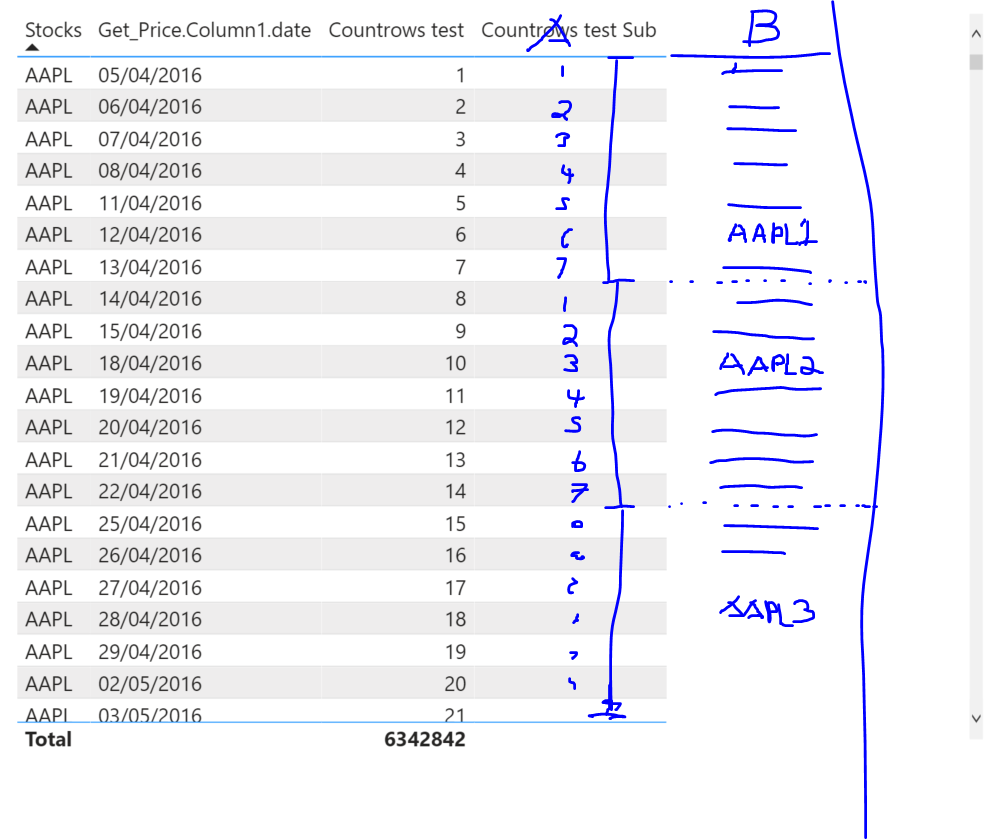
I need to produce two columns, A & B.
In column A : I need to count rows from 1 till 7 and the restart the counter in next row just as in the visual below until the end of the paticular stock eg AAPL.
In column B : I need to give a consecutive unique ID per group of 7 eg. AAPL1 ... AAPL2 ... AAPL3 ...
Would need to create this using calculated columns, i have been trying for hours whithout any luck.
Thnak you for any possible help
Solved! Go to Solution.
@Anonymous , create a new column like
New column = "APPL" & (Quotient([countrows test] -1,7) +1 )
Hi @Anonymous 👋
Can you explain how you generated the "Countrows test" column in the first place ? I need a similar field to create an id identifying which data came before which.
Many thanks and have a great day, 🙂
Hi,
Paste data in a format that can be taken to an MS Excel file. Also, against which number of column A do you want see AAPL1 or AAPL2 - should it be against 1 or 7?
Can you please do such calculations in Power Query, not in DAX? Power Query is the right place for this. In DAX it's possible but will be 1) ugly and 2) slow.
Hi,
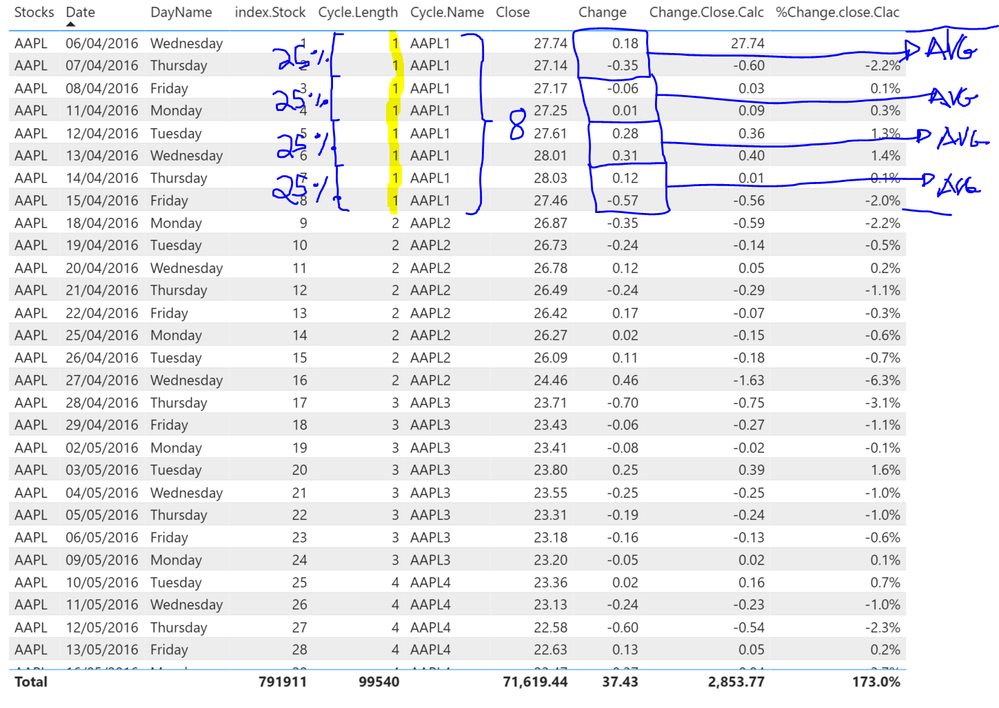
How about doing somting like the following:
Dividing the cycle length into 4 pieces each piece has 2 rows (Dates). Then take the sum of the change column and avarege it out. How would you implement something along those line?
THanks for any help
Hi Amitchandak,
Uuff!!! Thank you very much for the reply, supper easy solution. I was able to create both needed column with your Dax formula.
Million thanks,
Kr
Join us in Barcelona for FabCon and SQLCon, the Fabric, Power BI, SQL, and AI community event. Save €200 with code FABCMTY200.
Join Fabric Data Days 2026: 60 days of free live/on-demand sessions, challenges, study groups, and certification opportunities.
| User | Count |
|---|---|
| 22 | |
| 22 | |
| 18 | |
| 17 | |
| 13 |
| User | Count |
|---|---|
| 61 | |
| 52 | |
| 47 | |
| 41 | |
| 38 |