cancel
Showing results for 
Search instead for 
Did you mean: 

The Power BI Data Visualization World Championships is back! Get ahead of the game and start preparing now! Learn more

Reply
Anna422173
Regular Visitor

Rolling sum R12 with filter View

Hello,


I would like to have a 12 month rolling sum for revenue.

This measure should be used in a view, which shows only a date range (example 01.11.2022 - today)

The measure should sum up also the values which are not filtered in the view, but are part of the rolling 12 month (example: month NOV 2022 should shows the sum from 01.12.2021-31.11.2022)


I tried 2 measures, which both do not come to the right result:


1. Measure:


Revenue R12 Test 1 =
IF(
    ISFILTERED('Date'[Date]),
    ERROR("Quickmeasures mit Zeitintelligenz können nur über die von Power BI bereitgestellte Datumshierarchie oder die primäre Datumsspalte gruppiert oder gefiltert werden."),
    VAR __LAST_DATE = ENDOFMONTH('Date'[Date].[Date])
    VAR __DATE_PERIOD =
        DATESBETWEEN(
            'Date'[Date].[Date],
            STARTOFMONTH(DATEADD(__LAST_DATE, -11, MONTH)),
            __LAST_DATE
        )
    RETURN
        sumX(
            CALCULATETABLE(
                SUMMARIZE(
                    VALUES('Date'),
                    'Date'[Date].[Jahr],
                    'Date'[Date].[QuarterNo],
                    'Date'[Date].[Quartal],
                    'Date'[Date].[MonthNo],
                    'Date'[Date].[Monat]
                ),
                __DATE_PERIOD
            ),
            CALCULATE(SUM('Sachposten_Umsatz'[Revenue]), ALL('Date'[Date].[Tag]))
        )
)
 
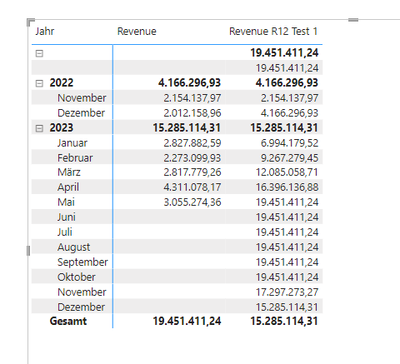
Result:
Anna422173_1-1686066686384.png


--> rolling sum starts in November 2022 and not includes the values from 01.12.2021-31.10.2022


2. Measure


Revenue R12 = CALCULATE (
    [Sum Revenue],
    DATESBETWEEN (
        'Date'[Date],
        NEXTDAY ( SAMEPERIODLASTYEAR ( LASTDATE ( 'Date'[Date] ) ) ),
        LASTDATE ( 'Date'[Date] )
    )
)
 
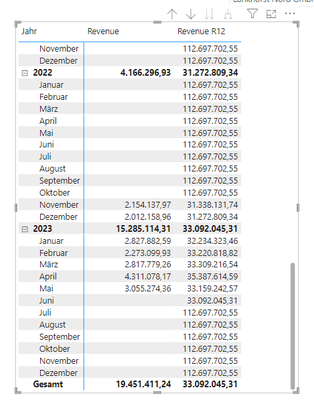
result:
 
Anna422173_2-1686066841545.png


wrong: all Dates are shown, even if it is filtered.


Maybe anyone can help me.


Greetings,

Anna

 
1 ACCEPTED SOLUTION
amitchandak
Super User
Super User

@Anna422173 , Make sure you are using date table, marked as date table, single directional join. Field from date table need to used in visual, measure and slicer


you need a measure like


Rolling 12 = CALCULATE(sum(Sales[Sales Amount]),DATESINPERIOD('Date'[Date],MAX('Date'[Date]),-12,MONTH))


using window for 12 month not by days


Rolling 12 = CALCULATE([Net], WINDOW(-11,REL, 0, REL, ADDCOLUMNS(ALLSELECTED('Date'[Month Year],'Date'[Month Year Sort] ),ORDERBY([Month Year Sort],asc)))


Why Time Intelligence Fails - Powerbi 5 Savior Steps for TI :https://youtu.be/OBf0rjpp5Hw
https://amitchandak.medium.com/power-bi-5-key-points-to-make-time-intelligence-successful-bd52912a5b...
To get the best of the time intelligence function. Make sure you have a date calendar and it has been marked as the date in model view. Also, join it with the date column of your fact/s. Refer :radacad sqlbi My Video Series Appreciate your Kudos.


Share with Power BI Enthusiasts: Full Power BI Video (20 Hours) YouTube
Microsoft Fabric Series 60+ Videos YouTube
Microsoft Fabric Hindi End to End YouTube

View solution in original post

1 REPLY 1
amitchandak
Super User
Super User

@Anna422173 , Make sure you are using date table, marked as date table, single directional join. Field from date table need to used in visual, measure and slicer


you need a measure like


Rolling 12 = CALCULATE(sum(Sales[Sales Amount]),DATESINPERIOD('Date'[Date],MAX('Date'[Date]),-12,MONTH))


using window for 12 month not by days


Rolling 12 = CALCULATE([Net], WINDOW(-11,REL, 0, REL, ADDCOLUMNS(ALLSELECTED('Date'[Month Year],'Date'[Month Year Sort] ),ORDERBY([Month Year Sort],asc)))


Why Time Intelligence Fails - Powerbi 5 Savior Steps for TI :https://youtu.be/OBf0rjpp5Hw
https://amitchandak.medium.com/power-bi-5-key-points-to-make-time-intelligence-successful-bd52912a5b...
To get the best of the time intelligence function. Make sure you have a date calendar and it has been marked as the date in model view. Also, join it with the date column of your fact/s. Refer :radacad sqlbi My Video Series Appreciate your Kudos.


Share with Power BI Enthusiasts: Full Power BI Video (20 Hours) YouTube
Microsoft Fabric Series 60+ Videos YouTube
Microsoft Fabric Hindi End to End YouTube

Helpful resources

Announcements
Power BI DataViz World Championships

Power BI Dataviz World Championships

The Power BI Data Visualization World Championships is back! Get ahead of the game and start preparing now!

December 2025 Power BI Update Carousel

Power BI Monthly Update - December 2025

Check out the December 2025 Power BI Holiday Recap!

FabCon Atlanta 2026 carousel

FabCon Atlanta 2026

Join us at FabCon Atlanta, March 16-20, for the ultimate Fabric, Power BI, AI and SQL community-led event. Save $200 with code FABCOMM.