Join us at FabCon Atlanta from March 16 - 20, 2026, for the ultimate Fabric, Power BI, AI and SQL community-led event. Save $200 with code FABCOMM.
Register now!The Power BI Data Visualization World Championships is back! Get ahead of the game and start preparing now! Learn more
Hi
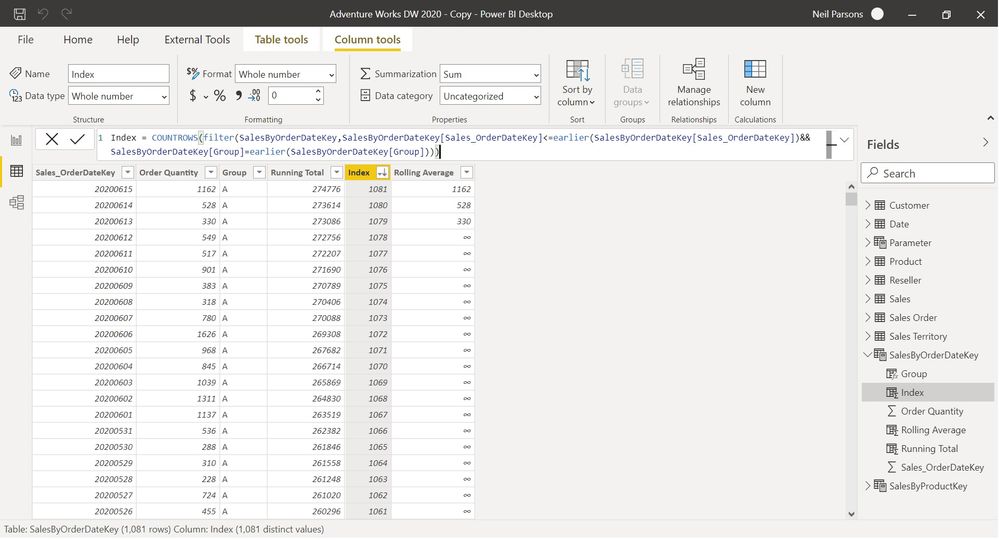
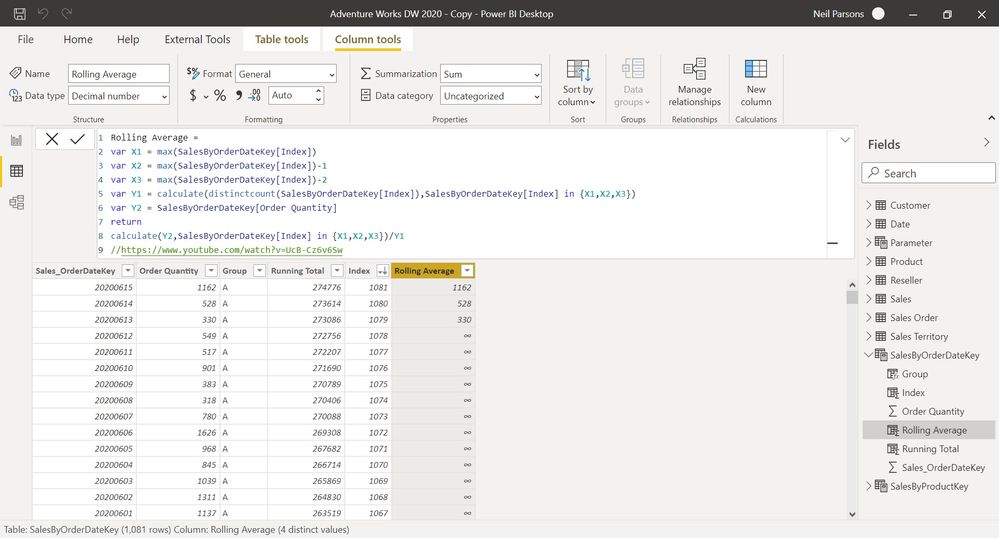
I am trying to create a rolling average in DAX using method 1 described at https://www.youtube.com/watch?v=UcB-Cz6v6Sw but by applying it to my own situation. Basically, I'm after a generic method of creating rolling averages based on an index column. I don't want to use dates as I often work with period numbers etc. and am after a solution I can apply to different situations. I have created an index column as shown below in the first screenshot. I then tried to adapt the method described in the link to my own table but it doesn't work. It just replicates the order quantity column for the last 3 rows in the table. (I have sorted it in descending order). Can anyone help adapt the DAX so it works for my table? Many thanks.
Solved! Go to Solution.
Normally this would be done with a measure but if you want a column...
Rolling Average =
var X1 = SalesByOrderDateKey[Index]
var X2 = SalesByOrderDateKey[Index]-1
var X3 = SalesByOrderDateKey[Index]-2
var Y1 = calculate(distinctcount(SalesByOrderDateKey[Index]), FILTER(SalesByOrderDateKey, SalesByOrderDateKey[Index] in {X1,X2,X3}))
RETURN
DIVIDE(calculate(SUM(SalesByOrderDateKey[Order Quantity]), FILTER(SalesByOrderDateKey, SalesByOrderDateKey[Index] in {X1,X2,X3})), Y1)
The code that didn't work would always return the same values for the first 3 variables. After that Y1 would always return zero.
Let me know how it goes
Normally this would be done with a measure but if you want a column...
Rolling Average =
var X1 = SalesByOrderDateKey[Index]
var X2 = SalesByOrderDateKey[Index]-1
var X3 = SalesByOrderDateKey[Index]-2
var Y1 = calculate(distinctcount(SalesByOrderDateKey[Index]), FILTER(SalesByOrderDateKey, SalesByOrderDateKey[Index] in {X1,X2,X3}))
RETURN
DIVIDE(calculate(SUM(SalesByOrderDateKey[Order Quantity]), FILTER(SalesByOrderDateKey, SalesByOrderDateKey[Index] in {X1,X2,X3})), Y1)
The code that didn't work would always return the same values for the first 3 variables. After that Y1 would always return zero.
Let me know how it goes
Hi HotChilli
Thank you very much. This works. Exactly what I wanted.
The Power BI Data Visualization World Championships is back! Get ahead of the game and start preparing now!
Check out the November 2025 Power BI update to learn about new features.
| User | Count |
|---|---|
| 59 | |
| 43 | |
| 42 | |
| 23 | |
| 17 |
| User | Count |
|---|---|
| 190 | |
| 122 | |
| 96 | |
| 66 | |
| 47 |