cancel
Showing results for 
Search instead for 
Did you mean: 

The Power BI Data Visualization World Championships is back! Get ahead of the game and start preparing now! Learn more

Reply
Anonymous
Not applicable

Returning SUM of MAX duration for bus trips to calculate total duration

Note - I want to do this in a measure, rather than a calculated column.


My data set comprises stop level data for bus routes, with timings, as well as a calculated column that calculates total elapsed duration. E.g. the following, where the result should be 840:


UniqueTripIDStopTimeRunningTimeDuration (calc column)
A17:00:00am0
A27:02:00am120
A37:04:00am240
A47:06:00am360
B18:00:00am0
B28:03:00am180
B38:05:00am300
B48:08:00am480


The total time for a trip is the MAX value for Calculated Duration for any given UniqueTripID (these are unique identifiers )


I've come up with a measure that works for individual level routes:


var maxtime = MAX(DATA_RADIOLA[RunningTripDuration])

var uniquetripid = MAX(DATA_RADIOLA[Unique TRIPID])

var routeresult =
CALCULATE(
MAX(
DATA_RADIOLA[RunningTripDuration]),
uniquetripid=DATA_RADIOLA[Unique TRIPID]
)

What I want to do is SUM the MAX for every unique TripID. The following does not work:
//CALCULATE(
// SUM(
// DATA_RADIOLA[RunningTripDuration]),
// DATA_RADIOLA[RunningTripDuration]=maxtime,
// DATA_RADIOLA[Unique TRIPID]=uniquetripid
//)
1 ACCEPTED SOLUTION
lbendlin
Super User
Super User

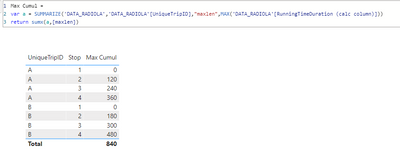
@Anonymous lbendlin_0-1639229750628.png

Max Cumul := 
var a = SUMMARIZE('DATA_RADIOLA','DATA_RADIOLA'[UniqueTripID],"maxlen",MAX('DATA_RADIOLA'[RunningTimeDuration (calc column)]))
return sumx(a,[maxlen])


View solution in original post

3 REPLIES 3
lbendlin
Super User
Super User

@Anonymous lbendlin_0-1639229750628.png

Max Cumul := 
var a = SUMMARIZE('DATA_RADIOLA','DATA_RADIOLA'[UniqueTripID],"maxlen",MAX('DATA_RADIOLA'[RunningTimeDuration (calc column)]))
return sumx(a,[maxlen])


Anonymous
Not applicable

Wonderful, works perfectly. Here is your result compared to one I created using a helper column (which slows down calculation time), and the difference is infinitesimal.
Thanks so much!!!

zhivana_0-1639339349968.png


you make a good point, especially on the impact of larger data sets on the performance. Instead of SUMMARIZE you can also use GROUPBY() or a variety of other approaches. In DAX Studio you can study the query plan and optimize your query as needed.

Helpful resources

Announcements
Power BI DataViz World Championships

Power BI Dataviz World Championships

The Power BI Data Visualization World Championships is back! Get ahead of the game and start preparing now!

December 2025 Power BI Update Carousel

Power BI Monthly Update - December 2025

Check out the December 2025 Power BI Holiday Recap!

FabCon Atlanta 2026 carousel

FabCon Atlanta 2026

Join us at FabCon Atlanta, March 16-20, for the ultimate Fabric, Power BI, AI and SQL community-led event. Save $200 with code FABCOMM.