cancel
Showing results for 
Search instead for 
Did you mean: 

Did you hear? There's a new SQL AI Developer certification (DP-800). Start preparing now and be one of the first to get certified. Register now

Reply
Anonymous
Not applicable

Return a Table With a SWITCH

hi,

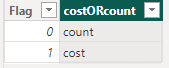
I have the following table: "COSTORCOUNT"

adicarmeliEX__3-1685866808271.png

and a parameter table:  "parameterTable"

adicarmeliEX__4-1685867454865.png


I'm tring to return a table according to selectedvalue from the "parameterTable"

I put the paramter column in a slicer.

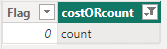
when selecting 0 -the excepted resuelt is the following table:

adicarmeliEX__1-1685866726111.png


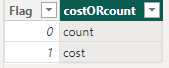
and when selecting 1 -

adicarmeliEX__2-1685866759751.png


Below is the code:


dynamicSlicer = 
VAR _TableAdi = SUMMARIZECOLUMNS(COSTORCOUNT[Flag])
VAR _TableTamir = SUMMARIZECOLUMNS(COSTORCOUNT[Flag],FILTER(COSTORCOUNT,COSTORCOUNT[Flag]=0))

VAR _Switch = IF( SELECTEDVALUE(parameterTable[parameter]) = 1,
                         _TableAdi, _TableTamir)

return _Switch


I'm getting the following error: 

adicarmeliEX__0-1685866449826.png

The expression specified in the query is not a valid table expression.


any advice will be appreciated.


Thank you, Adi

@Tamiri  @tamiribas 

1 ACCEPTED SOLUTION
Greg_Deckler
Community Champion
Community Champion

@Anonymous I've never had any luck with DAX being able to return one table or another table. It doesn't like it. Try this instead:

dynamicSlicer = 
    VAR _Selected = SELECTEDVALUE(parameterTable[parameter])
    VAR _Table = SUMMARIZE(FILTER(COSTORCOUNT, [Flag] = _Selected),[Flag])
RETURN
    _Table


Follow on LinkedIn
@ me in replies or I'll lose your thread!!!
Instead of a Kudo, please vote for this idea
Become an expert!: Enterprise DNA
External Tools: MSHGQM
YouTube Channel!: Microsoft Hates Greg
Latest book!:
DAX For Humans

DAX is easy, CALCULATE makes DAX hard...

View solution in original post

2 REPLIES 2
ant_lah
Frequent Visitor

Hello,

I'm dealing with a similar situation, but can't get the solution to work.

I want to filter a table based on a slicer selection, but whenever I put SELECTEDVALUE in the filter condition, the resulting table is blank no matter what slicer button I click.

leased =
    VAR _Selected = SELECTEDVALUE('Farm sizes and numbers'[Category of holdings])
    VAR _Table = SUMMARIZE(FILTER('Farm sizes and numbers', [Category of holdings] = _Selected),'Farm sizes and numbers'[State],'Farm sizes and numbers'[District], 
"number leased", SUM('Farm sizes and numbers'[Wholly leased-in holdings]), 
"area leased",SUM('Farm sizes and numbers'[Area of wholly leased-in holdings]))
RETURN
    _Table

If I substitute a string value for _Selected in the filter, say "Medium", everything works fine, but I need to manipulate the table dynamically rather than just set the condition in the DAX expression.


And if someone knows of a way to get this to work with multiple slicer selections (say, to allow both "Medium" and "Large" values of {Category of holdings], that would be magical.


Thank you!

Greg_Deckler
Community Champion
Community Champion

@Anonymous I've never had any luck with DAX being able to return one table or another table. It doesn't like it. Try this instead:

dynamicSlicer = 
    VAR _Selected = SELECTEDVALUE(parameterTable[parameter])
    VAR _Table = SUMMARIZE(FILTER(COSTORCOUNT, [Flag] = _Selected),[Flag])
RETURN
    _Table


Follow on LinkedIn
@ me in replies or I'll lose your thread!!!
Instead of a Kudo, please vote for this idea
Become an expert!: Enterprise DNA
External Tools: MSHGQM
YouTube Channel!: Microsoft Hates Greg
Latest book!:
DAX For Humans

DAX is easy, CALCULATE makes DAX hard...

Helpful resources

Announcements
April Power BI Update Carousel

Power BI Monthly Update - April 2026

Check out the April 2026 Power BI update to learn about new features.

Fabric SQL PBI Data Days

Data Days 2026 coming soon!

Sign up to receive a private message when registration opens and key events begin.

New to Fabric survey Carousel

New to Fabric Survey

If you have recently started exploring Fabric, we'd love to hear how it's going. Your feedback can help with product improvements.

Power BI DataViz World Championships carousel

Power BI DataViz World Championships - June 2026

A new Power BI DataViz World Championship is coming this June! Don't miss out on submitting your entry.