This is best Fabric, Power BI, SQL and AI community event. How do we know? The last event sold out! Save €200 with code FABCMTY200.
Register nowA new Data Days event is coming soon! This time we’re going bigger than ever. Fabric, Power BI, SQL, AI and more. Don't miss out.
hi,
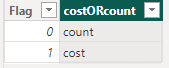
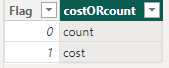
I have the following table: "COSTORCOUNT"
and a parameter table: "parameterTable"
I'm tring to return a table according to selectedvalue from the "parameterTable"
I put the paramter column in a slicer.
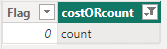
when selecting 0 -the excepted resuelt is the following table:
and when selecting 1 -
Below is the code:
dynamicSlicer =
VAR _TableAdi = SUMMARIZECOLUMNS(COSTORCOUNT[Flag])
VAR _TableTamir = SUMMARIZECOLUMNS(COSTORCOUNT[Flag],FILTER(COSTORCOUNT,COSTORCOUNT[Flag]=0))
VAR _Switch = IF( SELECTEDVALUE(parameterTable[parameter]) = 1,
_TableAdi, _TableTamir)
return _Switch
I'm getting the following error:
The expression specified in the query is not a valid table expression.
any advice will be appreciated.
Thank you, Adi
Solved! Go to Solution.
@Anonymous I've never had any luck with DAX being able to return one table or another table. It doesn't like it. Try this instead:
dynamicSlicer =
VAR _Selected = SELECTEDVALUE(parameterTable[parameter])
VAR _Table = SUMMARIZE(FILTER(COSTORCOUNT, [Flag] = _Selected),[Flag])
RETURN
_Table
Hello,
I'm dealing with a similar situation, but can't get the solution to work.
I want to filter a table based on a slicer selection, but whenever I put SELECTEDVALUE in the filter condition, the resulting table is blank no matter what slicer button I click.
leased =
VAR _Selected = SELECTEDVALUE('Farm sizes and numbers'[Category of holdings])
VAR _Table = SUMMARIZE(FILTER('Farm sizes and numbers', [Category of holdings] = _Selected),'Farm sizes and numbers'[State],'Farm sizes and numbers'[District],
"number leased", SUM('Farm sizes and numbers'[Wholly leased-in holdings]),
"area leased",SUM('Farm sizes and numbers'[Area of wholly leased-in holdings]))
RETURN
_TableIf I substitute a string value for _Selected in the filter, say "Medium", everything works fine, but I need to manipulate the table dynamically rather than just set the condition in the DAX expression.
And if someone knows of a way to get this to work with multiple slicer selections (say, to allow both "Medium" and "Large" values of {Category of holdings], that would be magical.
Thank you!
@Anonymous I've never had any luck with DAX being able to return one table or another table. It doesn't like it. Try this instead:
dynamicSlicer =
VAR _Selected = SELECTEDVALUE(parameterTable[parameter])
VAR _Table = SUMMARIZE(FILTER(COSTORCOUNT, [Flag] = _Selected),[Flag])
RETURN
_Table
Check out the May 2026 Power BI update to learn about new features.
Sign up to receive a private message when registration opens and key events begin.
If you have recently started exploring Fabric, we'd love to hear how it's going. Your feedback can help with product improvements.
| User | Count |
|---|---|
| 27 | |
| 25 | |
| 22 | |
| 20 | |
| 14 |
| User | Count |
|---|---|
| 51 | |
| 47 | |
| 23 | |
| 18 | |
| 18 |