Get Fabric or SQL Certified for Free.
Get certified for free when you join Fabric Data Days 2026 and dive into Fabric, Power BI, SQL, AI, and other essential data skills.
Join now- Power BI forums
- Get Help with Power BI
- Desktop
- Service
- Report Server
- Power Query
- Mobile Apps
- Developer
- DAX Commands and Tips
- Custom Visuals Development Discussion
- Health and Life Sciences
- Power BI Spanish forums
- Translated Spanish Desktop
- Training and Consulting
- Instructor Led Training
- Dashboard in a Day for Women, by Women
- Galleries
- Data Stories Gallery
- Themes Gallery
- Contests Gallery
- QuickViz Gallery
- Quick Measures Gallery
- Visual Calculations Gallery
- Fabric Apps Gallery
- Notebook Gallery
- Translytical Task Flow Gallery
- TMDL Gallery
- R Script Showcase
- Webinars and Video Gallery
- Ideas
- Custom Visuals Ideas (read-only)
- Issues
- Issues
- Events
- Upcoming Events
July 28 - August 9 | Final Round of the Power BI Dataviz World Championships. This is your chance. Learn more
- Power BI forums
- Forums
- Get Help with Power BI
- Desktop
- Re: Return Value from Another Column
- Subscribe to RSS Feed
- Mark Topic as New
- Mark Topic as Read
- Float this Topic for Current User
- Bookmark
- Subscribe
- Printer Friendly Page

- Mark as New
- Bookmark
- Subscribe
- Mute
- Subscribe to RSS Feed
- Permalink
- Report Inappropriate Content
Return Value from Another Column
ORIGINAL POST
Hi There,
I have a table of my customers and their purchase activities broken down by date (Customer ID, Date, Order ID, Source).
I would like to create a measure that can return the first purchase source for my customers.
The CALCULATE / MIN functions allows me to find the first purchase date, but I am unable to use it to return the sale Source.
-------
UPDATED POST
Hi @az38 @sanalytics ,
Aplogies I am new to the forums.
When posting this original post I tried to simplify my requests and data. I have applied @az38 formula as follows but got an error. I must also clarify that the data I have is actually from Google Analytics for users sessions and not customer sales data. My aim is to be able to find the source of the users first session, which is also the customer's source should the user convert into a customer. I am also aiming to find the customer's first sale source, which in this case would be the source of the session in which the customer made their first purchase.
The following suggested formula by @az38 did not work
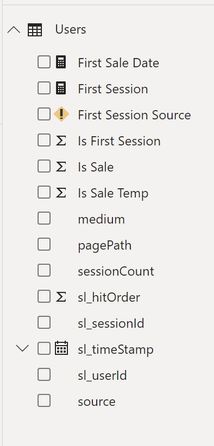
Field Notes
sessionCount: session squence. So for each user (i.e. sl_userId) will have sessionCount starting from 1 to the number of unique sessions they have made. i.e. Someone visits site for one time they will have a sessionCount= 1 under all of their activities in table. In they last session (n), sessionCount will be n for all of their activities in that last session. Sessions are identified by sl_sessionId.
sl_hitOrder: similar to sessionCount, each activity within a session will be lablelled by a hit order, starting from 1 to n which is the last activitiy in the session. Each session activitiy will have a unique row in data table (Users table).
Is First Session: A conditional column based on sessionCount=1
source: Source of session (i.e. Google, Direct, Facebook, etc.)
pagePath: activity page path on website that Google Analytics is tracking

Solved! Go to Solution.


- Mark as New
- Bookmark
- Subscribe
- Mute
- Subscribe to RSS Feed
- Permalink
- Report Inappropriate Content
try
First Session Source =
var FirstPurchaseDate = calculate(MIN('Users'[sl_timeStamp]),ALLEXCEPT('Users','Users'[User]))
return calculate(FIRSTNONBLANK('Users'[source],1),FILTER(ALL('Users'),'Users'[User]=SELECTEDVALUE('Users'[User]) && 'Users'[sl_timeStamp]=FirstPurchaseDate))
do not hesitate to give a kudo to useful posts and mark solutions as solution


- Mark as New
- Bookmark
- Subscribe
- Mute
- Subscribe to RSS Feed
- Permalink
- Report Inappropriate Content
Hey @syldia
Can you attach a dummy data and your expected output.It will help us to solve..
Regards,
Snandy
- Mark as New
- Bookmark
- Subscribe
- Mute
- Subscribe to RSS Feed
- Permalink
- Report Inappropriate Content
hi @syldia
try a measure in your customer table
FirstPurchaseSource =
var FirstPurchaseDate = calculate(MIN('purchase activities'[Date]))
return calculate(FIRSTNONBLANK('purchase activities'[Source];1);'purchase activities'[Date]=FirstPurchaseDate)
do not hesitate to give a kudo to useful posts and mark solutions as solution
- Mark as New
- Bookmark
- Subscribe
- Mute
- Subscribe to RSS Feed
- Permalink
- Report Inappropriate Content
- Mark as New
- Bookmark
- Subscribe
- Mute
- Subscribe to RSS Feed
- Permalink
- Report Inappropriate Content
I just added it, got the following error
The syntax for ';' is incorrect. (DAX(var FirstPurchaseDate = calculate(MIN('Users'[sl_timeStamp]))return calculate(FIRSTNONBLANK('Users'[source];1);'Users'[sl_timeStamp]=FirstPurchaseDate))).
Thanks
- Mark as New
- Bookmark
- Subscribe
- Mute
- Subscribe to RSS Feed
- Permalink
- Report Inappropriate Content
- Mark as New
- Bookmark
- Subscribe
- Mute
- Subscribe to RSS Feed
- Permalink
- Report Inappropriate Content
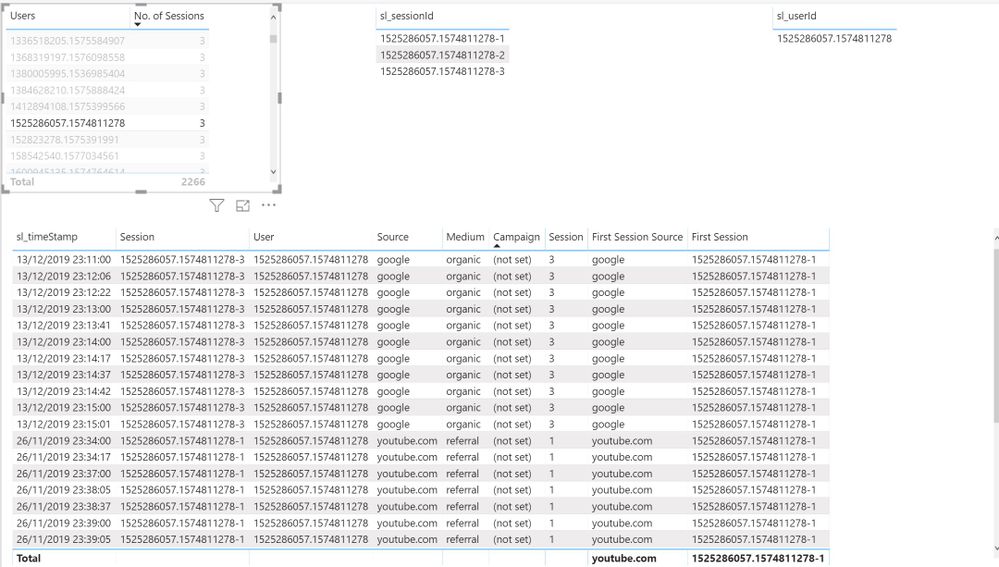
Formula is working now. However as you can see from visual below it is not delivering the correct results.
- Mark as New
- Bookmark
- Subscribe
- Mute
- Subscribe to RSS Feed
- Permalink
- Report Inappropriate Content
try
First Session Source =
var FirstPurchaseDate = calculate(MIN('Users'[sl_timeStamp]),ALLEXCEPT('Users','Users'[User]))
return calculate(FIRSTNONBLANK('Users'[source],1),FILTER(ALL('Users'),'Users'[User]=SELECTEDVALUE('Users'[User]) && 'Users'[sl_timeStamp]=FirstPurchaseDate))
do not hesitate to give a kudo to useful posts and mark solutions as solution

Helpful resources

Fabric Community Sticker Challenge - Barcelona 2026
If you love stickers, then you will definitely want to check out our community sticker challenge, Barcelona edition!

Power BI Monthly Update - July 2026
Check out the July 2026 Power BI update to learn about new features.

Power BI DataViz World Championships - June 2026
A new Power BI DataViz World Championship is coming this June! Don't miss out on submitting your entry.

| User | Count |
|---|---|
| 26 | |
| 22 | |
| 22 | |
| 20 | |
| 17 |


| User | Count |
|---|---|
| 35 | |
| 29 | |
| 21 | |
| 19 | |
| 17 |


