Join us at FabCon Atlanta from March 16 - 20, 2026, for the ultimate Fabric, Power BI, AI and SQL community-led event. Save $200 with code FABCOMM.
Register now!The Power BI Data Visualization World Championships is back! Get ahead of the game and start preparing now! Learn more
Hi,
Looking for some help please, im trying to create a measure to retrieve the name of the user with the highest number of clients, my columns are "Keyworker" (this is the user) and "carerid" (this is the client).
I have tried and failed to get this to work, it would be great if someone could point me in the right direction.
thanks
Solved! Go to Solution.
Hi @j3sting
You can use a pattern like this (pattern taken from SQLBI - Alternative use of FIRSTNONBLANK and LASTNONBLANK😞
TopUser =
FIRSTNONBLANK (
TOPN (
1,
VALUES ( YourTable[Keyworker] ),
CALCULATE ( DISTINCTCOUNT ( YourTable[carerid] ) )
),
1
)The FIRSTNONBLANK is just there to break ties.
Owen 🙂
You can also use the RANKX function to rank the client numbers and get the user name whose rank number is 1.
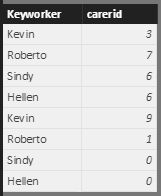
Assuming we have a table like below.
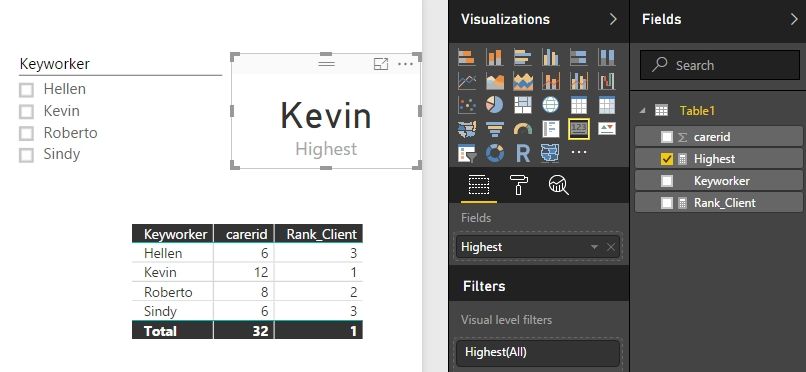
We can create two measures with following formulas.
Rank_Client = RANKX ( ALLSELECTED ( Table1 ), CALCULATE ( SUM ( Table1[carerid] ) ) )
Highest =
CALCULATE (
ALLSELECTED ( Table1[Keyworker] ),
FILTER (
ADDCOLUMNS ( VALUES ( Table1[Keyworker] ), "RankNum", [Rank_Client] ),
[RankNum] = 1
)
)
Best Regards,
Herbert
Hi @j3sting
You can use a pattern like this (pattern taken from SQLBI - Alternative use of FIRSTNONBLANK and LASTNONBLANK😞
TopUser =
FIRSTNONBLANK (
TOPN (
1,
VALUES ( YourTable[Keyworker] ),
CALCULATE ( DISTINCTCOUNT ( YourTable[carerid] ) )
),
1
)The FIRSTNONBLANK is just there to break ties.
Owen 🙂
The Power BI Data Visualization World Championships is back! Get ahead of the game and start preparing now!
| User | Count |
|---|---|
| 41 | |
| 38 | |
| 36 | |
| 30 | |
| 28 |
| User | Count |
|---|---|
| 129 | |
| 88 | |
| 79 | |
| 68 | |
| 63 |