cancel
Showing results for 
Search instead for 
Did you mean: 

Get Fabric Certified for FREE during Fabric Data Days. Don't miss your chance! Request now

Reply
Oelshamy
Helper I
Helper I

Reterive SharePoint List Multiple appeneded Text in Power Bi

I have a MS List with multiple line of text column with "Append Changes to existing text" turned ON called Updates  
I created a Power BI report to display information related to the list, I am trying to display the last update on this Updates Column. 
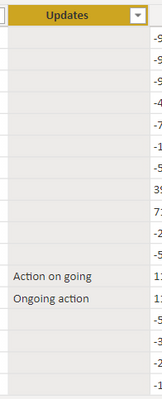
However, when I display the text columns in a table I am able to see the last text stored only and if I click on the item to view or edit any other column, the Update value disappears from Power BI Table and is replaced by null. 

is there any workaround or a solution that retrieves either the full history or last update only having the text?  

See the below screenshot, all items had text but when clicked to be edited all disappeared except the items which wasn't clicked 


Oelshamy_0-1650474261959.png


2 REPLIES 2
Oelshamy
Helper I
Helper I

I have found a workaround which is by creating a function: 


= () =>
let
Source = (VersionsRelevantSharePointListName as text, VersionsRelevantSharePointLocation as text, VersionsRelevantItemID as number) => let
Source = Xml.Tables(Web.Contents(Text.Combine({VersionsRelevantSharePointLocation,"/_api/web/Lists/getbytitle('",
VersionsRelevantSharePointListName ,
"')/items(",
Text.From(VersionsRelevantItemID),
")/versions"}
))),
entry = Source{0}[entry],
#"Removed Other Columns2" = Table.SelectColumns(entry,{"content"}),
#"Expanded content" = Table.ExpandTableColumn(#"Removed Other Columns2", "content", {"http://schemas.microsoft.com/ado/2007/08/dataservices/metadata"}, {"content"}),
#"Expanded content1" = Table.ExpandTableColumn(#"Expanded content", "content", {"properties"}, {"properties"}),
#"Expanded properties" = Table.ExpandTableColumn(#"Expanded content1", "properties", {"http://schemas.microsoft.com/ado/2007/08/dataservices"}, {"properties"})
in
#"Expanded properties"
in
Source


But it only reterieves 1 Item since the function requires 3 parameters, Any idea how to use the function with 2 parameters only and as well to invoke it automatically and have this is a query to be used in the visuals page? 


Thanks 

Hi @Oelshamy ,


{VersionsRelevantSharePointLocation,"/_api/web/Lists/getbytitle('",
VersionsRelevantSharePointListName ,
"')/items(",
Text.From(VersionsRelevantItemID),
")/versions"}


The purpose of this formula is to get a url. if possible, you can enter only one url as a parameter. You can directly enter the url with the arguments as a parameter.


let
Source = (URL as text) => let
Source = Xml.Tables(Web.Contents(URL
))),
entry = Source{0}[entry],


Best Regards

Community Support Team _ chenwu zhu


If this post helps, then please consider Accept it as the solution to help the other members find it more quickly.

Helpful resources

Announcements
November Power BI Update Carousel

Power BI Monthly Update - November 2025

Check out the November 2025 Power BI update to learn about new features.

Fabric Data Days Carousel

Fabric Data Days

Advance your Data & AI career with 50 days of live learning, contests, hands-on challenges, study groups & certifications and more!

FabCon Atlanta 2026 carousel

FabCon Atlanta 2026

Join us at FabCon Atlanta, March 16-20, for the ultimate Fabric, Power BI, AI and SQL community-led event. Save $200 with code FABCOMM.

Top Solution Authors
Top Kudoed Authors