Share feedback directly with Fabric product managers, participate in targeted research studies and influence the Fabric roadmap.
Sign up nowGet Fabric certified for FREE! Don't miss your chance! Learn more
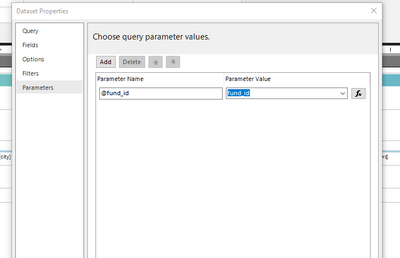
I have a MySQL query which includes a parameter, AND voi.fund_id IN (@fund_id). After validating the query, my parameter, fund_id, appears in the report data parameter pane and if I right-click on my dataset, then select parameters, I can see that my parameter is mapped to a field in the parameter value section. When I run the report and enter a parameter when prompted, no data is returned. If I run my query in MySQL, I can see that the parameter value I provided is present for certain records, yet no records are returned when I run the report within the Report Builder application. Why doesn't this work?
mapped...
Solved! Go to Solution.
Hi, @jrieman ;
This weird issue is due to the fact that SSRS is connected to MySQL by ODBC connector; therefore, the query parameters should be defined as ? and their names are Parameter1, Parameter2, etc... in order of appearance
https://www.tek-tips.com/viewthread.cfm?qid=1354185
https://stackoverflow.com/questions/65213887/change-database-based-on-parameters-in-ssrs
https://stackoverflow.com/questions/47448139/sss-report-builder-3-0-query-parameter-report-preview
Best Regards,
Community Support Team _ Yalan Wu
If this post helps, then please consider Accept it as the solution to help the other members find it more quickly.
Hi, @jrieman ;
This weird issue is due to the fact that SSRS is connected to MySQL by ODBC connector; therefore, the query parameters should be defined as ? and their names are Parameter1, Parameter2, etc... in order of appearance
https://www.tek-tips.com/viewthread.cfm?qid=1354185
https://stackoverflow.com/questions/65213887/change-database-based-on-parameters-in-ssrs
https://stackoverflow.com/questions/47448139/sss-report-builder-3-0-query-parameter-report-preview
Best Regards,
Community Support Team _ Yalan Wu
If this post helps, then please consider Accept it as the solution to help the other members find it more quickly.
If you love stickers, then you will definitely want to check out our Community Sticker Challenge!
Check out the January 2026 Power BI update to learn about new features.
| User | Count |
|---|---|
| 62 | |
| 62 | |
| 42 | |
| 20 | |
| 18 |