cancel
Showing results for 
Search instead for 
Did you mean: 

The Power BI Data Visualization World Championships is back! Get ahead of the game and start preparing now! Learn more

Reply
Anonymous
Not applicable

Conditional Formatting Stacked Column

Hi,


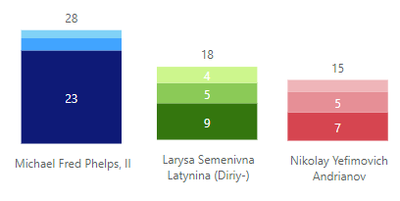
I want to learn if it is possible to change color for each column in stacked column chart as below (I did it as an example in pic editor.)

Main goal is to show each column where the competitor is from, for example

if he/she is from USA, column will be in Blue tones,

if he/she is from Italy column will be in green tones

if he/she is from Russia column will be in red tones

Competitors from other countries will be in all grey tones.

And also that tones will be in 3 shades of the selected colors , depends on the type of medals.(gold-silver-bronze)


haimow_0-1652185985561.png

Thank you in advance.


5 REPLIES 5
Arul
Super User
Super User

@Anonymous ,

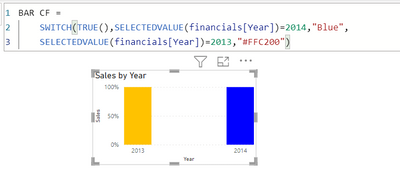
Conditional formatting for bar is achievable but i doubt about the color shade changes for different categories.

please refer the below,


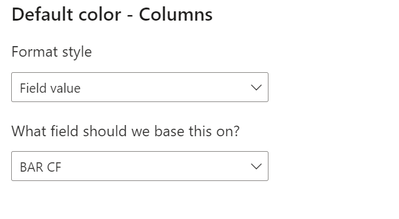
BAR CF = 
    SWITCH(TRUE(),SELECTEDVALUE(financials[Year])=2014,"Blue",
    SELECTEDVALUE(financials[Year])=2013,"#FFC200")


Arul_0-1652187642130.png


Did I answer your question? Mark my post as a solution!

Proud to be a Super User!


LinkedIn


Anonymous
Not applicable

It doesnt work 😞

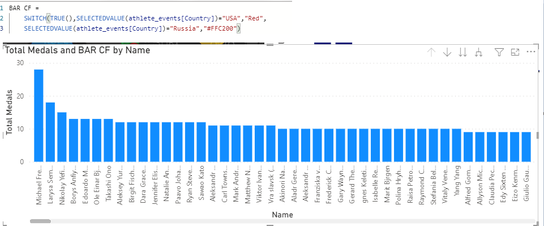
and i have to problem 

1) country color

2) medals shading according to country.


haimow_0-1652188903265.png

haimow_1-1652188998044.png


@Anonymous ,

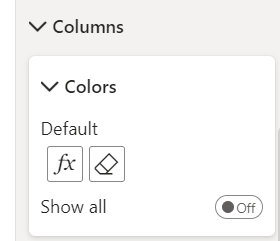
you have to use the measure in conditional formatting option setting- here 

Arul_0-1652189280566.png

set your measure like this,

Arul_1-1652189318618.png


Did I answer your question? Mark my post as a solution!

Proud to be a Super User!


LinkedIn


Anonymous
Not applicable

For only one factor, your formula works great, but as i told, there are 3 more factors, Gold-Silver-Bronze, do you have any idea about it ?

Hi, @Anonymous 


Unfortunately, power BI is now unable to achieve what you need . You can submit an idea for it at https://ideas.powerbi.com/forums and wait for users with the same needs as you to vote for you to help make it happen as soon as possible.


Best Regards,

Community Support Team _Charlotte

If this post helps, then please consider Accept it as the solution to help the other members find it more quickly.


Helpful resources

Announcements
Power BI DataViz World Championships

Power BI Dataviz World Championships

The Power BI Data Visualization World Championships is back! Get ahead of the game and start preparing now!

December 2025 Power BI Update Carousel

Power BI Monthly Update - December 2025

Check out the December 2025 Power BI Holiday Recap!

FabCon Atlanta 2026 carousel

FabCon Atlanta 2026

Join us at FabCon Atlanta, March 16-20, for the ultimate Fabric, Power BI, AI and SQL community-led event. Save $200 with code FABCOMM.