cancel
Showing results for 
Search instead for 
Did you mean: 

Next up in the FabCon + SQLCon recap series: The roadmap for Microsoft SQL and Maximizing Developer experiences in Fabric. All sessions are available on-demand after the live show. Register now

Reply
omerpq
Regular Visitor

Replacing Values in the Visual (Calculated) Column

Dear All:

All the best in all the reporting. I am too new to Power BI but the current stage where I am stuck has made me Go Through Power BI a lot. A blessing in disguise. 🙂

I need to Replace the values in the Column of Visual (obviously the column is showing values on specific conditions on the source) with the Values of another Column on the same visual, if the first column calculates any null values.

Please help in this regard.

As you can see below, i want to replace the values in Comm Veh Avg Pay (4th Column) if it is blank with the respective value in Total (ZF10 CC) (5th Column) if that is again blank, then with the values of next column which is Private Veh Cost. 

I am stuck since days, please help in this regard. Thanks in Advance as well.
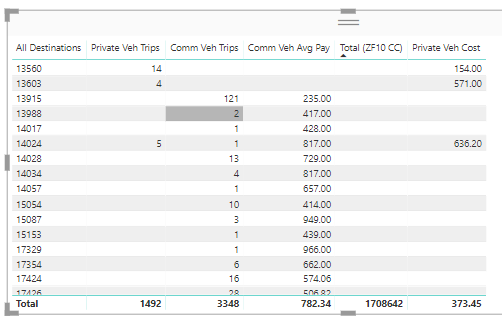
For Community.PNG

2 ACCEPTED SOLUTIONS
MattAllington
Community Champion
Community Champion

=IF([Measure1]=blank(),[Measure2],[Measure3]) 

or some variation.  You can use nested IF if needed, or even SWITCH TRUE

https://powerpivotpro.com/2015/03/the-diabolical-genius-of-switch-true/


* Matt is an 8 times Microsoft MVP (Power BI) and author of the Power BI Book Supercharge Power BI.
I will not give you bad advice, even if you unknowingly ask for it.

View solution in original post

I mean you should write a measure that reacts to the circumstances that are presented in the visual.


* Matt is an 8 times Microsoft MVP (Power BI) and author of the Power BI Book Supercharge Power BI.
I will not give you bad advice, even if you unknowingly ask for it.

View solution in original post

4 REPLIES 4
MattAllington
Community Champion
Community Champion

=IF([Measure1]=blank(),[Measure2],[Measure3]) 

or some variation.  You can use nested IF if needed, or even SWITCH TRUE

https://powerpivotpro.com/2015/03/the-diabolical-genius-of-switch-true/


* Matt is an 8 times Microsoft MVP (Power BI) and author of the Power BI Book Supercharge Power BI.
I will not give you bad advice, even if you unknowingly ask for it.

THANKS for the reply, did you mean that I need to create the Columns in visuals using "new measure"? Instead of using "New Column" or making the column calculated by the VISUAL TABLE'S filters?

I mean you should write a measure that reacts to the circumstances that are presented in the visual.


* Matt is an 8 times Microsoft MVP (Power BI) and author of the Power BI Book Supercharge Power BI.
I will not give you bad advice, even if you unknowingly ask for it.

Perfect solution you have quoted Matt... very nice. My issue resolved as well.

I have had been stuck since days over it.. Good Luck.

Thanks,

Helpful resources

Announcements
New to Fabric survey Carousel

New to Fabric Survey

If you have recently started exploring Fabric, we'd love to hear how it's going. Your feedback can help with product improvements.

Power BI DataViz World Championships carousel

Power BI DataViz World Championships - June 2026

A new Power BI DataViz World Championship is coming this June! Don't miss out on submitting your entry.

Join our Fabric User Panel

Join our Fabric User Panel

Share feedback directly with Fabric product managers, participate in targeted research studies and influence the Fabric roadmap.

March Power BI Update Carousel

Power BI Community Update - March 2026

Check out the March 2026 Power BI update to learn about new features.