cancel
Showing results for 
Search instead for 
Did you mean: 

The Power BI Data Visualization World Championships is back! Get ahead of the game and start preparing now! Learn more

Reply
Anonymous
Not applicable

Replace blanks with null

Dear friends


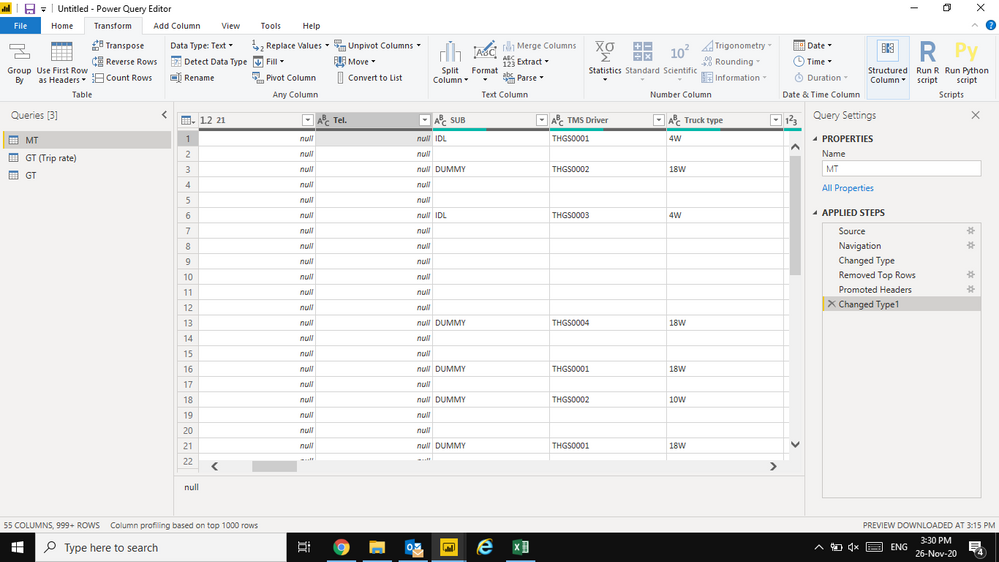
i need to fill down column but its cant because its not "null" how can i convert blank cell into null.

thank in advance for any suggestions.


Screenshot (19).png


1 ACCEPTED SOLUTION
manikumar34
Solution Sage
Solution Sage

@Anonymous , 

Use replace to achieve this. 

manikumar34_0-1606380016791.png

Leave Value to Find as empty and replace with null. 


In M-Query it looks something like below. 

= Table.ReplaceValue(#"Replaced Value","",null,Replacer.ReplaceValue,{"COLUMN"})


Try replacing the column name and add the above line in advanced editor else use the first step.

Regards, '

Manikumar


If you find this is helpful, Accept as a Solution and leave a like.


If this helps, Appreciate your KUDOS!
Did I answer your question? Mark my post as a solution!


Proud to be a Super User!


View solution in original post

5 REPLIES 5
amitchandak
Super User
Super User

@Anonymous , null is blank in power query. Unless it is text null. If it text null then replace it null

or replace "" with null

https://www.howtoexcel.org/power-query/bulk-replace-values/

https://www.excelcampus.com/powerquery/fill-down-blank-null-cells-power-query/

Share with Power BI Enthusiasts: Full Power BI Video (20 Hours) YouTube
Microsoft Fabric Series 60+ Videos YouTube
Microsoft Fabric Hindi End to End YouTube
manikumar34
Solution Sage
Solution Sage

@Anonymous , 


Awesome , you got the answer.


Your kudos will be appreciated 😊

Regards, 

Manikumar


If this helps, Appreciate your KUDOS!
Did I answer your question? Mark my post as a solution!


Proud to be a Super User!


manikumar34
Solution Sage
Solution Sage

@Anonymous , 

Use replace to achieve this. 

manikumar34_0-1606380016791.png

Leave Value to Find as empty and replace with null. 


In M-Query it looks something like below. 

= Table.ReplaceValue(#"Replaced Value","",null,Replacer.ReplaceValue,{"COLUMN"})


Try replacing the column name and add the above line in advanced editor else use the first step.

Regards, '

Manikumar


If you find this is helpful, Accept as a Solution and leave a like.


If this helps, Appreciate your KUDOS!
Did I answer your question? Mark my post as a solution!


Proud to be a Super User!


I have an entire Datamart with all strings stored in "Not NULL" columns. (blanks). Is there a way to change this somewhere Database or Table wide instead of changing this value on each individual field?

THanks for your help.  

Anonymous
Not applicable

thanks a lot @manikumar34  its work!

Helpful resources

Announcements
Power BI DataViz World Championships

Power BI Dataviz World Championships

The Power BI Data Visualization World Championships is back! Get ahead of the game and start preparing now!

December 2025 Power BI Update Carousel

Power BI Monthly Update - December 2025

Check out the December 2025 Power BI Holiday Recap!

FabCon Atlanta 2026 carousel

FabCon Atlanta 2026

Join us at FabCon Atlanta, March 16-20, for the ultimate Fabric, Power BI, AI and SQL community-led event. Save $200 with code FABCOMM.