cancel
Showing results for 
Search instead for 
Did you mean: 

The Power BI Data Visualization World Championships is back! Get ahead of the game and start preparing now! Learn more

Reply
Boycie92
Resolver I
Resolver I

Replace Values

Hi,


I was wondering if someone could help.


I know with power query you can mass replaces values. I was wondering if it was possible to do this for individual values?


For instance, I have 20 rows that and each have the letter A within a column. I would like to individually be able to alter them.


So that I can do something similar to this:


Row 1 A = A1

Row 2 A= A2

Row 3 A= A3


Thanks,

Boycie92

5 REPLIES 5
v-yulgu-msft
Microsoft Employee
Microsoft Employee

Hi @Boycie92,


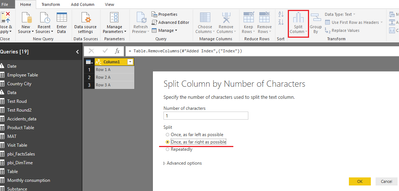
In Query Editor mode, please use the "Split Column" option twice. First time, split out A, second time, get a separate column listing row number.

1.PNG


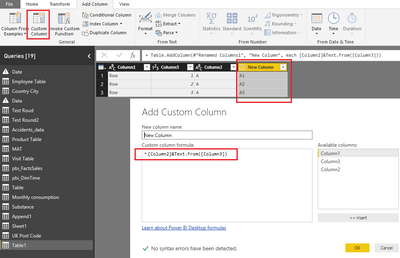
Then, combine these two columns.

=[Column2]&Text.From([Column3])

3.PNG


Best regards,
Yuliana Gu

Community Support Team _ Yuliana Gu
If this post helps, then please consider Accept it as the solution to help the other members find it more quickly.

Hi @Boycie92,


Have you achieved your desired result? If yes, would you please accept the helpful reply as an answer or share your solution?


Best regards,
Yuliana Gu

Community Support Team _ Yuliana Gu
If this post helps, then please consider Accept it as the solution to help the other members find it more quickly.

Hi @v-yulgu-msft


Apologies for the delay in responding.


Your solution would work but within my column I have other values that I need to use. (A) Is just an example.

So if I was to create another column I would need to somehow tell it if you see A show me A1 or A2 etc. However if the other values in the original column are not A the show me blank


Now I could use a custom column to do this, the problem I have is telling it to split the A values?


Thanks for the help,

Boycie92

Hi @Boycie92,


Could you try this:

=if [Column2]="A" then [Column2]&Text.From([Column3]) else null

Please pay attention the case sensitive. For more advice, please share more sample data and show us your expected output.


Regards,
Yuliana Gu

Community Support Team _ Yuliana Gu
If this post helps, then please consider Accept it as the solution to help the other members find it more quickly.

Hi @v-yulgu-msft


I am sorry when i said "However if the other values in the original column are not A the show me blank"


What I actually wanted was show me the original values within the original column if it’s not A. If it is A show me the values from the new column (A1, A2, etc)


Sorry again, I hope that makes much more sense!


Thanks,

Boycie92


Helpful resources

Announcements
Power BI DataViz World Championships

Power BI Dataviz World Championships

The Power BI Data Visualization World Championships is back! Get ahead of the game and start preparing now!

December 2025 Power BI Update Carousel

Power BI Monthly Update - December 2025

Check out the December 2025 Power BI Holiday Recap!

FabCon Atlanta 2026 carousel

FabCon Atlanta 2026

Join us at FabCon Atlanta, March 16-20, for the ultimate Fabric, Power BI, AI and SQL community-led event. Save $200 with code FABCOMM.