Join us at FabCon Atlanta from March 16 - 20, 2026, for the ultimate Fabric, Power BI, AI and SQL community-led event. Save $200 with code FABCOMM.
Register now!The Power BI Data Visualization World Championships is back! Get ahead of the game and start preparing now! Learn more
I am trying to put a background image for paginated report. Report consist of a matrix. I have tried many ways
1) I have put an image in the body near to the matrix. I have given RepeatWith 'matrix name' But when I expand the matrix, Image does not grows or repeat as no of pages increases.
2) I have put as backround image in report.It actually works, grows along with expansion of matrix. But when I tried to export it to powerpoint, background image is not present in pptx file.
3) I have also designed the report by inserting rectangle and given RepeatWith 'matrix name' But it also does not does not grows or repeat as no of pages increases
#2 above worked for my use case, but it is not showing up when I export to PowerPoint. Is this not supported ?
To recap I want to have a design element on the left side of the paginated report that repeats as the page grows. Think of it like a left side only border, border with multiple color and design. Can someone provide a solution to this and which can be exported to powerpoint.
Has anyone found a solution to this? I am also having the same issue where RepeatWith does not work
I am also having trouble with this issue except in my case I am trying to repeat a small table on evry page. I tried repeat with attribute but no luck. Any other ideas? Thanks
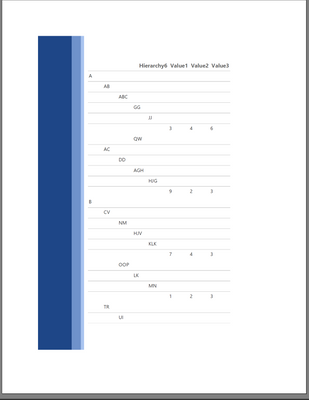
Here is what I tried, below is the paginated report with a blue border as background image. This works as intended in the report and when exporting to PDF.
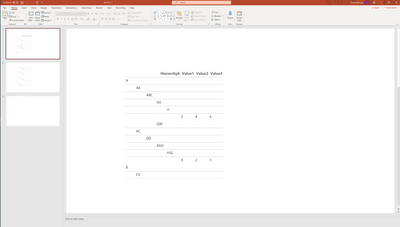
But when I export it to PPT I get the below, see that the blue border is missing:
Hi @ChristaAlen
I think power bi support you to export report with image backgrounds. You can try to download the sample from this link and have a test.
Sample: Sample Power BI paginated reports - Power BI | Microsoft Docs
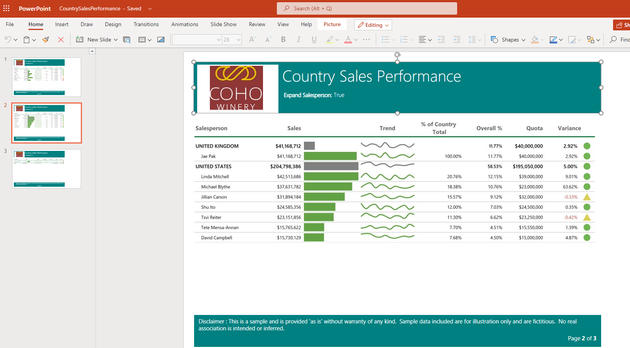
In my test, export works well. I can see the image in pptx file.
Here are some blogs about paginated report in Power BI.
For reference: Paginated reports in the Power BI service
Best Regards,
Rico Zhou
If this post helps, then please consider Accept it as the solution to help the other members find it more quickly.
Thank you for the response. But, this is not what I'm looking for. The file you shared adds the image to the header. But I want an image to be on the left side of the report like a border. I know about border property of report, but I cannot use it because my border contains 3 colours with rectangles.
I'm still struggling with it. Any help is appreciated.
Have you found a solution for this ?
The Power BI Data Visualization World Championships is back! Get ahead of the game and start preparing now!
Check out the November 2025 Power BI update to learn about new features.
| User | Count |
|---|---|
| 59 | |
| 46 | |
| 42 | |
| 23 | |
| 17 |
| User | Count |
|---|---|
| 190 | |
| 122 | |
| 96 | |
| 66 | |
| 47 |