cancel
Showing results for 
Search instead for 
Did you mean: 

Try your skills in the Power BI Dataviz World Championship! Round one ends June 26. Join now

Reply
AmyD
Helper I
Helper I

Reordering values

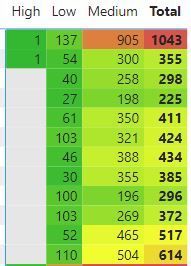
I have a column in Power Query labelled 'priority'. There are 3 values: high, medium, low. When I create a table, I drag in the 'priority' column; however, it automatically orders them alphabetically = high, low, medium. Is there a way around this? 


As they're not individual columns, I can't drag them into order. Sorting ascending/descending doesn't work either.


Thanks,

Priority.JPG

1 ACCEPTED SOLUTION
ToddChitt
Super User
Super User

You should create a simple lookup table. On the Home tab, look for the button "Enter Data". Creat a table with three rows:

High    1

Medium     2

Low          3

After that, set the Sort Order column of the text field above to the INT field in that table. Lastly, join that table to the table that contains those values. Display the Text from this table instead. Power BI will then sort them by the INT in this lookup table.

Another method: Create a calculated column in your table with something like this:

Priority Sort = IF [Priority] = "High", 1, IF ( [Priority] = Medium, 2....)

And sort Priority by Priority Sort.


Did I answer your question? If so, mark my post as a solution. Also consider helping someone else in the forums!

Proud to be a Super User!


View solution in original post

3 REPLIES 3
JoeBarry
Solution Sage
Solution Sage

Hi @AmyD 


Presuming you want to order fom Low to High


In the table add a new column


DAX: NewColumn

Priority Sort = if('priority' = "Low" , 1,
if('priority' = "Medium" , 2,
if('priority' = "High" , 3,0)


Mquery: Add New Column


if([priority] = "Low" then 1 else
if([priority] = "Medium" then 2 else
if([priority] = "High" then 3 else 0


After you have implemented either one, go to the Data View and highlight the priority column and click on Sort by Column and choose the priority sort. The visual should then change

JoeBarry_0-1691750655098.png


ToddChitt
Super User
Super User

You should create a simple lookup table. On the Home tab, look for the button "Enter Data". Creat a table with three rows:

High    1

Medium     2

Low          3

After that, set the Sort Order column of the text field above to the INT field in that table. Lastly, join that table to the table that contains those values. Display the Text from this table instead. Power BI will then sort them by the INT in this lookup table.

Another method: Create a calculated column in your table with something like this:

Priority Sort = IF [Priority] = "High", 1, IF ( [Priority] = Medium, 2....)

And sort Priority by Priority Sort.


Did I answer your question? If so, mark my post as a solution. Also consider helping someone else in the forums!

Proud to be a Super User!


Idrissshatila
Super User
Super User

Hello @AmyD ,


So first of all, Create a conditional column in Power query to identify if value equal to high then 1, medium then 2, low then 3.


the you load the data to Power BI, and sort the column of high meduim low by the one with numbers.

Idrissshatila_0-1691750332630.png


check this for more info https://learn.microsoft.com/en-us/power-bi/create-reports/desktop-sort-by-column?tabs=powerbi-deskto...


If I answered your question, please mark my post as solution, Appreciate your Kudos 👍

Follow me on Linkedin


Did I answer your question? Mark my post as a solution! Appreciate your Kudos
Follow me on LinkedIn linkedIn
Vote for my Community Mobile App Idea

Proud to be a Super User!


Helpful resources

Announcements
Fabric Data Days is here Carousel

Data Days 2026

Don't miss out on Data Days, June 15 through August 7. Learn Fabric, Power BI, SQL, AI and more.

Power BI DataViz World Championships carousel

Power BI DataViz World Championships - June 2026

A new Power BI DataViz World Championship is coming this June! Don't miss out on submitting your entry.