FabCon is coming to Atlanta
Join us at FabCon Atlanta from March 16 - 20, 2026, for the ultimate Fabric, Power BI, AI and SQL community-led event. Save $200 with code FABCOMM.
Register now!- Power BI forums
- Get Help with Power BI
- Desktop
- Service
- Report Server
- Power Query
- Mobile Apps
- Developer
- DAX Commands and Tips
- Custom Visuals Development Discussion
- Health and Life Sciences
- Power BI Spanish forums
- Translated Spanish Desktop
- Training and Consulting
- Instructor Led Training
- Dashboard in a Day for Women, by Women
- Galleries
- Data Stories Gallery
- Themes Gallery
- Contests Gallery
- QuickViz Gallery
- Quick Measures Gallery
- Visual Calculations Gallery
- Notebook Gallery
- Translytical Task Flow Gallery
- TMDL Gallery
- R Script Showcase
- Webinars and Video Gallery
- Ideas
- Custom Visuals Ideas (read-only)
- Issues
- Issues
- Events
- Upcoming Events
Get Fabric Certified for FREE during Fabric Data Days. Don't miss your chance! Request now
- Power BI forums
- Forums
- Get Help with Power BI
- Desktop
- Re: Renamed Columns not working after apply
- Subscribe to RSS Feed
- Mark Topic as New
- Mark Topic as Read
- Float this Topic for Current User
- Bookmark
- Subscribe
- Printer Friendly Page

- Mark as New
- Bookmark
- Subscribe
- Mute
- Subscribe to RSS Feed
- Permalink
- Report Inappropriate Content
Renamed Columns not working after apply
The last step in the Power Query Editor is to rename some field, for example 'Amount' to 'Amount ORI'.
In the report I have created a Measure ' Amount = sum(Amount ORI)'
This worked for years. When I, today, refresh my PBIX I get an error saying 'Then name 'Amount' is already used for a measure ...'
When I rename my measure and refresh, the field is named 'Amount' not 'Amount ORI' as it should according to the last step in the Power Query Editor. When I then rename the field to 'Amount ORI' in the report and then Refresh again. It is al ok.
When I close the PBIX and open it again, I get the exact issue from the start....
What is going wrong? Is there a bug in the new version? I need some help because like this I cannot work anymore in Power BI desktop!
Thank you
- Mark as New
- Bookmark
- Subscribe
- Mute
- Subscribe to RSS Feed
- Permalink
- Report Inappropriate Content
What I mean with that phrase is that after I correct the PBIX with renaming my fields and set everything back to as it should be, the refresh works correct. After I save and close the PBIX and open it again. The same issue with the name of the Amount field is back!
I have it with ALL my PBIX files.
A few days before I did not have any issues and now all my PBIX files are failing!
Kind regards
Suzy

- Mark as New
- Bookmark
- Subscribe
- Mute
- Subscribe to RSS Feed
- Permalink
- Report Inappropriate Content
Hi @SuzyThys ,
What is your data source?
Are all the data sources that are having this issue the same type?
Best Regards,
Jianbo Li
If this post helps, then please consider Accept it as the solution to help the other members find it more quickly.
- Mark as New
- Bookmark
- Subscribe
- Mute
- Subscribe to RSS Feed
- Permalink
- Report Inappropriate Content
No, I have HANA view, SQL databases, Folders with excels.
I strongly think there is a bug in the new version of Power BI desktop.
I have done some testing and all renames I do in the Power Query Editor are lost when I do Close & Apply. I started from a blank PBIX file and added a datasource, renamed a field and press Close & Apply and the rename was lost.
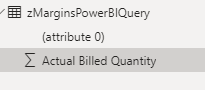
Also a merged column I added in the Power Query Editor do not have the name I gave it. It gets the name '(attribute 0)'
This is how the data looks like in the last step :

And this is how it shows up in the PBIX file :
- Mark as New
- Bookmark
- Subscribe
- Mute
- Subscribe to RSS Feed
- Permalink
- Report Inappropriate Content
Hi @SuzyThys ,
This issue has been submitted internally.
Please be patient to wait for fixing. If there is any news, I will update it here.
Best Regards,
Jianbo Li
If this post helps, then please consider Accept it as the solution to help the other members find it more quickly.
- Mark as New
- Bookmark
- Subscribe
- Mute
- Subscribe to RSS Feed
- Permalink
- Report Inappropriate Content
Any news?


- Mark as New
- Bookmark
- Subscribe
- Mute
- Subscribe to RSS Feed
- Permalink
- Report Inappropriate Content
hi, @v-jianboli-msft ! Any news on this issue? I have the same problem and my colleagues as well (I posted question yesterday, didn't find this post before https://community.fabric.microsoft.com/t5/Desktop/Renaming-columns-in-Power-Query-Editor-does-not-pr...)
- Mark as New
- Bookmark
- Subscribe
- Mute
- Subscribe to RSS Feed
- Permalink
- Report Inappropriate Content
No response yet... 😞

- Mark as New
- Bookmark
- Subscribe
- Mute
- Subscribe to RSS Feed
- Permalink
- Report Inappropriate Content
is anyone actually surprised that this (among many others) issue persists? My dashboards are all broken now that PBI can't figure out that I DIDN'T TOUCH THE RENAMING STEP!!!
- Mark as New
- Bookmark
- Subscribe
- Mute
- Subscribe to RSS Feed
- Permalink
- Report Inappropriate Content
Hi @SuzyThys ,
What does this phrase refer to? Can you explain it in detail?
When I close the PBIX and open it again, I get the exact issue from the start....
Has something changed in your data source between the last refresh and this one, such as the column name of the Amount column?
Sorry for that the information you have provided is not making the problem clear to me. Can you please share more details to help us clarify your scenario?
Best Regards,
Jianbo Li
If this post helps, then please consider Accept it as the solution to help the other members find it more quickly.

Helpful resources

Power BI Monthly Update - November 2025
Check out the November 2025 Power BI update to learn about new features.

Fabric Data Days
Advance your Data & AI career with 50 days of live learning, contests, hands-on challenges, study groups & certifications and more!

FabCon Atlanta 2026
Join us at FabCon Atlanta, March 16-20, for the ultimate Fabric, Power BI, AI and SQL community-led event. Save $200 with code FABCOMM.


