
This time we’re going bigger than ever. Fabric, Power BI, SQL, AI and more. We're covering it all. You won't want to miss it.
Learn moreJoin the FabCon + SQLCon recap series. Up next: Power BI, Real-Time Intelligence, IQ and AI, and Data Factory take center stage. All sessions are available on-demand after the live show. Register now
Hi Experts,
I have created a date calendar using DAX as below:
Date =
GENERATE (
CALENDARAUTO(),
VAR currentDay = [Date]
VAR day = DAY( currentDay )
VAR month = MONTH ( currentDay )
VAR year = YEAR ( currentDay )
RETURN ROW (
"day", day,
"month", month,
"year", year )
)
I have set the the date field format as dd/mm/yyyy and data type as text and created a slicer using this.
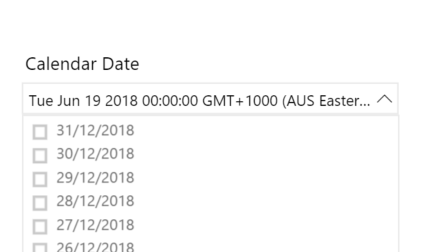
When publishing to web service, the slicer come up with date and time.
Please let me know how can i remove the timestamp in the slicer.
Thanks.
HI @Divya904
Maybe something like//
Date = GENERATE ( CALENDARAUTO(), VAR currentDay = [Date] VAR dayShort = FORMAT(currentDay,"dd/MM/yyyy") VAR day = DAY( currentDay ) VAR month = MONTH ( currentDay ) VAR year = YEAR ( currentDay ) RETURN ROW ( "day", day, "short day" , dayShort, "month", month, "year", year ) )
Hi Phil,
Thanks for your reply.
Tried the same DAX calculation that you have provided. But still getting the time stamp in the slicer.
Here is the screenshot from Desktop.
Thanks and Regrads,
Divya
Hi @Divya904
It seems odd. I tried to replicate it here and it works ok for me up in the web service.
I've attached a simple example PBIX file that I used. Can you upload that and see if it does the same thing?
Hi Phil,
Thanks for your prompt and sharing the .pbix file.
In your Date slicer, there is time as well. Please let me know how can we remove this time, so that we have just dates in the dropdown.
Thanks
Regards,
Divya
I'm not sure sorry. It's interesting that it works fine for me. It suggests a setting in your Power BI Tenant such as region, or locale
I know, date formats works differenctly in different machines. This is because of Power BI desktop regional settings and Browers settings for Power BI web service
I have set,
Power BI desktop , regional settings to English Australia
Web service setting is default Browser setting, which is English UK
System language and Locale setting is English Australia
Thanks.
Check out the April 2026 Power BI update to learn about new features.
If you have recently started exploring Fabric, we'd love to hear how it's going. Your feedback can help with product improvements.
A new Power BI DataViz World Championship is coming this June! Don't miss out on submitting your entry.
| User | Count |
|---|---|
| 38 | |
| 38 | |
| 31 | |
| 22 | |
| 15 |
| User | Count |
|---|---|
| 74 | |
| 61 | |
| 31 | |
| 31 | |
| 23 |