
Join us at FabCon Atlanta from March 16 - 20, 2026, for the ultimate Fabric, Power BI, AI and SQL community-led event. Save $200 with code FABCOMM.
Register now!The Power BI Data Visualization World Championships is back! It's time to submit your entry. Live now!
Is there a way to remove various strings from within parentheses from the query editor in PowerBI? There could be 0, 1, or multiple instances of text within parenthesis I need to remove from my strings. I need to do it within the query. I've tried using ReplaceValue with an asterisk, but that doesn't seem like it works this way.
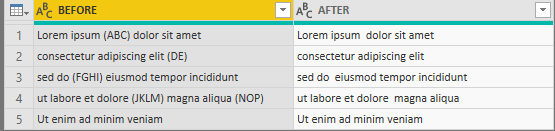
Here's a gibberish example:
| BEFORE | AFTER |
| Lorem ipsum (ABC) dolor sit amet | Lorem ipsum dolor sit amet |
| consectetur adipiscing elit (DE) | consectetur adipiscing elit |
| sed do (FGHI) eiusmod tempor incididunt | sed do eiusmod tempor incididunt |
| ut labore et dolore (JKLM) magna aliqua (NOP) | ut labore et dolore magna aliqua |
| Ut enim ad minim veniam | Ut enim ad minim veniam |
Thanks!
Solved! Go to Solution.
@ELW ,
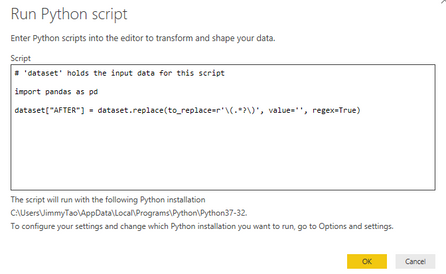
An simple way than power query is to write a python script to replace (...) using non-greedy matching.
# 'dataset' holds the input data for this script import pandas as pd dataset["AFTER"] = dataset.replace(to_replace=r'\(.*?\)', value='', regex=True)
Community Support Team _ Jimmy Tao
If this post helps, then please consider Accept it as the solution to help the other members find it more quickly.
i have multiple instances of parenthesis in the column. I tried solution provided here it worked but only for first instance of a cell. Refer the attached screenshot. Any help is appreciated.
@ELW add new custom column in power query with following expression
Text.Replace(Text.Replace([BEFORE],"(",""), ")", "" )
Subscribe to the @PowerBIHowTo YT channel for an upcoming video on List and Record functions in Power Query!!
Learn Power BI and Fabric - subscribe to our YT channel - Click here: @PowerBIHowTo
If my solution proved useful, I'd be delighted to receive Kudos. When you put effort into asking a question, it's equally thoughtful to acknowledge and give Kudos to the individual who helped you solve the problem. It's a small gesture that shows appreciation and encouragement! ❤
Did I answer your question? Mark my post as a solution. Proud to be a Super User! Appreciate your Kudos 🙂
Feel free to email me with any of your BI needs.
Thanks @parry2k! I believe that just replaces the parentheses themselves while leaving the text inside them. Is there a way to modify that formula to remove the text from inside the parentheses as well?
@ELW ,
An simple way than power query is to write a python script to replace (...) using non-greedy matching.
# 'dataset' holds the input data for this script import pandas as pd dataset["AFTER"] = dataset.replace(to_replace=r'\(.*?\)', value='', regex=True)
Community Support Team _ Jimmy Tao
If this post helps, then please consider Accept it as the solution to help the other members find it more quickly.
| User | Count |
|---|---|
| 51 | |
| 38 | |
| 33 | |
| 22 | |
| 19 |
| User | Count |
|---|---|
| 136 | |
| 101 | |
| 58 | |
| 36 | |
| 35 |