
cancel
Showing results for 
Search instead for 
Did you mean: 

We've captured the moments from FabCon & SQLCon that everyone is talking about, and we are bringing them to the community, live and on-demand. Starts on April 14th. Register now

Reply
ELW
Advocate II
Advocate II

Remove strings within parentheses from Power Query Editor

Is there a way to remove various strings from within parentheses from the query editor in PowerBI?  There could be 0, 1, or multiple instances of text within parenthesis I need to remove from my strings.  I need to do it within the query.  I've tried using ReplaceValue with an asterisk, but that doesn't seem like it works this way.  


Here's a gibberish example: 


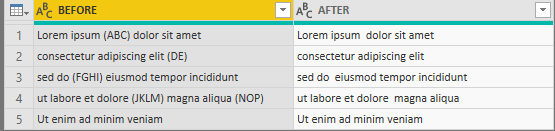
BEFOREAFTER
Lorem ipsum (ABC) dolor sit ametLorem ipsum dolor sit amet
consectetur adipiscing elit (DE)consectetur adipiscing elit
sed do (FGHI) eiusmod tempor incididuntsed do eiusmod tempor incididunt
ut labore et dolore (JKLM) magna aliqua (NOP)ut labore et dolore magna aliqua
Ut enim ad minim veniamUt enim ad minim veniam


Thanks!

1 ACCEPTED SOLUTION

@ELW ,


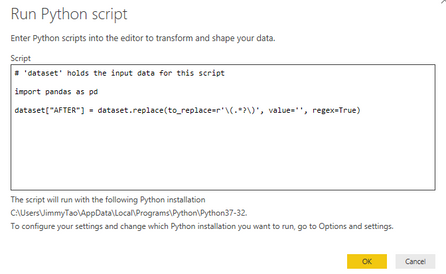
An simple way than power query is to write a python script to replace (...) using non-greedy matching.

# 'dataset' holds the input data for this script

import pandas as pd

dataset["AFTER"] = dataset.replace(to_replace=r'\(.*?\)', value='', regex=True)

1.PNG2.PNG 


Community Support Team _ Jimmy Tao

If this post helps, then please consider Accept it as the solution to help the other members find it more quickly.

View solution in original post

4 REPLIES 4
Anonymous
Not applicable

i have multiple instances of parenthesis in the column. I tried solution provided here it worked but only for first instance of a cell. Refer the attached screenshot. Any help is appreciated.

sushilc112_0-1597775853890.png


parry2k
Super User
Super User

@ELW add new custom column in power query with following expression


Text.Replace(Text.Replace([BEFORE],"(",""), ")", "" )


Subscribe to the @PowerBIHowTo YT channel for an upcoming video on List and Record functions in Power Query!!

Learn Power BI and Fabric - subscribe to our YT channel - Click here: @PowerBIHowTo

If my solution proved useful, I'd be delighted to receive Kudos. When you put effort into asking a question, it's equally thoughtful to acknowledge and give Kudos to the individual who helped you solve the problem. It's a small gesture that shows appreciation and encouragement! ❤


Did I answer your question? Mark my post as a solution. Proud to be a Super User! Appreciate your Kudos 🙂
Feel free to email me with any of your BI needs.

Thanks @parry2k!  I believe that just replaces the parentheses themselves while leaving the text inside them.  Is there a way to modify that formula to remove the text from inside the parentheses as well? 

@ELW ,


An simple way than power query is to write a python script to replace (...) using non-greedy matching.

# 'dataset' holds the input data for this script

import pandas as pd

dataset["AFTER"] = dataset.replace(to_replace=r'\(.*?\)', value='', regex=True)

1.PNG2.PNG 


Community Support Team _ Jimmy Tao

If this post helps, then please consider Accept it as the solution to help the other members find it more quickly.

Helpful resources

Announcements
New to Fabric survey Carousel

New to Fabric Survey

If you have recently started exploring Fabric, we'd love to hear how it's going. Your feedback can help with product improvements.

Power BI DataViz World Championships carousel

Power BI DataViz World Championships - June 2026

A new Power BI DataViz World Championship is coming this June! Don't miss out on submitting your entry.

Join our Fabric User Panel

Join our Fabric User Panel

Share feedback directly with Fabric product managers, participate in targeted research studies and influence the Fabric roadmap.

March Power BI Update Carousel

Power BI Community Update - March 2026

Check out the March 2026 Power BI update to learn about new features.