cancel
Showing results for 
Search instead for 
Did you mean: 

The Power BI Data Visualization World Championships is back! Get ahead of the game and start preparing now! Learn more

Reply
Anonymous
Not applicable

Remove Nulls

Path 2 = 
VAR PathLen =
    PATHLENGTH ( 'Project'[WBS - Copy] )
VAR Delimiter = "."
RETURN
    IF (
        PathLen >= 2,
        'Project'[Path 1] & Delimiter
            & PATHITEM ( 'Project'[WBS - Copy], 2, TEXT ),
        BLANK()
    )

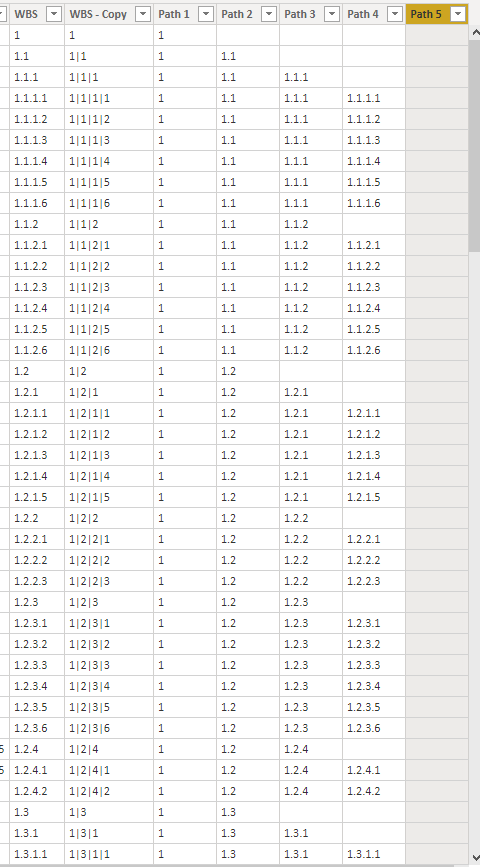
I am creating a few measures and the results will be like a tree format list

i am getting blanks for empty fields but i want them to be nulls. Otherwise my tree appears as 

1

(Blank)

1.1

1.1.1

(Blank)


Where visually, you'd imagine Blank should be 1.0 and 1.1.1.0 but they shouldnt appear either way. It should be a null

1 ACCEPTED SOLUTION
v-lionel-msft
Community Support
Community Support

Hi @Anonymous ,

Does your DAX formulae return this result?

1

1.1

(Blank row)
1.1.1
(Blank row)

And is this what you want?

1

1.1

1.1.1
(Remove the blank rows)

If yes, you can use 'filter on this visual' when you use the measure in a visual.

b1.PNG


Best regards,
Lionel Chen


If this post helps, then please consider Accept it as the solution to help the other members find it more quickly.


View solution in original post

5 REPLIES 5
v-lionel-msft
Community Support
Community Support

Hi @Anonymous ,

Does your DAX formulae return this result?

1

1.1

(Blank row)
1.1.1
(Blank row)

And is this what you want?

1

1.1

1.1.1
(Remove the blank rows)

If yes, you can use 'filter on this visual' when you use the measure in a visual.

b1.PNG


Best regards,
Lionel Chen


If this post helps, then please consider Accept it as the solution to help the other members find it more quickly.


Anonymous
Not applicable

Capture.PNG


Something so simple. There is a Hide Members selection in the Hierarchy Slicer properties.

Hide Members and voila ... (blank) is gone.

Anonymous
Not applicable

I meant to say that this is a measure also

Anonymous
Not applicable

Unfortunately, I've tried filtering.

This is my code for using the HierarchysSlicer. 

Path 1 = 
 PATHITEM('Project'[WBS - Copy],1,TEXT)

Path 2 = 
VAR PathLen =
    PATHLENGTH ( 'Project'[WBS - Copy] )
VAR Delimiter = "."
RETURN
  IF(
        PathLen >=2,
        'Project'[Path 1] & Delimiter
            & PATHITEM ( 'Project'[WBS - Copy], 2, TEXT ),
       BLANK()
    )

Path 3 = 
VAR PathLen =
    PATHLENGTH ( 'Project'[WBS - Copy] )
VAR Delimiter = "."
RETURN
    IF (
        PathLen >=3,
        'Project'[Path 2] & Delimiter
            & PATHITEM ( 'Project'[WBS - Copy], 3, TEXT ),
        BLANK ()
    )
Anonymous
Not applicable

Capture2.PNGCapture.PNG

Helpful resources

Announcements
Power BI DataViz World Championships

Power BI Dataviz World Championships

The Power BI Data Visualization World Championships is back! Get ahead of the game and start preparing now!

December 2025 Power BI Update Carousel

Power BI Monthly Update - December 2025

Check out the December 2025 Power BI Holiday Recap!

FabCon Atlanta 2026 carousel

FabCon Atlanta 2026

Join us at FabCon Atlanta, March 16-20, for the ultimate Fabric, Power BI, AI and SQL community-led event. Save $200 with code FABCOMM.