This is best Fabric, Power BI, SQL and AI community event. How do we know? The last event sold out! Save €200 with code FABCMTY200.
Register nowA new Data Days event is coming soon! This time we’re going bigger than ever. Fabric, Power BI, SQL, AI and more. Don't miss out.
Path 2 =
VAR PathLen =
PATHLENGTH ( 'Project'[WBS - Copy] )
VAR Delimiter = "."
RETURN
IF (
PathLen >= 2,
'Project'[Path 1] & Delimiter
& PATHITEM ( 'Project'[WBS - Copy], 2, TEXT ),
BLANK()
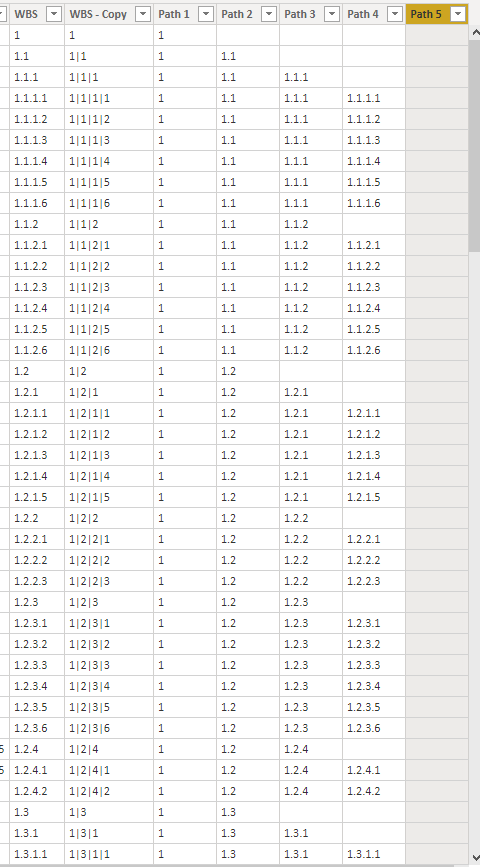
)I am creating a few measures and the results will be like a tree format list
i am getting blanks for empty fields but i want them to be nulls. Otherwise my tree appears as
1
(Blank)
1.1
1.1.1
(Blank)
Where visually, you'd imagine Blank should be 1.0 and 1.1.1.0 but they shouldnt appear either way. It should be a null
Solved! Go to Solution.
Hi @Anonymous ,
Does your DAX formulae return this result?
1
1.1
(Blank row)
1.1.1
(Blank row)
And is this what you want?
1
1.1
1.1.1
(Remove the blank rows)
If yes, you can use 'filter on this visual' when you use the measure in a visual.
Best regards,
Lionel Chen
If this post helps, then please consider Accept it as the solution to help the other members find it more quickly.
Hi @Anonymous ,
Does your DAX formulae return this result?
1
1.1
(Blank row)
1.1.1
(Blank row)
And is this what you want?
1
1.1
1.1.1
(Remove the blank rows)
If yes, you can use 'filter on this visual' when you use the measure in a visual.
Best regards,
Lionel Chen
If this post helps, then please consider Accept it as the solution to help the other members find it more quickly.
Something so simple. There is a Hide Members selection in the Hierarchy Slicer properties.
Hide Members and voila ... (blank) is gone.
I meant to say that this is a measure also
Unfortunately, I've tried filtering.
This is my code for using the HierarchysSlicer.
Path 1 =
PATHITEM('Project'[WBS - Copy],1,TEXT)
Path 2 =
VAR PathLen =
PATHLENGTH ( 'Project'[WBS - Copy] )
VAR Delimiter = "."
RETURN
IF(
PathLen >=2,
'Project'[Path 1] & Delimiter
& PATHITEM ( 'Project'[WBS - Copy], 2, TEXT ),
BLANK()
)
Path 3 =
VAR PathLen =
PATHLENGTH ( 'Project'[WBS - Copy] )
VAR Delimiter = "."
RETURN
IF (
PathLen >=3,
'Project'[Path 2] & Delimiter
& PATHITEM ( 'Project'[WBS - Copy], 3, TEXT ),
BLANK ()
)
Check out the May 2026 Power BI update to learn about new features.
Sign up to receive a private message when registration opens and key events begin.
If you have recently started exploring Fabric, we'd love to hear how it's going. Your feedback can help with product improvements.
| User | Count |
|---|---|
| 30 | |
| 28 | |
| 23 | |
| 19 | |
| 17 |
| User | Count |
|---|---|
| 49 | |
| 47 | |
| 40 | |
| 21 | |
| 19 |