This time we’re going bigger than ever. Fabric, Power BI, SQL, AI and more. We're covering it all. You won't want to miss it.
Learn moreDid you hear? There's a new SQL AI Developer certification (DP-800). Start preparing now and be one of the first to get certified. Register now
Path 2 =
VAR PathLen =
PATHLENGTH ( 'Project'[WBS - Copy] )
VAR Delimiter = "."
RETURN
IF (
PathLen >= 2,
'Project'[Path 1] & Delimiter
& PATHITEM ( 'Project'[WBS - Copy], 2, TEXT ),
BLANK()
)I am creating a few measures and the results will be like a tree format list
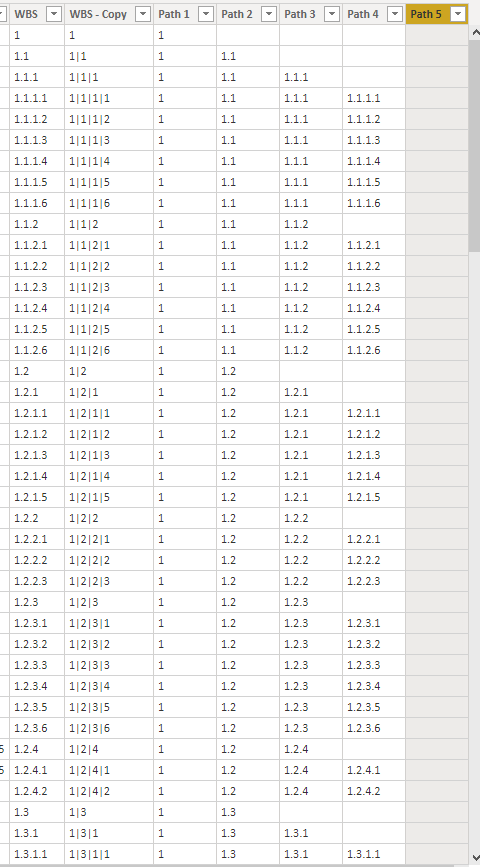
i am getting blanks for empty fields but i want them to be nulls. Otherwise my tree appears as
1
(Blank)
1.1
1.1.1
(Blank)
Where visually, you'd imagine Blank should be 1.0 and 1.1.1.0 but they shouldnt appear either way. It should be a null
Solved! Go to Solution.
Hi @Anonymous ,
Does your DAX formulae return this result?
1
1.1
(Blank row)
1.1.1
(Blank row)
And is this what you want?
1
1.1
1.1.1
(Remove the blank rows)
If yes, you can use 'filter on this visual' when you use the measure in a visual.
Best regards,
Lionel Chen
If this post helps, then please consider Accept it as the solution to help the other members find it more quickly.
Hi @Anonymous ,
Does your DAX formulae return this result?
1
1.1
(Blank row)
1.1.1
(Blank row)
And is this what you want?
1
1.1
1.1.1
(Remove the blank rows)
If yes, you can use 'filter on this visual' when you use the measure in a visual.
Best regards,
Lionel Chen
If this post helps, then please consider Accept it as the solution to help the other members find it more quickly.
Something so simple. There is a Hide Members selection in the Hierarchy Slicer properties.
Hide Members and voila ... (blank) is gone.
I meant to say that this is a measure also
Unfortunately, I've tried filtering.
This is my code for using the HierarchysSlicer.
Path 1 =
PATHITEM('Project'[WBS - Copy],1,TEXT)
Path 2 =
VAR PathLen =
PATHLENGTH ( 'Project'[WBS - Copy] )
VAR Delimiter = "."
RETURN
IF(
PathLen >=2,
'Project'[Path 1] & Delimiter
& PATHITEM ( 'Project'[WBS - Copy], 2, TEXT ),
BLANK()
)
Path 3 =
VAR PathLen =
PATHLENGTH ( 'Project'[WBS - Copy] )
VAR Delimiter = "."
RETURN
IF (
PathLen >=3,
'Project'[Path 2] & Delimiter
& PATHITEM ( 'Project'[WBS - Copy], 3, TEXT ),
BLANK ()
)
Check out the April 2026 Power BI update to learn about new features.
Sign up to receive a private message when registration opens and key events begin.
If you have recently started exploring Fabric, we'd love to hear how it's going. Your feedback can help with product improvements.
| User | Count |
|---|---|
| 34 | |
| 31 | |
| 25 | |
| 20 | |
| 16 |
| User | Count |
|---|---|
| 60 | |
| 48 | |
| 29 | |
| 23 | |
| 23 |