Join us at FabCon Atlanta from March 16 - 20, 2026, for the ultimate Fabric, Power BI, AI and SQL community-led event. Save $200 with code FABCOMM.
Register now!Learn from the best! Meet the four finalists headed to the FINALS of the Power BI Dataviz World Championships! Register now
I'm extracting data from excel where there are #REF errors in the spreadsheet. For some reason remove errors will not remove them. So far I have tried:
Even with multiple attempts on each of these steps, the result is either nothing (steps 1,3,4,5) or they won't work as they throw an error themselves (2).
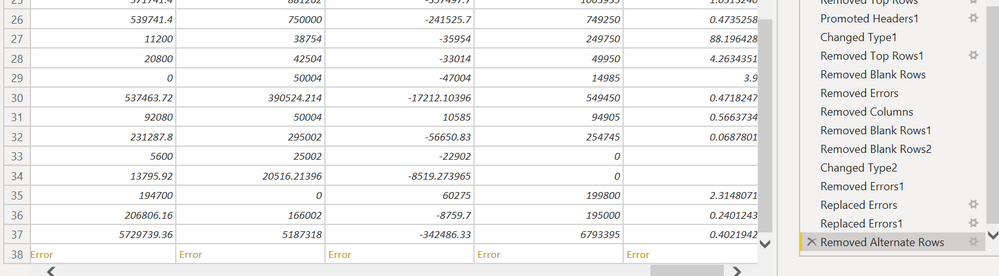
Here is a screenshot to demonstrate my problem. The error is on the last row, and the #REF error is from the data source where a user has attempted to divide a cell by another #REF. I cannot change the data source.
Error cannot be removed
How do I overcome this problem?
Please did you ever find a solution to this? I'm absolutley stumped in a similar situation, years later. The only thing I seem able to do is to fix the #REF! error in my source Excel file. This is a wierd scenario where it's essentially a step-level error, but it should be a cell-level error. Because of this, replace / remove errors is not working as that only picks up cell-level errors.
Hi @Anonymous ,
I already saw that link and followed the solution which was to replace rows. As shown above this doesnt work.
Kind regards,
Colleen
Hey Colleen,
Follow all the steps in the link. Replace with value "null". Then right click on the column header and select "Remove Empty"...worked for me
Regards,
L
Share feedback directly with Fabric product managers, participate in targeted research studies and influence the Fabric roadmap.
Check out the February 2026 Power BI update to learn about new features.
| User | Count |
|---|---|
| 62 | |
| 54 | |
| 40 | |
| 17 | |
| 15 |
| User | Count |
|---|---|
| 94 | |
| 83 | |
| 33 | |
| 32 | |
| 24 |