
cancel
Showing results for 
Search instead for 
Did you mean: 

The Power BI Data Visualization World Championships is back! Get ahead of the game and start preparing now! Learn more

Reply
usman96
Helper II
Helper II

Remaining Days of Month Calculation

tmp.PNG

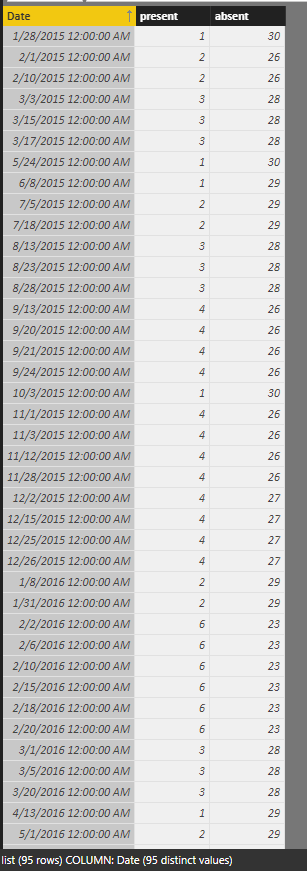
I have this column which have dates  , these dates show the day on which employees are "present"

How to calculate absent days (other days which are not in this column) ? in powerbi 


1 ACCEPTED SOLUTION
Anonymous
Not applicable

Hi @usman96,


You can use below calculate column to achieve your requirement:

present =
COUNTROWS (
    FILTER (
        ALL ( list ),
        YEAR ( [Date] ) = YEAR ( EARLIER ( list[Date] ) )
            && MONTH ( [Date] ) = MONTH ( EARLIER ( list[Date] ) )
    )
)

absent = 
DAY ( DATE ( YEAR ( [Date] ), MONTH ( [Date] ) + 1, 1 ) - 1 )
    - [present]

Result:

8.PNG


Regards,
Xiaoxin Sheng

View solution in original post

5 REPLIES 5
Anonymous
Not applicable

Hi @usman96,


You can use below calculate column to achieve your requirement:

present =
COUNTROWS (
    FILTER (
        ALL ( list ),
        YEAR ( [Date] ) = YEAR ( EARLIER ( list[Date] ) )
            && MONTH ( [Date] ) = MONTH ( EARLIER ( list[Date] ) )
    )
)

absent = 
DAY ( DATE ( YEAR ( [Date] ), MONTH ( [Date] ) + 1, 1 ) - 1 )
    - [present]

Result:

8.PNG


Regards,
Xiaoxin Sheng

Phil_Seamark
Microsoft Employee
Microsoft Employee

HI @usman96


You could join to a Date table and add two columns.  The first column showing a 1 on dates that match your list.  The second column shows a 1 on days where there is no match.


Does that sound like it might work for you?


To learn more about DAX visit : aka.ms/practicalDAX

Proud to be a Datanaut!

it would be better if could show them in bar dual bar chart 


The first bar show the present days  in number like ( 7 present days)

and the 2nd chart show the absent days  in numbers like ( 2 absent days ) 

Can you show me how to achieve this ? 

HI @usman96


Can you please mock something up (using your sample data) as I'm still not 100% clear.


I'm sure it's possible to come up with a formula, I just don't understand what you are trying to do (Sorry)


To learn more about DAX visit : aka.ms/practicalDAX

Proud to be a Datanaut!

"You could join to a Date table and add two columns.  The first column showing a 1 on dates that match your list.  The second column shows a 1 on days where there is no match."

Can you implement this and give me some sample of what you said ?

Helpful resources

Announcements
Power BI DataViz World Championships

Power BI Dataviz World Championships

The Power BI Data Visualization World Championships is back! Get ahead of the game and start preparing now!

December 2025 Power BI Update Carousel

Power BI Monthly Update - December 2025

Check out the December 2025 Power BI Holiday Recap!

FabCon Atlanta 2026 carousel

FabCon Atlanta 2026

Join us at FabCon Atlanta, March 16-20, for the ultimate Fabric, Power BI, AI and SQL community-led event. Save $200 with code FABCOMM.